Your thoughts, protected: a beautifully minimal and secure diary app with a built-in privacy lock.
1 / 6
Project Overview
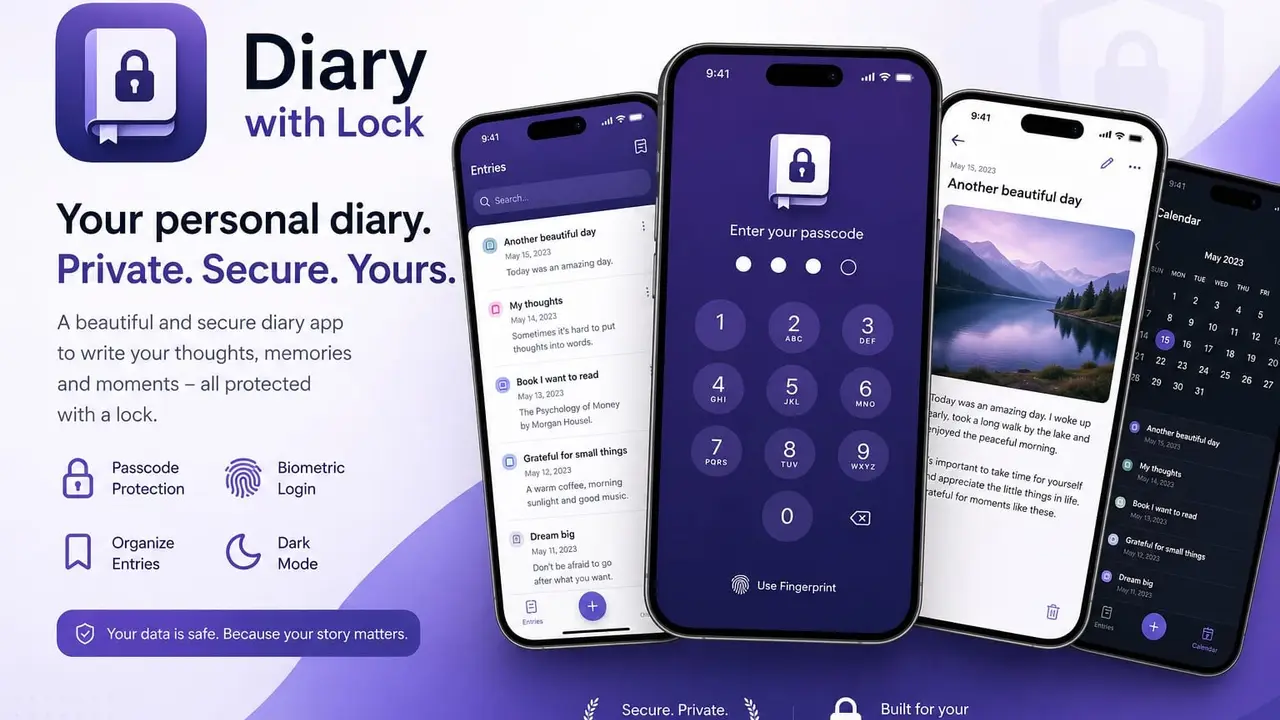
Journaling only works when it feels private. So we built Diary with Lock, a diary app with lock for people who want to write honestly without wondering who might pick up their device next. It runs on web, iOS, and Android, and the ritual stays simple everywhere: open, unlock, write.
Our client’s brief asked for two things that usually fight each other. The app had to feel genuinely protected, and it had to stay so minimal that opening it never feels like work. Every screen we designed answers to both: a clean dark interface, one clear action at a time, and a privacy lock standing quietly in front of it all.
The result is a secure diary app that treats a personal journal the way it deserves to be treated: as something worth locking.
Key Features
Privacy lock: a PIN gate with optional biometric protection keeps every entry personal.
Auto-lock: the diary locks itself when idle or backgrounded, so it is never left open by accident.
Distraction-free editor: rich text formatting and a live word count, nothing else competing for attention.
Daily prompts: reflection questions that give hesitant writers a place to start.
PDF export: entries export with their formatting intact, for backup or a printed keepsake.
Writing streaks: a streak counter and level badges that reward showing up daily.
Free and premium tiers: core journaling stays free, power features sit behind one affordable subscription.
Tech Stack & Integrations
FlutterFlow: one codebase behind the web, iOS, and Android apps.
Firebase: accounts and entry storage, keeping a private journal in sync across devices.
Stripe: subscription payments on the web app.
RevenueCat: subscription management on iOS and Android.
Challenges & Solutions
A diary app with lock lives or dies on trust, and trust breaks the moment the lock behaves differently on different devices. Locking behavior had to feel identical on web, iOS, and Android, whether the user walked away mid-entry or switched apps. We tuned it per platform until it did, without ever making the daily unlock feel like a chore.
PDF export was the second fight. A formatted entry had to come out looking the same from a browser, an iPhone, and an Android phone, and each platform had its own opinion about that. We kept iterating until one entry produced one faithful document everywhere.
The third was payments. Stripe handles the web, RevenueCat handles the stores, and a subscriber must be premium everywhere the moment they pay anywhere. We unified both into a single entitlement status, so upgrading on the web unlocks the phone too.
Development Time
Two weeks from design concept to fully functional web and mobile builds, covering design, development, payments, and testing across all three platforms.
Impact or Outcome
The project shipped on time after a two-week build. The web app is live and fully functional, and the iOS and Android builds are ready for store deployment, currently awaiting the client’s go-live. No launch or user numbers to report yet, and we will not invent any: those come when the client flips the switch.
My Role & Value
We owned the whole project: UI/UX design, the FlutterFlow build, the Firebase backend, payment integration, and deployment support. The hardest value to see is the one the client never has to think about again: one product with one subscription status across web and mobile, instead of three apps drifting apart. That is what our web app development and mobile work look like when they ship as one system.
Diary with Lock runs on the web, iOS, and Android, and we can build your product for every platform the same way. Our cross-platform app development and web app development are handled by one team, so your app works equally well everywhere. Book your free call and we will talk through how to get your idea started.
We design and build cross-platform apps, web apps, and custom websites, from first idea to launch. The first 30-minute call is free, and afterwards you get a clear scope, timeline, and fixed price.
Get the App Launch Checklist: the exact steps we use to take a product from idea to live. Open it now, and leave your email so we can send a copy and the occasional build note.
Your checklist is ready
Thanks. Open your checklist below. We will send a copy to your inbox and only the occasional, useful note after that.
We use cookies to see how the site is used and to measure our ads. What the site needs to work always runs. You choose the rest. Privacy Policy.
NecessaryAlways on
Your language, your theme, which version of the design you were shown, and this cookie choice, stored in your browser so the site works and so we can count which version works better. None of it identifies you or follows you to other sites.
Google Analytics 4 and Microsoft Clarity, so we can see which pages help and fix the ones that do not.
Google Ads and the Meta pixel, plus sending your enquiry to Meta from our server, so we can measure which ads bring real enquiries and show you relevant ones.