Choosing a cross-platform mobile app development strategy in 2026 feels like it should be easier than it was five years ago. The frameworks have matured. The tooling has improved. The community resources have multiplied. And yet, the decision has actually gotten harder, because the consequences of getting it wrong have compounded. A bad architectural bet in 2021 meant a painful rewrite. A bad bet in 2026 means 18 to 36 months of accumulated technical debt, a demoralized engineering team, and a product that’s perpetually six months behind its roadmap.
This article is not a feature comparison chart. It’s a decision playbook, built around product archetypes, real benchmarking recipes, TCO models with honest assumptions, and migration strategies that account for the messy reality of production apps with real users. If you’re a product manager, engineering leader, or CTO trying to make this call, what follows is the process you should run, not just the answer you want to hear.
Why This Decision Is Harder Than It Looks
The first thing that derails most evaluations is terminology confusion. Teams walk into architecture meetings conflating three fundamentally different approaches. Cross-platform means a shared codebase that compiles to or targets native runtimes, Flutter, React Native, and Kotlin Multiplatform all fall here, though they share code at different layers. Hybrid means webview-wrapped HTML/CSS/JS packaged as a native app, Capacitor and Ionic are the modern versions of this. PWA means a browser-delivered web app with service workers and a manifest file, no app store involved. These are not points on a spectrum. They are different tools with different performance ceilings, different distribution models, and different security surfaces. When a VP of Engineering says “let’s go cross-platform” and the team hears “let’s wrap our web app in a webview,” the project is already in trouble before a single line of code is written.
The stakes are strategic, not just technical. Framework choice determines your hiring pipeline for the next three years. It determines how fast you can respond to new device classes, foldables, wearables, AR headsets. It determines your app’s binary size in markets where every megabyte affects install conversion. It determines whether your security and compliance posture is built on solid ground or on a stack of unaudited third-party plugins. This is a product decision that happens to involve technology, and it deserves a product-grade evaluation process. That’s what this playbook provides: a framework-agnostic decision matrix, archetype-specific recommendations, reproducible benchmarking steps, CI/CD templates, and a migration playbook with rollback checkpoints.
The 2026 Framework Landscape
As of 2026, there are exactly four production-ready cross-platform frameworks with meaningful adoption, active core teams, and ecosystem depth worth evaluating for serious products. There are also two approaches, hybrid and PWA, that win specific, narrow use cases and deserve honest acknowledgment rather than dismissal. The architectural fork that matters most is not “which framework is best” but “do you want to share UI, share logic, or share both?” That question determines your code reuse ceiling, your platform fidelity floor, and your long-term maintenance burden.
UI-Sharing Frameworks
Flutter
Flutter 3.x owns its entire rendering pipeline. It does not use platform widgets at all, it draws every pixel through its own engine, which as of 2025 defaults to Impeller on both iOS and Android. Impeller pre-compiles shaders, which eliminates the shader compilation jank that plagued Skia-based rendering in earlier Flutter versions. The practical result: pixel-perfect UI consistency across platforms is trivial. You design it once, it looks identical everywhere.
The trade-off is platform fidelity. A Flutter app does not automatically get iOS’s native bounce physics, Android’s Material You dynamic theming, or platform-specific accessibility behaviors unless you explicitly build or import them. The Cupertino widget library covers the basics, but teams building for design-conscious consumer apps on iOS will spend real effort matching platform conventions. Flutter’s Dart runtime is compiled ahead-of-time for release builds, which gives strong startup performance, typically under 1.5 seconds cold start on mid-tier devices. Hot reload during development remains best-in-class, with sub-second UI updates that preserve application state.
For new device classes, Flutter has early foldable support through MediaQuery and adaptive layout APIs, but WearOS support is experimental and visionOS support is community-driven, not first-party. If your product roadmap includes wearables or spatial computing in the next 18 months, Flutter alone won’t get you there.
React Native (New Architecture)
React Native’s New Architecture, JSI (JavaScript Interface), Fabric renderer, and TurboModules, is now the default in new projects as of 2025. The old async bridge that serialized every native call through JSON is gone. JSI allows synchronous, direct communication between the JavaScript thread and native modules, which eliminates an entire category of performance bottlenecks. Fabric replaces the old rendering system with a concurrent-capable renderer that supports React 18 features like Suspense and transitions.
The core advantage hasn’t changed: React Native renders actual platform-native views. An RN button on iOS is a UIButton. A list is backed by UICollectionView or RecyclerView. This means platform feel is free, your app looks and behaves like a native app because it is rendering native components. The cost is plugin fragility. Every native module is a bridge between TypeScript/JavaScript and platform APIs, and those bridges break when iOS or Android ship breaking changes. The React Native ecosystem has hundreds of community plugins of wildly varying maintenance quality. Teams that don’t audit and own their critical plugin dependencies will pay for it 12 months post-launch.
Foldable support depends on react-native-screens and community layout libraries, which are functional but not comprehensive. WearOS and watchOS are effectively unsupported in React Native, you’ll write those in native code regardless.
Logic-Sharing Approaches
Kotlin Multiplatform
Kotlin Multiplatform (KMM) takes a fundamentally different approach: share business logic, networking, data validation, and persistence across platforms, but write UI natively for each. Your shared Kotlin code compiles to JVM bytecode for Android and to native binaries via Kotlin/Native for iOS. This means you maintain two UI codebases, SwiftUI and Jetpack Compose, typically, but your domain logic, API clients, and data models are written once.
This is a deliberate architectural choice, not a limitation. Teams with existing native apps, strong platform-specific design requirements, or regulatory needs that demand native-level control over the UI layer choose KMM because it gives them 40-70% code reuse without sacrificing any platform fidelity. The ramp-up cost is real: KMM requires senior Kotlin engineers who understand both the JVM and Kotlin/Native memory models. The hiring pool is smaller than JavaScript or Dart. But for enterprise teams with existing Kotlin expertise, it’s the lowest-risk path to meaningful code sharing.
Compose Multiplatform
JetBrains’ Compose Multiplatform extends Jetpack Compose’s declarative UI model to iOS, desktop, and web. As of 2026, iOS support has reached stable status, making it a genuine UI-sharing option for teams already invested in Kotlin. It occupies a middle ground: you get shared UI and shared logic, but the rendering approach on iOS uses a Skia-based canvas similar to Flutter’s model, which means platform-native widget fidelity requires the same kind of explicit effort Flutter demands. Compose Multiplatform is strongest for teams that are already Kotlin-native and want to extend their existing Compose UI skills across platforms without learning Dart or JavaScript.
When Hybrid or PWA Still Wins
Capacitor-based hybrid apps, where a web app runs inside a native webview shell with access to native APIs through plugins, win exactly one scenario convincingly: when you have an existing, mature web application and need to ship a mobile presence quickly with minimal additional engineering investment. If your app is primarily content display, forms, and CRUD operations with no heavy animation, offline requirements, or performance-sensitive interactions, Capacitor gets you to both app stores in weeks, not months. The ceiling is lower, 60fps scroll performance in a webview on a low-tier Android device is aspirational, not guaranteed, but the floor is reached fast.
PWAs win when app store distribution is unnecessary or undesirable: internal enterprise tools, event-specific apps, or markets where install friction is the primary conversion barrier. In 2026, iOS Safari’s PWA support remains frustratingly limited compared to Chrome on Android, no push notifications for web apps on iOS until 2023, and background sync support is still restricted. If your audience is >40% iOS, a PWA-only strategy has a hard ceiling.
| Item | Value |
|---|---|
| Flutter | 42% |
| React Native | 33% |
| KMM | 12% |
| Compose Multiplatform | 7% |
| Capacitor/Ionic | 6% |
Cross-platform framework adoption in new projects, 2025-2026 surveys
Match Your Product Archetype to an Architecture
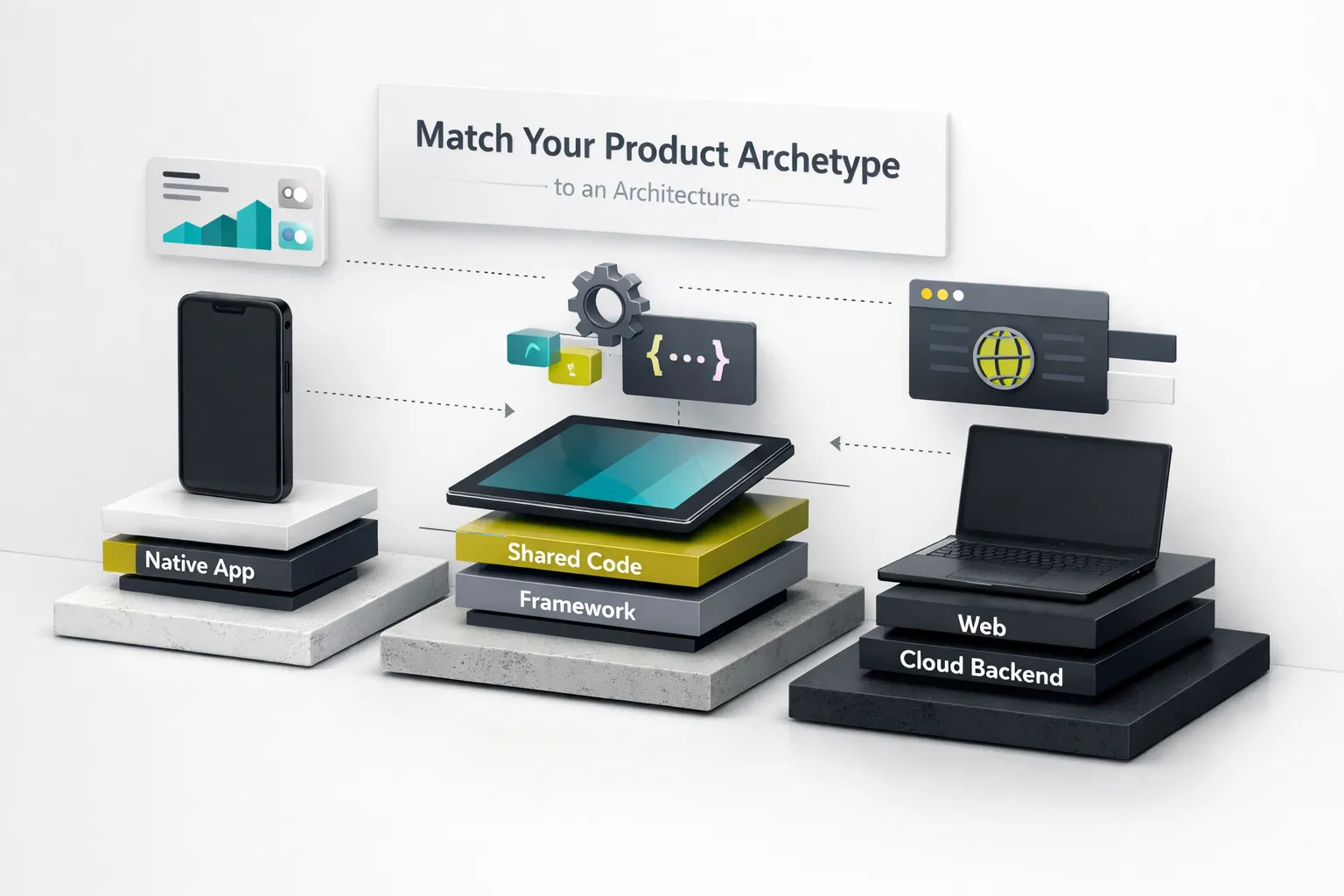
This is where most framework comparison guides fail. They compare features in a vacuum, as if every app has the same requirements. They don’t. A fintech app with PCI-DSS compliance requirements and a consumer social app with 120fps animation targets have almost nothing in common from an architectural standpoint. The framework that’s perfect for one may be actively harmful for the other. What follows is a product-archetype-driven recommendation matrix, eight real product types mapped to specific architectures with explicit rationale.
Eight Archetypes, Eight Answers
1. Consumer Social (animation-rich feeds, stories, real-time interactions): Flutter. The Impeller renderer delivers consistent 120fps on ProMotion displays. Custom animations, gesture-driven transitions, and pixel-perfect branded UI are Flutter’s strongest suit. The trade-off, less native platform feel, matters less in social apps where the brand’s design language dominates anyway.
2. Data-Heavy Enterprise (complex forms, dashboards, offline sync): Kotlin Multiplatform. Enterprise apps live or die on data validation, business rule enforcement, and sync logic, all of which belong in a shared layer. The UI is typically forms and tables, where native platform components (SwiftUI, Compose) provide better accessibility defaults and platform-specific input behaviors than any cross-platform renderer.
3. IoT / Embedded Device Control (BLE, hardware protocols): Flutter or React Native, depending on BLE plugin maturity for your specific hardware. Both have BLE libraries (flutter_blue_plus, react-native-ble-plx), but plugin quality varies by chipset. Run a POC against your actual hardware before committing. If your IoT protocol is proprietary, you’ll write a native bridge or platform channel regardless, factor that maintenance cost in.
4. Media / Animation-Rich (video editing, AR filters, game-like UI): Flutter with Impeller. The pre-compiled shader pipeline eliminates frame drops during complex animations. For apps that need sustained high frame rates across diverse device tiers, owning the renderer is a significant advantage over delegating to platform views.
5. Fintech with Compliance (PCI-DSS, SOC 2, banking regulations): KMM or Flutter, with a mandatory security audit checklist. KMM’s advantage is that sensitive operations (encryption, token management, biometric auth) can be implemented in native code with full platform security API access. Flutter works if you invest in native platform channels for security-critical paths and don’t rely on third-party plugins for encryption or credential storage.
6. Offline-First Logistics (field operations, inventory, delivery): Flutter with Drift (SQLite) or React Native with WatermelonDB. Both have mature offline persistence and sync libraries. The deciding factor is your team’s language preference (Dart vs. TypeScript/JavaScript) and whether your sync logic is complex enough to warrant a shared logic layer (which favors KMM + native UI).
7. B2B SaaS Mobile Companion: React Native. If your SaaS product has a React web frontend, React Native gives you component-level reuse, shared TypeScript types, and a unified design system across web and mobile. The talent pool overlap is the largest of any framework. Your web engineers can contribute to mobile without learning a new language.
8. MVP / Prototype (validate fast, iterate faster): Flutter. Single-codebase speed, hot reload that preserves state, and a widget library deep enough to build production-quality UI without third-party dependencies. CompletApp’s 4-week Flutter MVP model is a real-world example of this archetype in practice, shipping a testable product to both app stores in under a month, then iterating based on real user data rather than hypothetical architecture debates.
Benchmarks That Actually Matter
Synthetic benchmarks, “Framework X renders 10,000 list items 3ms faster than Framework Y”, are noise. They test conditions your app will never encounter.
The four KPIs that actually expose framework weaknesses in production are:
- Cold startup time, measured on a mid-tier device (think Samsung Galaxy A54 or iPhone SE 3rd gen, not a flagship). Target: under 2 seconds from tap to interactive. This exposes Dart runtime initialization overhead in Flutter, JavaScript engine startup in React Native, and shared library loading in KMM.
- 95th-percentile frame rate, not average FPS, but the sustained rate during your app’s most demanding interaction (scrolling a complex list, running an animation sequence). Target: 60fps sustained, 120fps on ProMotion displays. Median FPS hides jank; P95 reveals it.
- Peak memory / heap under load, measured during a realistic user session that includes navigation, background data sync, and image loading. Memory leaks in cross-platform apps often hide in the bridge layer or in improperly disposed native resources.
- OTA update delta size, the actual bytes a user downloads for an incremental update, not the full bundle size. This matters for retention in bandwidth-constrained markets and for user willingness to accept updates.
Measure these four KPIs on your actual product’s most representative screen, on your actual target device tier, with your actual data volume. Anything less produces misleading results that will haunt you six months after launch.
Estimating Real TCO
Total cost of ownership for a cross-platform mobile app development project extends far beyond initial build hours. Competitors’ TCO comparisons typically include development time and maybe CI costs. Here are the five cost buckets that actually determine whether cross-platform saves you money or costs you more than two native apps:
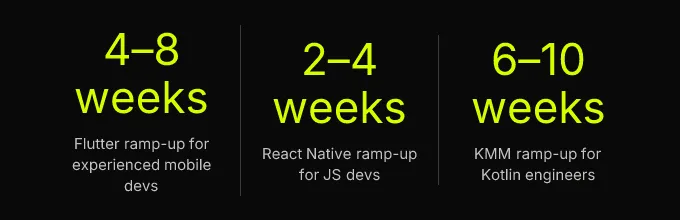
Developer ramp-up: A senior iOS developer learning Flutter’s Dart runtime and widget model takes 4 to 8 weeks to reach productive velocity. A JavaScript developer picking up React Native takes 2 to 4 weeks, the language is familiar, but mobile-specific concepts (lifecycle, permissions, deep linking) still require learning. KMM requires 6 to 10 weeks because engineers need to understand Kotlin/Native’s memory model, Gradle multimodule builds, and XCFramework packaging. These aren’t one-time costs, they recur every time you hire.
Plugin ownership and ABI stability: Every third-party native plugin is a liability. When Apple ships a new iOS version that changes a framework API, every plugin that wraps that API needs updating. If the plugin maintainer has moved on, your team owns the fork. Budget 10-20% of ongoing engineering time for plugin maintenance across all three frameworks.
Build infrastructure: CI/CD for mobile is expensive. Flutter builds for both platforms from a single codebase but requires both macOS runners (for iOS) and Linux runners (for Android). React Native has the same requirement. KMM adds Gradle multimodule build complexity. Multi-flavor releases (staging, production, white-label) multiply build minutes. A realistic CI budget for a cross-platform app is 1.5-2× what a single-platform native app requires, not 0.5×.
App store overhead: Review cycles, binary size limits (Apple’s 200MB cellular download limit), and platform-specific metadata management. Binary size optimization, app bundle (AAB) generation, app thinning, deferred components, is ongoing work, not a one-time task.
Accessibility and localization: Cross-platform frameworks have varying levels of accessibility API support. Flutter’s Semantics tree is comprehensive but requires explicit annotation. React Native inherits native accessibility APIs but plugin components often lack proper labels. KMM’s native UI approach gives the best accessibility defaults. Localization infrastructure (string extraction, RTL layout, plural rules) must be maintained per platform regardless of framework. Budget accordingly.
The hiring market shapes long-term cost more than any technical factor. React Native draws from the enormous JavaScript/TypeScript talent pool. Flutter’s Dart developer pool is smaller but has grown roughly 40% year-over-year since 2023. KMM requires senior Kotlin engineers who are in high demand and command premium salaries. If you can’t hire for a framework, the framework’s technical merits are irrelevant.
Build, Benchmark, and Ship It Right
A decision made from blog posts and conference talks is a guess. A decision made from a structured proof-of-concept with reproducible benchmarks is engineering. This section covers what a valid POC must contain, how to set up CI/CD pipelines that won’t collapse under production demands, and the security threats that are unique to bridge and webview architectures, threats that general mobile security guides consistently miss.
Reproducible POC Recipes
A decision-grade POC must exercise four capabilities that expose real framework behavior, not best-case demos. First: a list screen rendering 500+ heterogeneous items with images, measuring scroll performance via systrace (Android) or Instruments (iOS) to capture P95 frame times. Second: a background data sync task that runs for 60+ seconds, measuring memory/heap growth and battery impact. Third: a platform-native feature call, camera capture or biometric authentication, exercised through the framework’s native bridge or platform channel mechanism. Fourth: a complete OTA update cycle using the framework’s update mechanism (Shorebird for Flutter, CodePush or EAS Update for React Native) measuring delta download size and apply time.
A POC missing any of these four produces misleading results. The list screen tests rendering performance. The background sync tests memory management and native bridge overhead. The platform feature call tests plugin reliability and permission handling. The OTA cycle tests your update distribution story. Together, they give you the four KPIs described above, measured on your actual target devices.
For benchmarking: capture frame timing via systrace’s gfx category on Android and Instruments’ Core Animation template on iOS. Take heap snapshots at rest, during peak load, and after navigation back to the home screen (to detect leaks). Measure APK/IPA size before and after tree-shaking and binary size optimization. Record all results in a standardized spreadsheet so you can compare frameworks side-by-side on identical hardware.
CI/CD Pipeline Templates
A complete CI/CD pipeline for cross-platform mobile app development must handle building, signing, testing, and distributing for both platforms, and most teams underestimate the complexity until they’re debugging signing failures at 2 AM before a release. Here’s what each framework requires:
Flutter: Build with flutter build appbundle --release for Android (generating a split AAB for binary size optimization) and flutter build ipa for iOS. Use fastlane match for iOS certificate and provisioning profile management. Integrate Shorebird for OTA code-push updates that bypass app store review for Dart code changes. Run flutter test for unit/widget tests and flutter drive or integration_test for on-device integration tests. Device farm testing on services like Firebase Test Lab or AWS Device Farm should cover at minimum 3 Android API levels and 2 iOS versions.
React Native: Android builds via Gradle with per-flavor build variants; iOS builds via Xcode with schemes mapped to environments. Use EAS Build (Expo) or a custom fastlane setup for signing and distribution. CodePush or EAS Update for OTA JavaScript bundle updates. Run Jest for unit tests, React Native Testing Library for component tests, and Detox for E2E integration tests. Hermes bytecode compilation should be enabled by default, it reduces startup time by 30-50% and bundle size by 15-25%.
KMM: Gradle multimodule build producing an Android AAR and an iOS XCFramework. The XCFramework must be versioned and distributed via a Swift Package Manager feed or a CocoaPods spec repo. CI must run shared Kotlin tests on both JVM and Kotlin/Native targets, behavior differences between the two runtimes are rare but real. Native UI tests (XCTest, Espresso) run separately per platform.
Multi-flavor release support, staging, production, white-label variants, is the step most teams skip and most teams regret. Configure it from day one. Retrofitting build flavors into an established CI pipeline is a week of lost productivity and a source of signing-related bugs that only surface during app store submission.
Security Threats in Bridges and Webviews
General mobile security guides cover the basics: certificate pinning, encrypted storage, obfuscation. What they miss are the attack surfaces unique to cross-platform architectures that use bridges or webviews to connect JavaScript/Dart code to native capabilities.
JavaScript injection via postMessage: Hybrid apps using Capacitor or webview-based plugins often communicate between the web layer and native layer via postMessage handlers. If these handlers don’t validate message origin and schema, a malicious script injected via XSS can invoke native APIs, camera, file system, contacts, without user consent. Mitigation: enforce a Content Security Policy that restricts script sources, validate every postMessage payload against a strict schema, and never expose destructive native operations through the webview bridge.
Insecure plugin APIs: Community-maintained native plugins sometimes expose capabilities without proper permission checks. A plugin that accesses the device’s keychain or biometric APIs may not verify that the calling context is authorized. Mitigation: audit every native plugin’s API surface before adoption. Maintain an allowlist of approved plugins. Fork and own any plugin that touches sensitive data or device capabilities.
Serialization vulnerabilities in React Native’s JSI bridge: JSI allows synchronous calls between JavaScript and native code, which means type confusion or buffer overflow bugs in custom native modules can be exploited without the serialization safety net the old async bridge provided. Mitigation: use TurboModules’ type-safe codegen for all native module interfaces. Never pass raw pointers or unvalidated data across the JSI boundary.
Compliance non-negotiables: GDPR/CCPA data-at-rest encryption, HIPAA audit logging, and PCI-DSS secure storage requirements must be implemented at the native layer regardless of framework. No cross-platform abstraction should be trusted as the sole encryption or credential storage mechanism. Use platform-native Keychain (iOS) and EncryptedSharedPreferences or Android Keystore (Android) directly through platform channels.
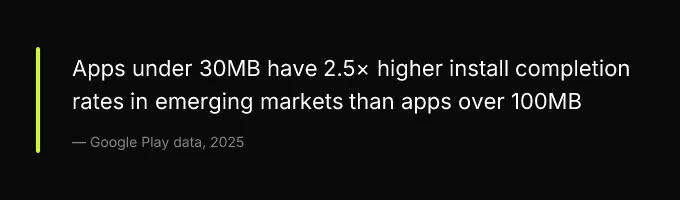
Binary size optimization deserves specific attention because it directly affects install conversion in low-bandwidth markets. Flutter apps should use deferred components to split the app into base and feature modules, compress assets aggressively, and strip unused icon fonts, a default Flutter app includes the entire Material Icons font at ~1.5MB. React Native apps should ensure Hermes is enabled (it produces smaller bytecode than JavaScriptCore), use metro bundle splitting for lazy-loaded features, and enable ProGuard/R8 for Android. KMM apps should strip unused Kotlin standard library functions and use Android’s app bundle (AAB) format with app thinning for iOS. Realistic targets: under 30MB installed size for emerging-market apps, under 15MB for OTA delta updates.
Migrating From Native Without Breaking Production
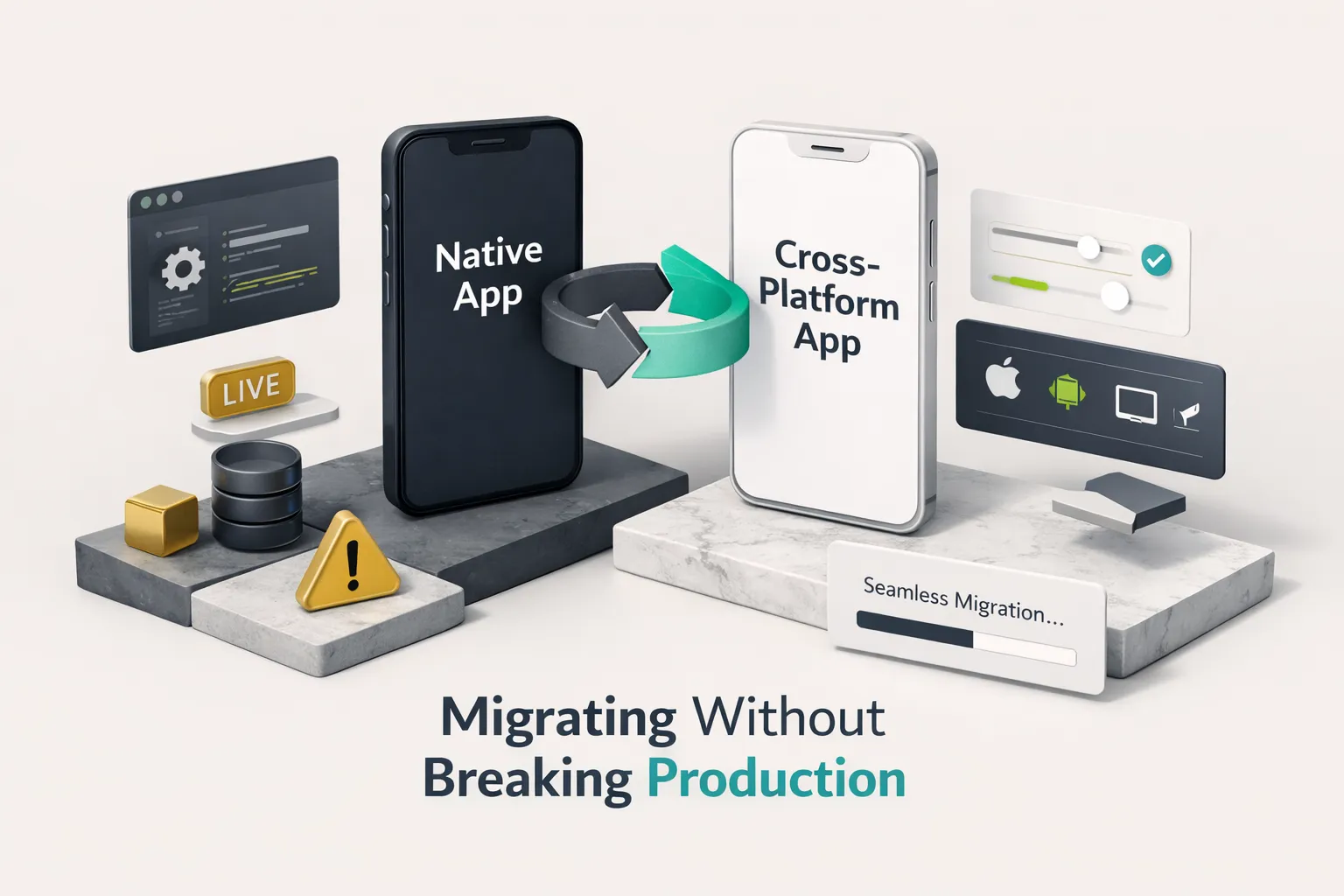
Most teams reading this article are not starting from zero. They have existing native iOS and Android apps, often with different feature sets, different bug backlogs, and different levels of technical debt. The question isn’t “which framework should I build with?” but “how do I migrate to a shared codebase without breaking the app my users depend on?” The answer is incremental migration, not a rewrite.
The Strangler Fig Pattern for Mobile
The strangler fig pattern, borrowed from backend architecture, is the only safe migration path for apps with more than 50,000 daily active users. The approach: embed a Flutter module (using add-to-app) or a React Native component (using a native host) inside your existing native app shell. Migrate one screen at a time. The native app remains the primary shell; the cross-platform module handles individual screens or features. Users don’t notice the transition because the app shell, navigation, and deep linking remain native.
Each migrated screen must pass parity benchmarks against the native version it replaces before the native version is deprecated. “Parity” means equivalent or better performance on all four KPIs (startup contribution, frame rate, memory, update size), equivalent accessibility scores, and equivalent crash-free rates. Only after parity is confirmed, and after the cross-platform version has run in production for at least two release cycles, should the native screen be removed from the codebase.
Risk Checkpoints and Rollback
Define four migration risk checkpoints that must pass before each phase advances:
- Benchmark parity on your target device tier, the cross-platform screen must match or beat the native screen’s P95 frame rate and cold contribution to startup time.
- Accessibility audit pass, VoiceOver (iOS) and TalkBack (Android) must navigate the migrated screen with full label coverage, correct focus order, and proper trait announcements.
- Crash-free rate ≥ native baseline, measured over a minimum 7-day window with at least 10,000 sessions. A single crash spike during migration erodes user trust faster than any performance gain recovers it.
- App store review approval, the hybrid binary (native shell + cross-platform module) must pass both Apple and Google review without rejection. Apple in particular scrutinizes apps that dynamically load code; ensure your OTA update mechanism complies with App Store Review Guideline 3.3.2.
If any checkpoint fails, the rollback plan is to re-enable the native screen via a remote feature flag. Wire this feature flag infrastructure before you begin migration, not after a failure forces you to improvise.
In Flutter add-to-app, this means the native host checks a remote config value and either initializes the Flutter engine for that route or renders the native screen. In React Native, the native host conditionally loads the RN bridge for specific screens.
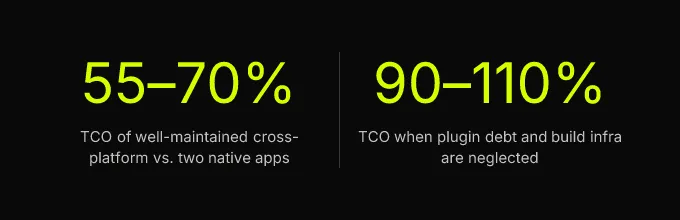
Plugin and third-party module versioning during migration is the maintenance cost that kills cross-platform projects 18 months post-launch. Teams must maintain a plugin compatibility matrix: every native plugin version pinned, tested against every supported OS version, with an owner assigned. When Apple ships iOS 19 or Google ships Android 16, every plugin in your matrix needs verification within the beta period, not after your users report crashes. This is not optional overhead. It is the ongoing cost of cross-platform development, and teams that don’t budget for it end up spending 90-110% of what two native apps would have cost.
Finally, design and UX parity obligations fall on PMs and designers, not just engineers. Before migrating a screen, audit platform-specific interaction patterns: iOS bottom sheets vs. Android modal dialogs, haptic feedback APIs, Dynamic Type (iOS) and font scaling (Android), edge-to-edge display handling, and back gesture behavior. A shared component library that ignores these differences produces apps that feel subtly wrong on both platforms, and “subtly wrong” is worse than “obviously different” because users can’t articulate why the app feels off, they just stop using it.
Your Next Step Is a POC, Not a Decision
The right cross-platform mobile app development framework for your product cannot be determined from this article, from a conference talk, or from a Slack poll in a developer community. It can only be validated by running the POC recipe described above against your actual product archetype, on your actual target device tier, with your actual data volume and user flows. The decision matrix in this playbook narrows the field to one or two candidates. The POC confirms which one wins.
Here is your concrete action sequence: identify your product archetype from the eight described above. Select two finalist frameworks. Build the four-component POC (list screen, background sync, native feature call, OTA update cycle) in both. Measure the four KPIs on a mid-tier device. Complete a TCO spreadsheet with your team’s actual hiring costs, CI infrastructure pricing, and plugin maintenance estimates. Then commit. This is a 2 to 4 week process, and it will save you 12 to 24 months of regret.
Teams that lack the bandwidth to run this evaluation themselves, or that want to avoid the learning-curve cost of building POCs in unfamiliar frameworks, can engage a studio that has already run these benchmarks across 70+ shipped cross-platform apps. The value isn’t just execution speed. It’s validated judgment: knowing which benchmarks matter, which plugins are reliable, and which architectural decisions will hold up 18 months after launch. That’s the difference between choosing a framework and choosing the right framework.