What React Native App Development Really Involves
Most founders think React Native is a website squeezed into an app.
It isn’t.
React Native is a framework that lets you write JavaScript and TypeScript, then renders real native iOS and Android UI components on the device. A React Native button is a genuine UIKit or Android view, not an HTML element inside a browser window.
That distinction matters because it shapes everything else: performance, user experience, and how your app feels in someone’s hand. Older hybrid tools like Cordova wrapped a web view and called it an app.
Users noticed.
React Native takes a different path, and the result is cross-platform mobile development that feels native when it’s done well.
The promise needs a reality check, though.
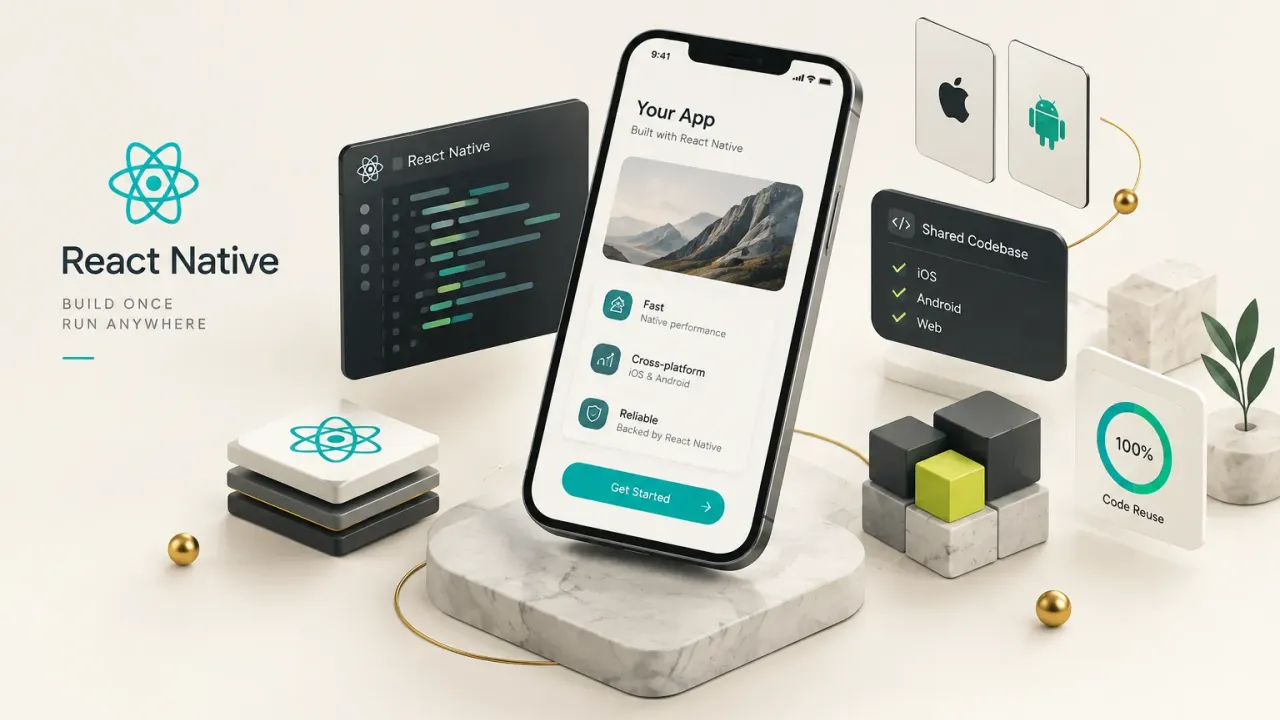
React Native gives you one shared codebase for business logic and most of the UI, not 100% code reuse. Real projects typically share the large majority of their code, while some screens, permissions flows, and native integrations still need platform-specific code for iOS or Android.
Think of it like a restaurant chain with one central kitchen. The recipes, ordering system, and supply chain are shared.
But each location still adjusts for local health codes and floor plans.
Your app works the same way.
This guide covers what a founder or product lead actually needs to decide:
- How the architecture works, including the New Architecture that now powers every modern React Native app.
- When to choose Expo, the bare React Native CLI workflow, Flutter, or fully native development.
- How to plan, build, test, and ship safely through the app stores.
- Privacy disclosures, release engineering, and the skills your team or vendor must have.
Why does this matter in 2026?
Because the “does it work?” debate is over.
React Native runs in production at Meta, Shopify, Discord, Microsoft and thousands of other companies. Shopify moved its mobile apps to React Native, and Meta uses it across products like Facebook Marketplace.
The real question isn’t whether React Native works. It’s whether it’s the right fit for your specific product, budget, and timeline.
How React Native Works Under the Hood
For years, every React Native app had a quiet bottleneck sitting in the middle of it.
It was called the bridge.
Understanding what replaced it explains why React Native performance in 2026 looks very different from the complaints you may have read in 2018.
The New Architecture: JSI, Fabric, TurboModules
In the legacy bridge model, your JavaScript code ran on one thread and native code ran on another. They communicated by serializing messages into JSON, sending them across asynchronously, and decoding them on the other side.
It worked, but every scroll event, animation frame, and native call paid a translation tax.
Picture two offices that can only talk by mailing letters.
Fine for weekly reports.
Terrible for a live conversation.
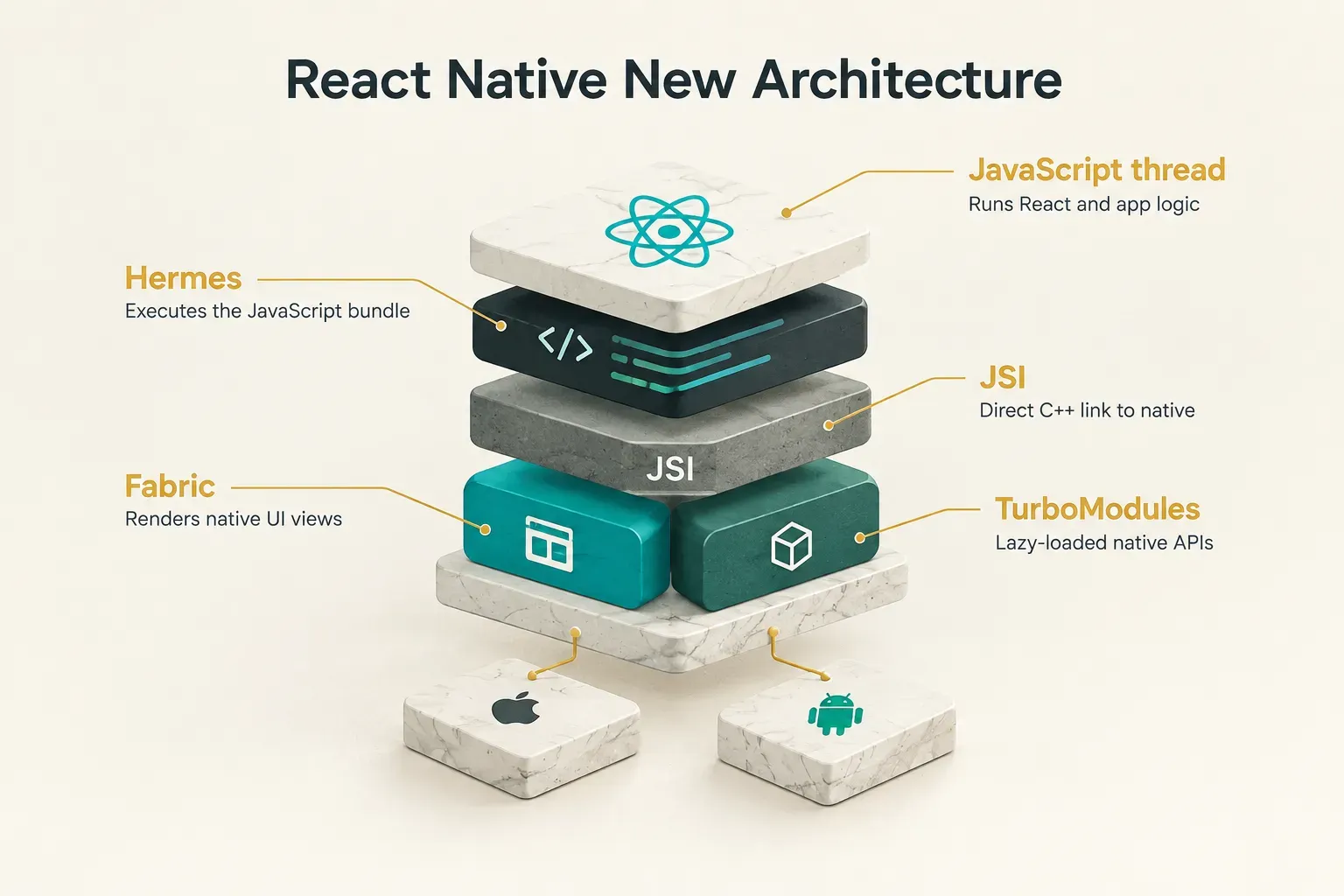
The React Native New Architecture replaces that mail system with a direct phone line. At its core is JSI (JavaScript Interface), a C++ layer that lets JavaScript hold references to native objects and call native methods directly, including synchronously when needed.
No JSON serialization.
No waiting in a queue.
Two systems build on JSI:
- Fabric renderer: the new rendering system. It lets React compute layouts and commit UI updates with far less overhead, and it supports React 18+ features like concurrent rendering. Fabric can also measure and update views synchronously, which removes the layout “jumps” common in older apps.
- TurboModules: the new native module system. Modules load lazily, only when your code first uses them, instead of all at startup. That trims launch time for apps that depend on many native libraries.
The New Architecture became the default in React Native 0.76, and recent releases have removed the option to fall back to the legacy bridge entirely. Expo SDK projects followed the same path.
Paired with the Hermes JavaScript engine (React Native’s default engine, optimized for fast startup and lower memory use), this is the current baseline for any new project.
The practical payoff shows up in three places: long scrolling lists, gesture-driven animations, and camera-heavy screens. These are exactly the workloads where the old bridge choked on constant back-and-forth traffic.
But here’s what vendors don’t always say out loud.
Enabling the New Architecture does not fix bad code.
If your components re-render on every keystroke, your list renders 2,000 items at once, or you run heavy calculations on the JavaScript thread during scrolling, the app will still stutter.
Faster plumbing can’t save a leaky design.
Talking to Native iOS and Android APIs
Your app eventually needs something JavaScript can’t do alone. Camera access, Bluetooth, Face ID, background location, health data.
That’s where native modules come in.
A native module is a piece of Swift, Objective-C, Kotlin, or Java code that exposes iOS and Android APIs to your JavaScript. Your React components call a simple function, and the module handles the platform-specific work underneath.
Most of the time, you won’t write these yourself.
The Expo SDK and the community already cover camera, biometrics, push notifications, file storage, maps, and in-app purchases. A team should reach for a custom native module when:
- You integrate proprietary hardware, such as a medical device or a payment terminal with its own SDK.
- A required vendor SDK (say, an identity verification provider) has no maintained React Native wrapper.
- An existing library doesn’t support the New Architecture or hasn’t been updated in over a year.
- You need performance-critical processing, like real-time audio or frame-by-frame camera analysis, that must run natively.
Writing a native module isn’t exotic work, but it requires someone comfortable in Xcode and Android Studio. Budget for it early if your product depends on hardware.
Expo, Bare React Native, Flutter or Native?
Here’s a counterintuitive truth: the stack decision rarely fails because a framework is “slow.” It fails because teams pick a tool before they’ve listed what the app actually has to do.
Start with requirements, then choose.
Expo or React Native CLI
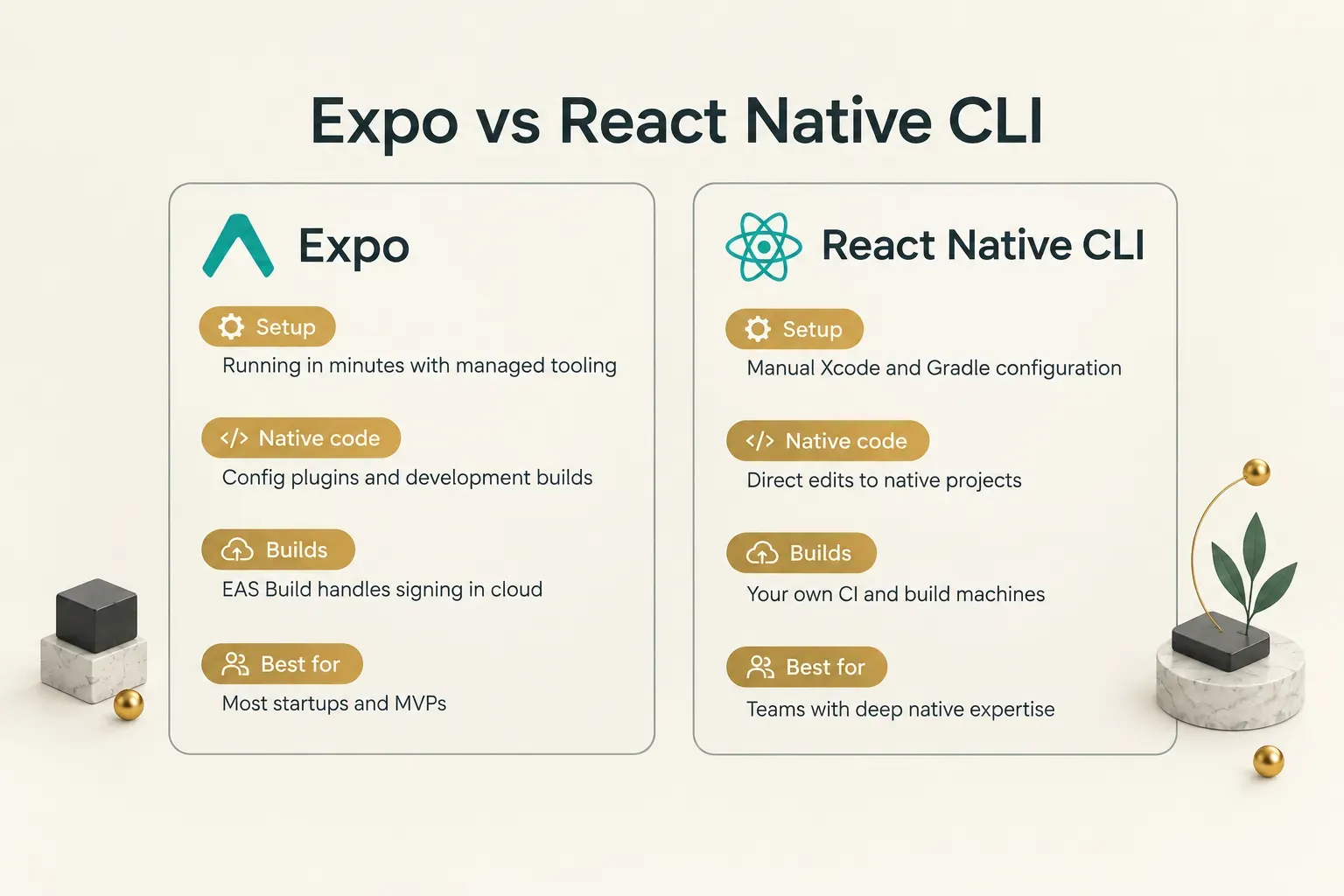
Expo is a framework and toolchain built on top of React Native. Its managed approach handles native project configuration for you, ships the Expo SDK of prebuilt modules, and includes Expo Router for file-based navigation.
Cloud services like EAS Build and EAS Update handle compiling, signing, and over-the-air JavaScript updates.
The old myth was that Expo couldn’t run custom native code.
That stopped being true years ago.
With development builds, you compile your own version of the Expo client that includes any native library you need, and config plugins modify the iOS and Android projects automatically during the build.
The React Native Community CLI (the “bare” workflow) gives you raw iOS and Android project folders to manage by hand.
You get full control.
You also own every Xcode upgrade, Gradle conflict, and dependency mismatch.
When does a custom native module force your hand? If the module is simple, a development build plus a config plugin covers it without leaving Expo.
You move to a bare-style workflow only when you need heavy, ongoing edits to native project files that a plugin can’t express cleanly.
For most MVPs, Expo with development builds is the sensible default in 2026, and the React Native team itself recommends starting with a framework like Expo.
React Native, Flutter, or Fully Native
Forget vague claims like “Flutter is faster” or “native is always better.” Score your app against five criteria instead:
| Decision factor | Points toward React Native or Flutter | Points toward fully native |
|---|---|---|
| Real-time graphics | Standard UI, charts, maps, light animation | 3D rendering, AR, game engines, video editing |
| Hardware access depth | Camera, GPS, biometrics, push, Bluetooth basics | Custom hardware, low-level Bluetooth, background audio processing |
| Animation intensity | Transitions, gestures, micro-interactions | Continuous physics-driven or GPU-heavy animation |
| Team skill set | Web or JavaScript team (React Native), Dart-ready team (Flutter) | Separate, experienced Swift and Kotlin teams |
| Time-to-market pressure | Need both platforms within weeks | Can afford two parallel builds over quarters |
Once you’ve scored your app, compare the three stacks directly:
| Criteria | React Native | Flutter | Fully native (Swift / Kotlin) |
|---|---|---|---|
| Code sharing | High; logic and most UI shared, some platform-specific code | Very high; UI drawn by Flutter’s own engine on both platforms | None; two separate codebases |
| Language | JavaScript and TypeScript | Dart | Swift (iOS), Kotlin (Android) |
| UI rendering | Real native platform components via Fabric | Custom-rendered widgets via the Impeller engine | Native UIKit / SwiftUI and Jetpack Compose |
| Performance ceiling | Native-feel for most business apps; limits at heavy real-time graphics | Very smooth custom UI; limits at deep OS integration | Highest; full access to every platform API |
| Library ecosystem | Mature, leans on npm and Expo SDK; quality varies by package | Mature and growing via pub.dev; strong first-party packages | Most mature; every new OS feature lands here first |
| Hiring pool | Largest; JavaScript has topped Stack Overflow’s language usage survey for over a decade | Smaller but growing Dart talent pool | Large, but you need two specialists |
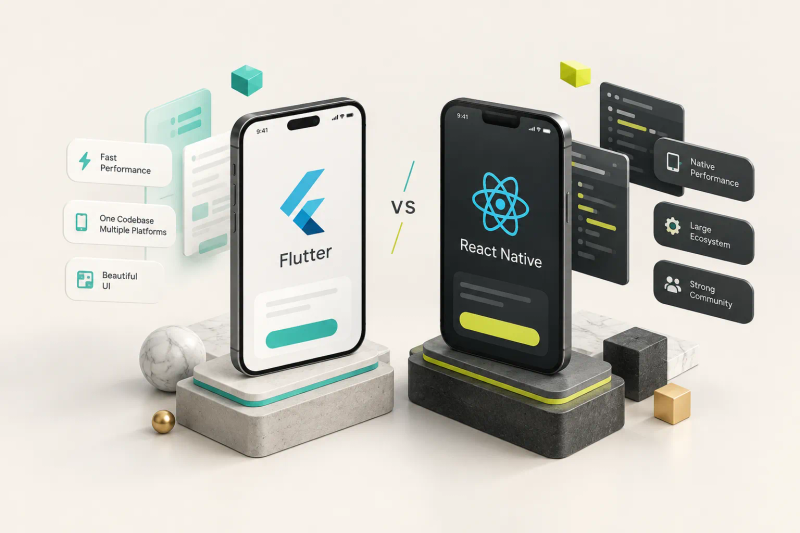
React Native and Flutter are close cousins for most products. The tie-breaker is usually your team, not the framework.
Product studios apply this logic every week. CompletApp, for example, scopes client MVPs by running through these exact factors before writing code.
When speed and a shared codebase outweigh niche native requirements, they choose a cross-platform stack (Flutter, in their case) and deliver a fixed-scope build in weeks rather than quarters.
The framework choice follows the requirements.
Never the reverse.
From Product Idea to a Working App
The most expensive bug in any app is the one written into the plan. Most rework comes from fuzzy requirements, not bad code.
So the first step happens on paper.
What to Define Before Writing Code
Before anyone opens a code editor, lock down these five decisions:
- Map the core user journey. Write the single path that delivers your app’s value, from first launch to “aha moment,” in 5 to 10 steps. Everything outside that path is a candidate for version two.
- Decide who owns the backend. Choose between a backend-as-a-service (Supabase, Firebase), an existing company API, or a custom build. This decision drives your API integration work and often half the project’s cost.
- Define analytics events. List the 10 to 20 events you’ll track, such as sign-up completed or first purchase. Adding analytics after launch means you fly blind for your most important weeks.
- Write acceptance criteria. For every feature, state what “done” means in testable terms, including offline behavior and error states. Vague criteria guarantee scope creep.
- Set post-launch success metrics. Pick two or three numbers, like day-7 retention or activation rate, that will tell you whether the app works as a business.
Skills, Tooling and Common Mistakes
Once the plan is solid, the first technical steps follow a predictable order:
- Create the project. Run npx create-expo-app with TypeScript enabled, or initialize with the React Native Community CLI if you need a bare setup. TypeScript catches whole categories of bugs before they reach a device.
- Set up navigation. Use Expo Router for file-based routing or React Navigation for a configuration-based approach. Define your tab, stack, and modal structure around the core user journey.
- Choose state management. Separate server state (TanStack Query works well) from local UI state (Zustand or Redux Toolkit). Mixing the two creates tangled code and needless re-renders.
- Configure environments. Create separate dev, staging, and production settings for API URLs and keys from day one. Retrofitting this later is painful and risky.
The skills behind those steps are specific.
Your team needs fluent JavaScript and TypeScript, a solid grasp of the React component model (props, state, hooks, rendering behavior), and working knowledge of native build tooling in Xcode and Android Studio. Just as important: comfort reading a native crash log when something breaks only on one Android vendor’s phone.
And then there are the mistakes.
They repeat across projects with remarkable consistency:
- Ignoring platform conventions. iOS and Android users expect different back gestures, date pickers, and permission prompts. Copying one platform’s UX onto the other feels wrong to users immediately.
- Skipping real device testing. Simulators hide memory limits, slow processors, and notch layouts. Test on at least one low-end Android device every sprint.
- Installing libraries blindly. Before adding a package, check its New Architecture support, last release date, and open issue count. An abandoned library becomes your maintenance burden.
- Handling permissions as an afterthought. Camera, location, and notification permissions need clear explanations and graceful fallbacks when users say no.
Performance, Testing and Shipping Safely
A smooth app has a budget: 16.7 milliseconds per frame to hit 60 FPS rendering. Miss it repeatedly and users feel jank, even if they can’t name it.
The fix starts with knowing which part of the app is overspending.
React Native performance problems fall into five distinct categories, and each needs a different fix:
- JavaScript-thread bottlenecks: heavy computation, large JSON parsing, or excessive re-renders block the JS thread, so taps feel delayed. Fix with memoization, moving work off the critical path, and profiling with React DevTools.
- UI-thread bottlenecks: overly deep view hierarchies, large unoptimized images, and complex shadows overload the UI thread. Flatten layouts and resize images to display dimensions.
- Slow startup: too many modules loading at launch or a bloated JavaScript bundle. Hermes bytecode, TurboModules’ lazy loading, and deferring non-critical work all help.
- Poor list rendering: rendering hundreds of rows at once instead of using virtualized lists like FlatList or Shopify’s FlashList, which only render what’s on screen.
- Heavy animation workloads: animations driven from JavaScript compete with app logic. Libraries like Reanimated run animations on the UI thread, keeping them smooth under load.
One rule overrides everything: measure performance only in release builds.
Development mode adds debugging checks and unminified code that can make an app feel several times slower than production.
Teams that profile in dev mode end up chasing problems that don’t exist… and missing the ones that do.
A Testing Pyramid for React Native
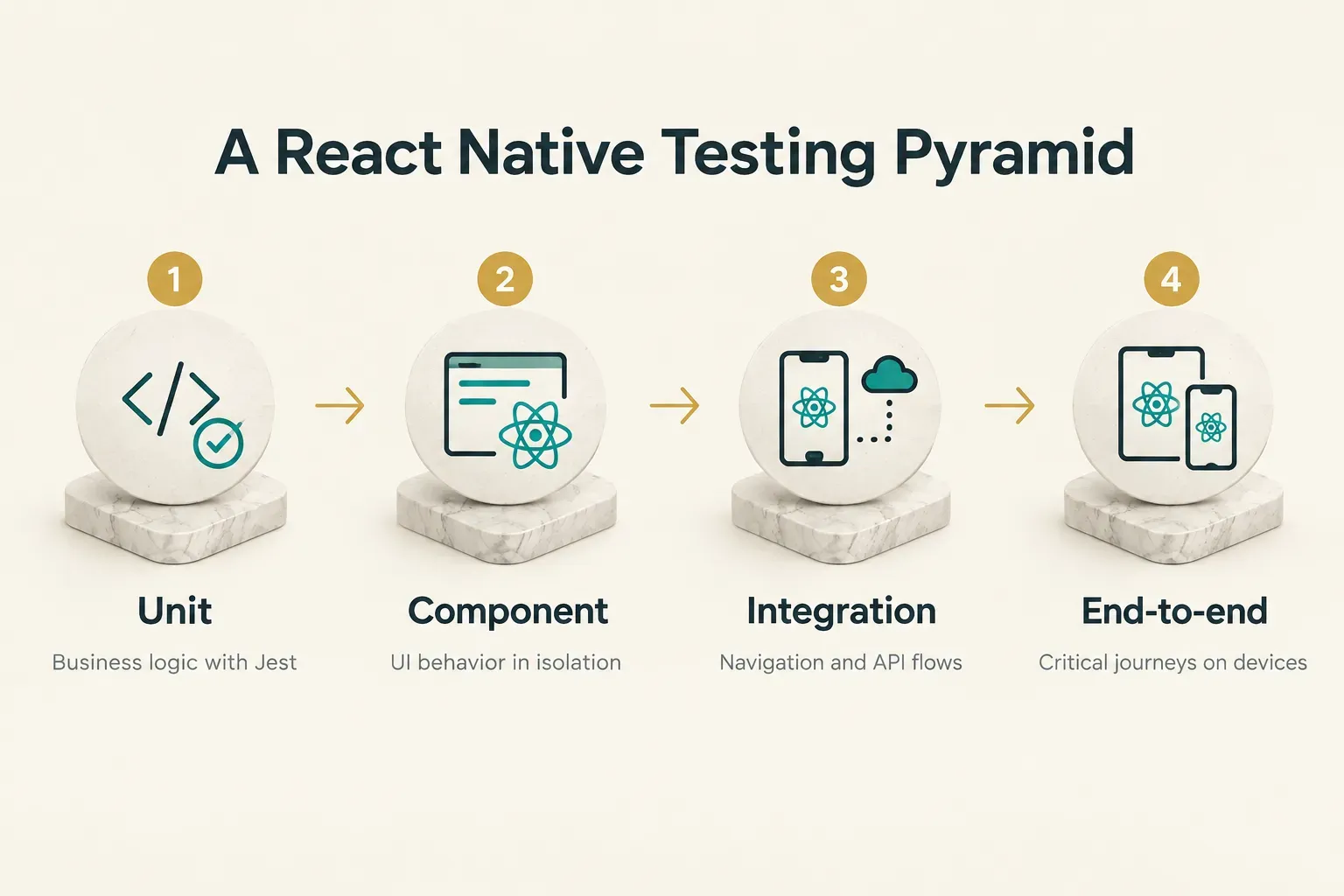
Not every test is worth the same effort. A pyramid keeps the cheap, fast tests at the base and the slow, expensive ones at the top:
- Unit tests for logic: validate pricing calculations, date formatting, and data transformations with Jest. These run in milliseconds and should make up the bulk of your suite.
- Component tests for UI behavior: use React Native Testing Library to confirm a form shows errors, a button disables while loading, and a list renders empty states. This layer covers unit and component testing of what users actually see.
- Integration tests for navigation and API flows: verify that logging in routes to the right screen and that API failures surface the correct message, using mocked network responses.
- End-to-end tests for critical journeys: run Detox or Maestro on real devices or emulators for sign-up, checkout, and other money-making paths. Keep this layer small; end-to-end testing is slow and brittle when overused.
Release Engineering and Store Compliance
Shipping an app isn’t the same as deploying a website.
You can’t hotfix a native crash in five minutes, because store review sits between you and your users.
Release engineering is how you make that delay survivable:
- Environment variables per stage: dev, staging, and production builds should point to separate backends and analytics projects, so test data never pollutes real metrics.
- Code signing credentials: iOS certificates, provisioning profiles, and Android upload keystores must be stored securely and backed up. Losing an Android signing key without Play App Signing enabled can lock you out of updating your own app.
- CI/CD pipelines: automate builds, tests, and store submissions with EAS Build, GitHub Actions, or Fastlane. Good CI/CD and release automation turns a stressful half-day release into a routine button press.
- Crash monitoring: wire up Sentry or Firebase Crashlytics before launch, with source maps uploaded so JavaScript stack traces are readable.
- Staged rollouts and rollback plans: Google Play Console supports percentage-based rollouts, and App Store Connect offers a 7-day phased release. Pair them with feature flags and over-the-air updates for JavaScript-only fixes.
Then there’s compliance, which trips up more launches than bugs do. Every SDK you add collects data, and you must disclose it:
- Privacy labels and Data Safety forms: analytics, authentication, push notification, payment, location, and camera SDKs all require accurate app privacy disclosures in App Store Connect’s privacy labels and the Google Play Data Safety form. Apple also requires privacy manifests for many common third-party SDKs.
- Accessibility: set accessibility labels, support dynamic text sizes, and test with VoiceOver and TalkBack. Accessibility is both a legal exposure and a growth lever.
- Safe areas: respect notches, Dynamic Island, and Android gesture bars so content never hides behind hardware.
- Localization: externalize every string from day one, even if you launch in one language. Retrofitting translation later means touching every screen.
- Offline states: decide what users see without a connection. An offline-first architecture that caches key data locally makes an app feel dependable on subways and spotty networks.
Deciding If React Native Fits Your App
Strip away the debate and the decision gets simple.
If your app is mostly forms, content feeds, dashboards, bookings, chat, or e-commerce, React Native is very likely the right call.
You’ll ship both platforms from one team, faster.
If your app needs heavy real-time 3D, AR, continuous GPU-driven animation, or deep OS-level integration like custom hardware drivers, weigh fully native or Flutter instead.
That’s not a knock on React Native.
It’s matching the tool to the job.
Before you approach any developer or studio, do one exercise.
Write down your core user journey in ten steps or fewer, then list every native feature you consider non-negotiable.
That single page will sharpen every quote you receive and expose vendors who recommend a stack before understanding your product.
Ready to turn that page into a real plan?
Book a free discovery call to get a fixed-scope, fixed-price plan for your MVP before you commit a single week of engineering time.
You’ll leave knowing exactly what gets built, on which stack, and by when.