What a SaaS MVP Really Is
Most “MVPs” never collect a single dollar. They are polished demos, Figma walkthroughs, or landing pages dressed up as products.
And that is exactly why so many founders mistake early applause for traction.
SaaS MVP development is the process of building the first version of a subscription product that real users can sign up for, use end-to-end, and pay for.
Not a demo.
Not a clickable mockup.
A minimum viable product in the software as a service world has to survive contact with a credit card, a forgotten password, and a user who shows up on a Tuesday expecting it to work.
That bar is higher than most guides admit.
Feature checklists are everywhere, but they skip the parts that decide whether an MVP becomes a business: tenant-safe data, billing states, onboarding, metrics, and who actually owns the code.
This playbook covers all of them.
One more thing before we start.
As of 2026, AI coding assistants can cut raw build time dramatically, sometimes by a third or more on boilerplate-heavy work.
But faster typing does not fix a bloated scope or an unvalidated idea.
Speed amplifies whatever discipline you bring to the project, good or bad.
MVP vs Prototype vs POC
These three terms get used interchangeably.
They shouldn’t be, because each one answers a different question.
A proof of concept (POC) tests technical feasibility.
Can we actually parse these PDFs, sync with this API, or run this model fast enough?
It is often ugly, internal, and disposable.
A prototype tests look and flow.
It shows users what the product will feel like, usually without a working backend.
Useful for user journey mapping and early feedback, but nobody can pay for it.
An MVP tests whether the core workflow creates enough value to retain and bill a user.
That is the only one of the three that tells you anything about problem-solution fit with money attached.
If your “MVP” cannot charge a customer, it is still a prototype.
Finding the Workflow Worth Building
Every successful SaaS MVP is built around one sequence of actions: the shortest path from signup to the moment a user thinks “this saves me real time.”
Find that path and every scope decision gets easier.
Miss it and you end up building settings pages for a product nobody uses.
To identify your core workflow, ask what a user must complete to experience your core value proposition at least once.
For an invoicing tool, that might be: create account, add client, generate invoice, send it, get paid.
Everything outside that chain is a candidate for cutting.
- Write the workflow as five to eight verbs. If it takes more than eight steps to reach value, the workflow is either too broad or your onboarding is doing too much work.
- Mark the “aha” step. This is usually where the product does something the user could not easily do alone, like generating a document or surfacing an insight.
- Use the workflow as your scope backbone. When someone proposes a feature, the first question is always: does this make the core workflow possible, safer, or faster?
Validate Before You Build
CB Insights’ long-running analysis of startup post-mortems has consistently ranked “no market need” among the top reasons startups fail.
Customer validation before code is the cheapest insurance you will ever buy.
These four methods cost weeks, not months.
- Problem interviews. Talk to 15 to 20 people who have the problem, and ask about their current workaround, how often it hurts, and what they already spend to fix it. Avoid pitching your solution; you are researching the pain, not selling.
- A landing page with a real signup or waitlist. Describe the outcome, show pricing if you can, and measure how many visitors leave an email or book a call. A conversion rate in the low single digits from cold traffic is a starting signal; warm audiences should do noticeably better.
- Concierge or manual delivery. Deliver the service by hand using spreadsheets, email, and your own time. If people won’t keep using the manual version, software won’t save it.
- Pre-selling to design partners. Sign three to five early customers who pay a discounted rate or deposit in exchange for influence over the roadmap. Money changes the conversation in a way compliments never do.
A Framework for Cutting Features
Scope creep rarely arrives as one big feature.
It arrives as twenty reasonable ones.
A tiered framework turns those debates into quick, consistent decisions.
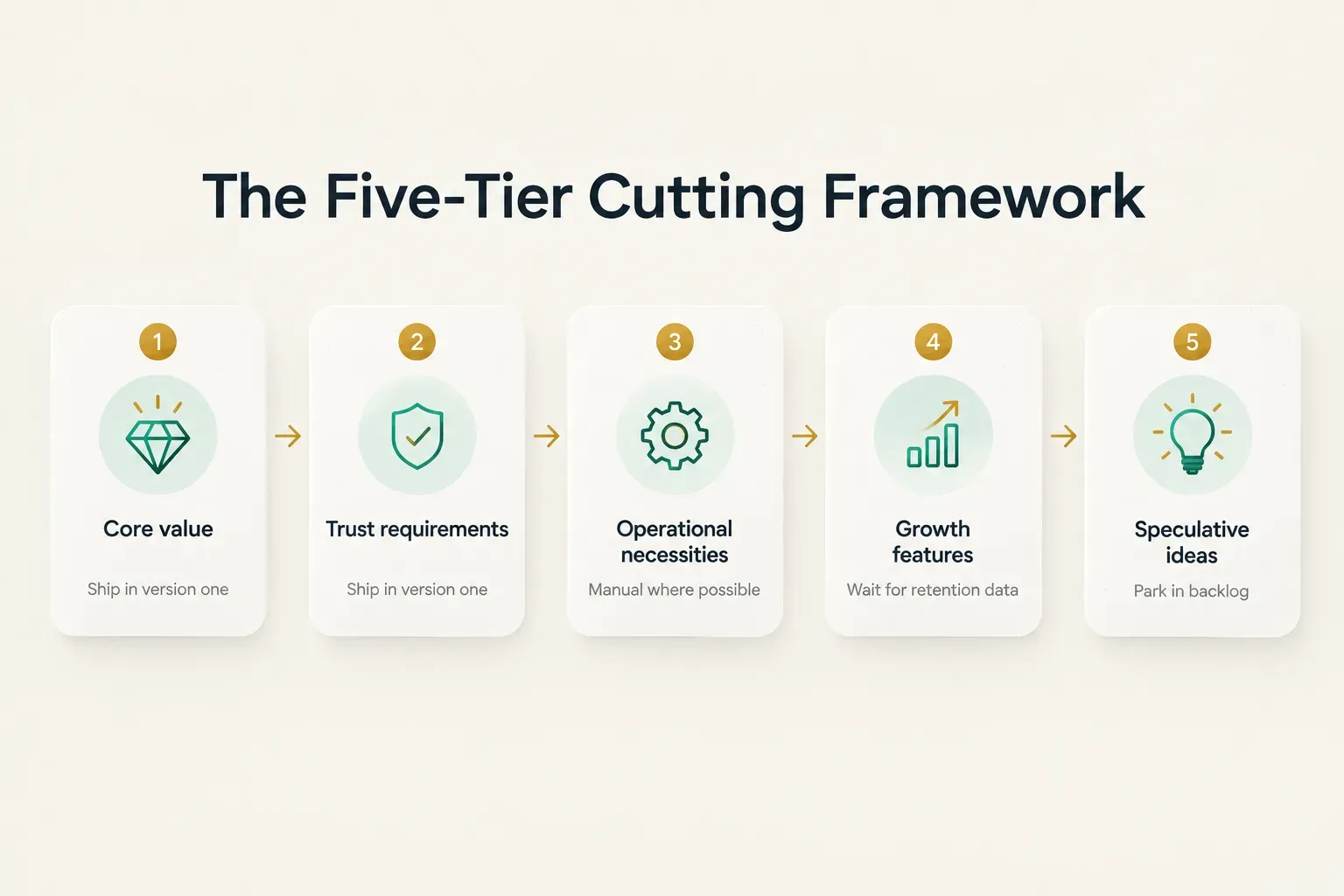
- Core value. Features required to complete the core workflow. These ship in version one, no exceptions.
- Trust requirements. Security, data handling, password resets, and privacy basics. Users won’t hand over data or payment details without them, so they ship too.
- Operational necessities. Support channels and admin tools that let you run the business. Keep them minimal and manual where possible, like an internal dashboard instead of a self-serve help center.
- Growth features. Referrals, integrations, advanced onboarding flows. Valuable, but only after you know people stay.
- Speculative functionality. Ideas that “users might want.” Park them in a backlog and revisit when data, not opinions, says otherwise.
Here is how it plays out.
Imagine a B2B invoicing tool for small agencies.
The founder wants team roles, custom reports, a Slack integration, and invoicing.
- Invoicing and payment collection stay, because they are the core workflow.
- Secure login and tenant-isolated client data stay, because they are trust requirements.
- Team roles get cut from the first release, since most early customers are two-person shops where one owner sends invoices.
- Custom reports get replaced by a single CSV export that covers 80% of reporting needs for now.
- Slack integration moves to tier four until retention proves the core product sticks.
The Technical Backbone of Your MVP
Here is the uncomfortable truth about MVP shortcuts: the ones that hurt most are invisible to users at launch.
Billing edge cases and data isolation don’t show up in a demo.
They show up three months later, at 2 a.m., when a customer sees another company’s records.
Auth and Billing That Hold Up
Signup is the easy part.
Real subscription billing involves states, and your product needs to know which state every account is in at all times.
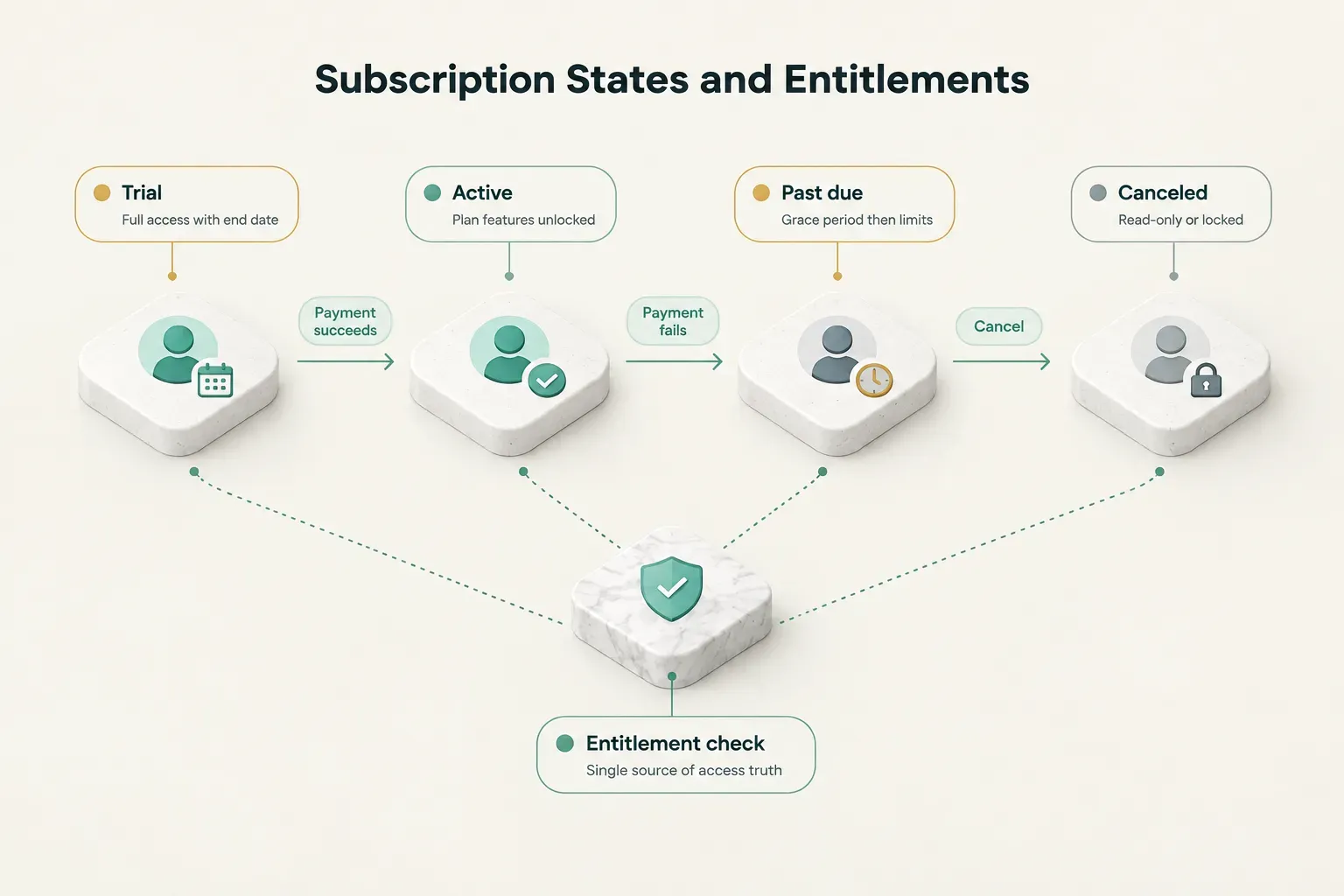
The four that matter for an MVP are trial, active, past due, and canceled.
Each state should map to clear entitlement logic, meaning a single source of truth that decides what a user can access based on plan and payment status.
A trial user might get full features with an end date.
A past-due account might keep read access for a seven-day grace period before features lock.
Hardcoding “if paid, show feature” across fifty screens is how billing bugs multiply.
Failed payments are not an edge case.
Card expirations and declines are a routine part of running any subscription business, and involuntary churn from failed charges can quietly drain revenue if nobody handles it.
Your MVP needs dunning emails, retry logic, and a clear path for users to update their card.
That brings us to payment webhooks.
Stripe and similar providers notify your app about events like a successful charge, a failed invoice, or a canceled subscription.
Three rules apply from day one:
First, verify webhook signatures so nobody can fake an event.
Second, make handlers idempotent, because Stripe retries events and the same “invoice paid” message may arrive twice.
Third, log every event so you can replay or debug when something goes wrong.
Patching this later means auditing months of possibly inconsistent billing data… not a fun week.
Multi-Tenancy and Data Isolation
Multi-tenant architecture means one shared application serves many customers, while each customer’s data stays fully separated.
Think of an apartment building: shared plumbing and elevators, but every unit has its own lock.
In practice, tenant data isolation comes down to a few habits.
Every record carries a tenant identifier.
Every query filters by it.
Every request passes through role-based access control checks that confirm the user belongs to that tenant and has permission for the action.
Database-level protections, like row-level security in Postgres, add a second lock behind the first.
Why not postpone this?
Because retrofitting tenancy means touching every table, every query, and every API endpoint while customers are actively using the product.
Teams that defer it often spend weeks on migrations that would have cost a few days upfront.
Build it in from the first commit.
Where AI Should Earn Its Place
In 2026, nearly every pitch deck mentions AI.
Far fewer can say what it measurably improves.
Treat AI in your MVP as a hypothesis: it must either improve the core workflow or remove manual work, with an outcome you can measure.
Good hypotheses sound like this: “Auto-categorizing expenses will cut time-to-first-report from 20 minutes to under 5.”
Bad ones sound like: “We’ll add a chatbot because users expect AI.”
If you can’t name the metric, the feature belongs in tier five.
This is how a product studio like CompletApp approaches it.
Models from OpenAI or Claude handle specific jobs inside the workflow, such as classifying incoming documents or generating a first draft, while Firebase or Supabase manage auth and data and Stripe handles billing underneath.
The AI does one job well, and the boring infrastructure keeps it trustworthy.
Timeline, Cost, and Build Choices
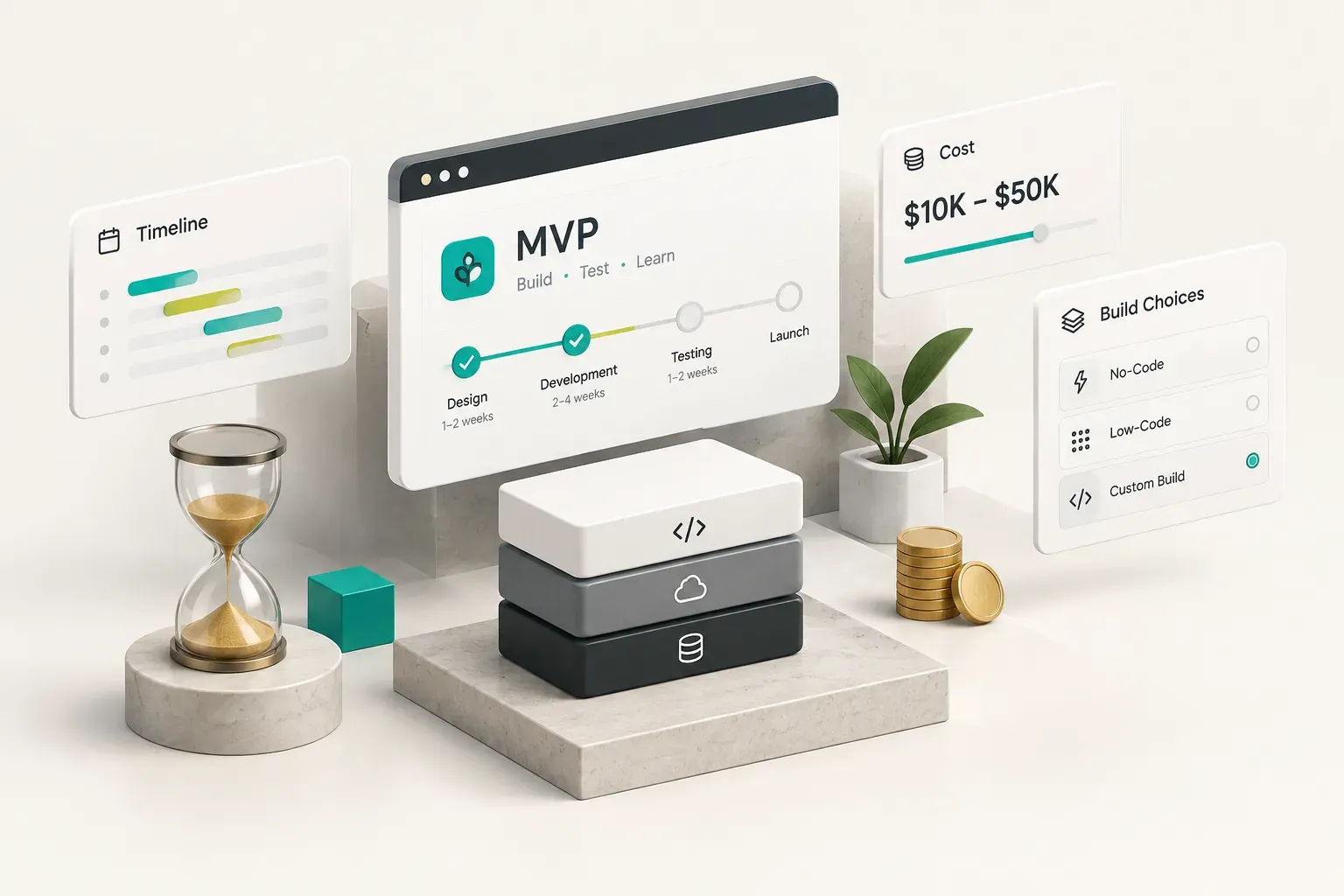
“How long and how much?” is the first question every founder asks.
It’s also the one most often answered with a useless blended range like “$10,000 to $500,000.”
Let’s break it into pieces you can actually plan around.
What Drives Timeline and Cost
A focused SaaS MVP in 2026 typically takes 8 to 16 weeks from kickoff to launch, plus a few weeks of post-launch iteration.
The phases are predictable even when the total isn’t.
Here is how time usually splits across a well-run project.
| Phase | Typical Share of Total Time | What Happens | Common Delay Risk |
|---|---|---|---|
| Product discovery | 10% | Workflow definition, acceptance criteria, technical risks | Founders still debating core scope |
| Design | 15% | User flows, wireframes, core UI screens | Too many revision rounds on visuals |
| Engineering | 45% | Auth, billing, tenancy, core workflow, admin tools | Late feature additions |
| QA | 10% | Functional, billing, and permission testing | Skipped edge cases in payment states |
| Deployment | 5% | Production setup, domains, monitoring, backups | Missing credentials or app store reviews |
| Launch support | 5% | Bug fixes, onboarding first users | Unplanned support load |
| First post-launch iteration | 10% | Fixes and changes driven by real usage data | No analytics in place to guide decisions |
Cost follows complexity, not page count.
The biggest drivers are billing logic, third-party integrations, multi-platform requirements (web plus iOS plus Android), and how much custom AI work sits in the core workflow.
No-Code, Low-Code, or Custom
Your build approach shapes speed, cost, and who controls the product two years from now. A single number hides those trade-offs, so compare them side by side.
| Factor | No-Code (Bubble, Softr, Glide) | Low-Code (Retool, FlutterFlow, Supabase-heavy builds) | Custom Development |
|---|---|---|---|
| Speed to first version | 1 to 4 weeks | 4 to 8 weeks | 8 to 16 weeks |
| Typical build cost | $2,000 to $15,000 | $10,000 to $40,000 | $35,000 to $125,000+ |
| Flexibility | Limited to platform features and plugins | Good, with custom code at the edges | Full control over logic and UX |
| Data ownership | Data lives on vendor infrastructure | Usually your own database | Fully yours, hosted where you choose |
| Long-term maintainability | Vendor lock-in; costly to migrate off | Moderate; depends on exported code quality | Strong, if code and docs are handed over |
No-code suffices for very narrow internal tools and pure validation, like testing whether anyone will fill out a workflow before investing in it.
Custom code is required when you need complex billing logic, multiple integrations, real multi-tenant isolation, scale beyond a few hundred active accounts, or a product investors will diligence.
Plenty of founders start in no-code, prove demand, then rebuild.
That’s a valid path, as long as you plan the rebuild instead of being surprised by it.
Picking a Stack That Lasts
The right stack is the one your team can iterate on quickly and fully own later.
Fashion matters far less than fit.
For mobile, cross-platform frameworks like Flutter let one codebase ship to both iOS and Android, which roughly halves the surface area a small team maintains.
For web, React remains the default for interactive apps, while Astro shines for fast marketing sites and content-heavy front ends.
For monetization, Stripe covers web subscriptions, and RevenueCat simplifies in-app purchases across Apple and Google stores.
Each of those choices ties back to two questions.
How fast can we ship the next change?
And can a different team pick this up in a year without starting over?
If the answer to the second is “no,” the stack is borrowing against your future.
Launching as a Learning Phase
Launch day is not the finish line.
It is the moment your assumptions finally meet real behavior.
The founders who treat it as a controlled experiment learn in eight weeks what others take a year to figure out.
Metrics That Show It’s Working
Vanity metrics like total signups feel great and tell you almost nothing.
Your MVP scorecard should track the chain from first login to recurring revenue.
Five numbers matter most:
Activation event: the specific action that signals a user got value, such as sending a first invoice.
User activation rate is the share of signups who hit it.
Core workflow completion rate: how many users who start the main workflow actually finish it.
A big drop at one step points straight to your next fix.
Week one and week four retention cohorts: group users by signup week and track how many return.
Retention cohorts flattening out, rather than sliding toward zero, is one of the earliest signals of product-market fit.
Trial-to-paid conversion and early churn: the money test.
If people activate but won’t pay, the value is real but the pricing or packaging isn’t.
Numbers tell you what is happening.
Interviews tell you why.
Pair the dashboard with short weekly calls, especially with users who churned or stalled mid-workflow.
Security and Operational Readiness
Before the first paying customer, a baseline has to be in place.
Not enterprise compliance.
Just the basics that stop small problems from becoming existential ones.
That baseline includes role-based access control enforced on the server, not just hidden buttons in the UI.
Secrets management keeps API keys and database credentials out of the codebase.
Dependency updates should run on a schedule, since outdated packages are a common entry point for attacks.
Add error monitoring (Sentry or similar), structured logging, and automated daily backups you have actually tested restoring.
A backup you’ve never restored is a hope, not a plan.
Then run launch as a controlled phase with design partners.
Sit in on onboarding sessions and watch where people hesitate.
Handle support manually through a shared inbox before automating anything, because manual support reveals patterns no ticketing system will.
Feed every structured feedback interview into the roadmap with a simple tag: bug, friction, or missing capability.
Finally, demand ownership.
Whoever builds your MVP, you should hold source code ownership, admin access to the repository, deployment and hosting credentials, written documentation, and a clear handover plan.
If a build partner hesitates on any of these, that’s your answer.
When to Expand or Rebuild
So when does a narrow MVP stop being enough? The signals are usually clear if you’re watching for them.
Add a second workflow when retention on the first one holds steady and customers keep asking for the same adjacent capability.
Scale infrastructure when response times climb or costs rise faster than revenue.
Consider a rebuild when architecture limits block features customers will pay for, when technical debt makes every change take twice as long as it should, or when demand consistently outgrows what the original no-code or rushed build can handle.
But don’t expand because you’re bored.
Expand because the data makes staying narrow more expensive than growing.
Start With One Workflow
Here is your next step, and it costs nothing: write the acceptance criteria for your one core workflow before anything else gets built.
Spell out each step a user takes, what “done” looks like, and which edge cases (failed payment, wrong permissions, empty states) must be handled.
If you can’t write it in a page, your scope isn’t ready.
Then apply a simple decision rule.
Validate first if you are unsure of demand.
Build custom if billing or data isolation is involved.
Choose no-code only for pure testing, with a planned exit.
Good SaaS MVP development is less about building fast and more about building the right thing once.
Before committing budget, book a scoping conversation with a studio that ships working products, not decks.
CompletApp’s free discovery call is a practical place to start: bring your workflow, leave with a realistic scope, timeline, and plan you actually own.