Why Custom Web Apps Get Built
Most failed software projects don’t fail in code. They fail weeks earlier, in a meeting where someone says “we need an app” and nobody asks what kind, for whom, or why an existing tool won’t do.
Custom web app development services cover the full set of work behind a purpose-built business application: product discovery, requirements gathering, user experience design, engineering, integration with your existing systems, and ongoing ownership after launch.
Coding is one piece.
It is rarely the piece that decides whether the project succeeds.
This guide is written for business owners, founders, and operations leaders who need a decision framework before committing budget.
It is not a sales pitch dressed up as an article.
You’ll get the questions to ask, the trade-offs to weigh, and the warning signs to watch for.
The framework runs as one connected path: product strategy (should this exist at all?), process (how it gets built responsibly), technology trade-offs, security and quality, and partner evaluation. Each step shapes the next.
Picking the wrong category (website vs web app vs SaaS) or the wrong development partner is the most common cause of wasted software budget. Both mistakes happen before a single line of code is written.
Website, Web App, or SaaS?
Here’s a question that saves real money: are you building something people read, something people use, or something people pay to use?
The answer puts you in a completely different category of cost, timeline, and risk.
Website vs Web App vs SaaS
These terms get used interchangeably in sales calls.
They shouldn’t be.
Each category has a distinct architecture and a distinct budget profile.
- Marketing website: Mostly static and informational. Visitors read, browse, and maybe fill out a contact form. No login, no stored state, no workflow beyond “learn about us.”
- Web app: Interactive, authenticated, and stateful. Users log in, create and edit data, and move through workflows that remember where they left off. Think booking systems, customer portals, or order management tools.
- SaaS (software as a service): A web app that is the product. It’s multi-tenant (many customer organizations share one system with isolated data), sold by subscription, and needs billing, onboarding, and tenant management on top of the core features.
- Internal tool: A web app used only by your own team. Admin panels, ops dashboards, and approval workflows fall here. Design polish matters less, but data accuracy and role-based access control matter a lot.
- Mobile app: Installed from an app store, with deeper access to device hardware like cameras, Bluetooth, and background location. More expensive to maintain because you’re shipping to two platforms and two review processes.
Certain business situations point clearly toward a custom web app:
- Spreadsheet-based operations that have outgrown their spreadsheets, where five people edit the same file and version conflicts cost hours every week.
- Customer portals where clients check order status, download documents, or submit requests without emailing your team.
- Booking or marketplace platforms with matching logic, availability rules, or payment splits that generic tools can’t model.
- Internal dashboards tied to proprietary workflows, especially when data lives across three or four systems that don’t talk to each other.
When Buying Beats Building
Building custom is not automatically the ambitious choice.
Sometimes it’s just the expensive one.
The decision comes down to whether the workflow sets you apart from competitors.
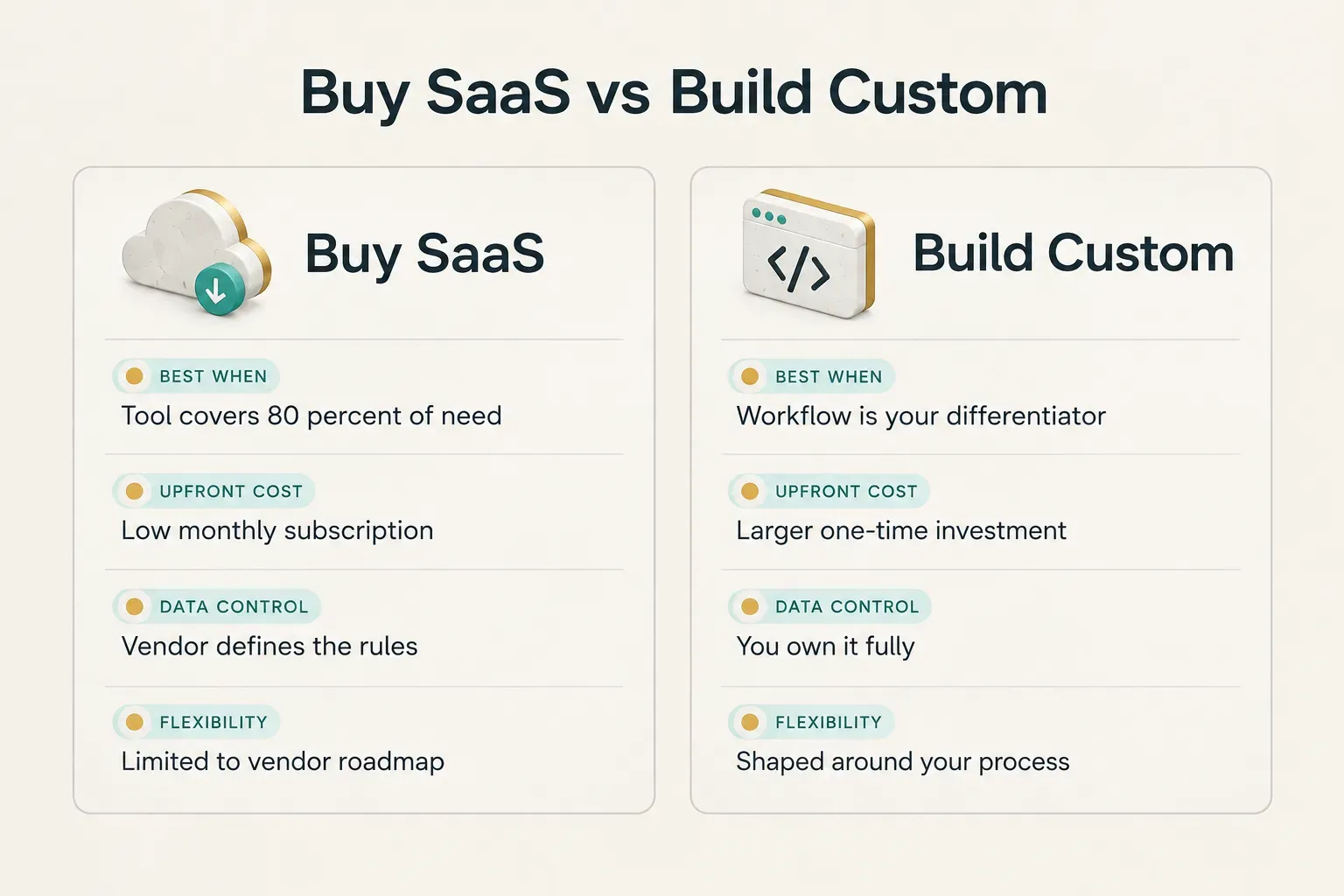
- Buy SaaS when an off-the-shelf tool covers 80% or more of your need and the workflow isn’t a competitive differentiator. Payroll, email marketing, and standard CRM pipelines rarely justify custom builds.
- Build custom when the workflow is the differentiator. If the way you quote, schedule, or fulfill is why customers choose you, forcing it into someone else’s software flattens your advantage.
- Build custom when data ownership matters. Regulated industries, proprietary pricing models, and businesses planning to sell data-driven insights need full control over where data lives and how it’s structured.
- Build custom when integration complexity exceeds what SaaS allows. If you’re stitching together four tools with Zapier and still exporting CSVs by hand, the “cheap” option is already costing you.
Getting the category wrong is expensive in both directions.
Businesses that buy SaaS for a core differentiator usually end up rebuilding 18 to 36 months later, after paying subscriptions and migrating data twice.
Businesses that build custom for a commodity workflow overspend on something they could have rented for $50 a month.
Inside a Responsible Build Process
The best predictor of a project’s outcome isn’t the developer’s portfolio.
It’s what exists on paper before development starts.
Teams that skip product discovery tend to discover the requirements anyway… just later, during development, at four times the cost.
What Discovery Should Deliver
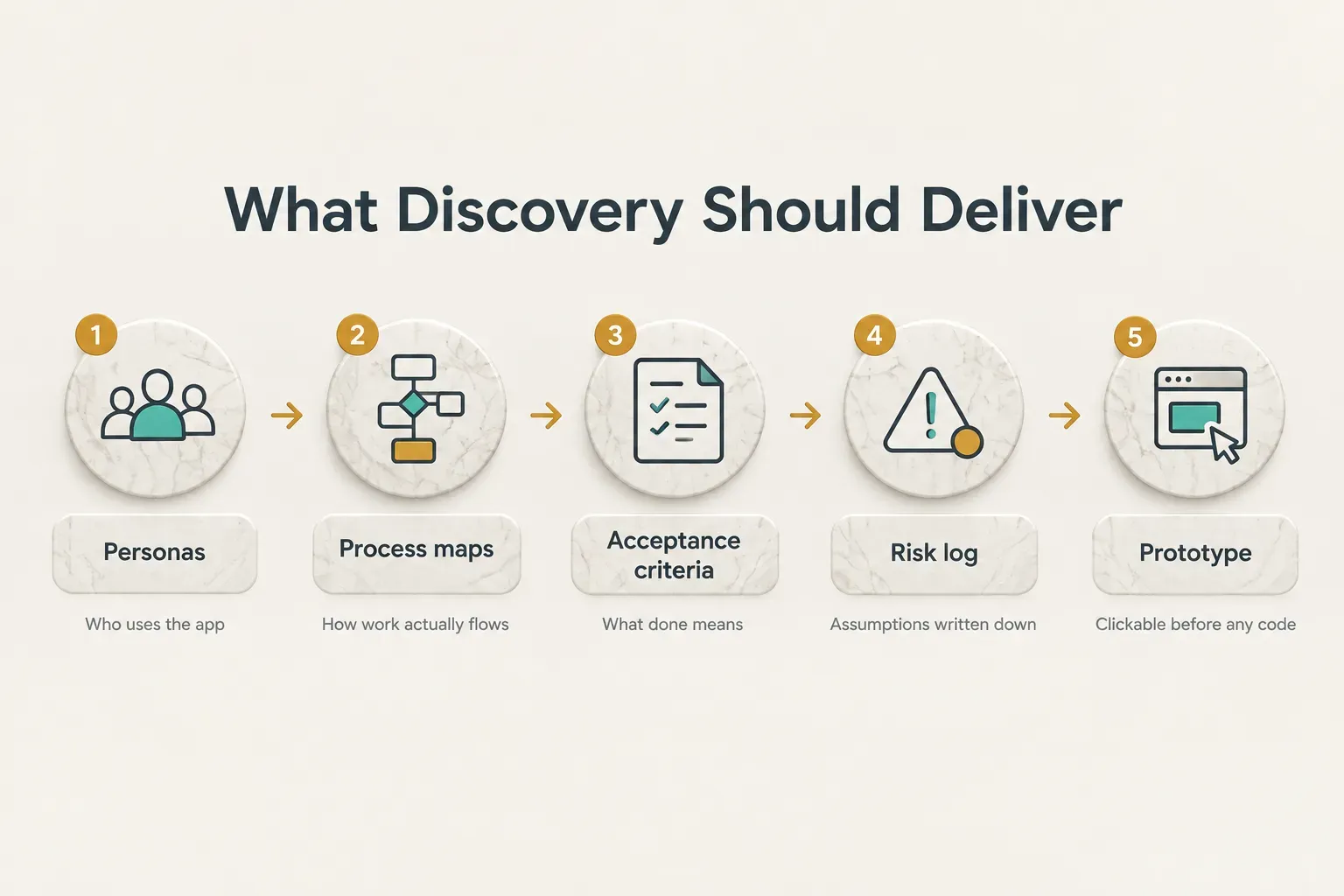
A discovery phase should produce tangible artifacts you can hold the team accountable to.
If it ends with a slide deck and a handshake, it wasn’t discovery.
- User personas: Short profiles of each user type (customer, admin, field technician) describing their goals, constraints, and technical comfort level.
- Process maps: Visual user journey mapping of how work flows today and how it will flow in the new system, including handoffs, approvals, and exceptions.
- Written acceptance criteria: Plain-language statements of what “done” means for each feature. “A customer can reschedule a booking up to 24 hours before the appointment” is testable. “Easy rescheduling” is not.
- Documented technical constraints and risk assumptions: Existing systems to integrate, data volumes, compliance obligations, and the assumptions everyone is making that could turn out to be wrong.
- A clickable prototype: A navigable mockup that real users can test before any code is written. Changing a prototype takes hours. Changing shipped code takes weeks.
Finding Your Real MVP
An MVP is not a smaller version of everything.
It’s the complete version of one thing.
Good MVP development follows a simple prioritization method:
- Name the single core user outcome. Write one sentence describing the result the product must deliver end-to-end, such as “a client books and pays for a service without calling us.”
- Trace every step required to reach that outcome. Each step on that path is in scope, including the boring ones like password reset and confirmation emails.
- Move everything else to v2. Reporting dashboards, dark mode, referral programs, and advanced filters can wait until real usage tells you which ones matter.
- Test the cut list with users. If removing a feature makes the core outcome impossible, it goes back in. If users shrug, it stays out.
What Drives Cost and Timeline
Ask five agencies for a quote and you’ll get five numbers, often without explanation. These are the variables actually driving the spread:
- Workflow complexity: A linear three-step process costs far less than one with branching approvals, exceptions, and conditional logic.
- User roles and permission levels: Every additional role (admin, manager, staff, customer, partner) multiplies the screens, rules, and test cases.
- Integrations: Each third-party integration adds setup, error handling, and ongoing maintenance.
- Data migration: Moving years of messy spreadsheet data into a clean database design often takes longer than anyone budgets for.
- Compliance requirements: HIPAA, GDPR, SOC 2, or PCI obligations add audit logging, encryption, and documentation work.
- Custom UI design: A bespoke design system costs more than adapting a proven component library.
- Testing scope: Automated testing across browsers, devices, and edge cases is an investment that pays back, but it shows up on the invoice.
Typical ranges in 2026 run from roughly 4 weeks for a focused MVP with one user role and minimal integrations, to 3 to 6 months or more for multi-role platforms with payments, compliance, and several external systems.
Fixed-scope delivery can still work responsibly under this uncertainty.
The safeguards are a paid or structured discovery phase that pins down requirements first, milestone approvals with clickable previews so you see progress before paying for the next stage, and a defined change-control process for new requests.
That beats open-ended hourly billing, where every unclear requirement becomes your cost.
Picking the Right Tech Stack
Developers love arguing about frameworks.
Business owners should care about one thing: does this stack fit what users actually need to do?
The right web application architecture depends on interactivity, SEO, and device access, not on what’s trending this year.
React, Server-Rendered, or PWA?
Each architecture solves a different problem. Here’s how they compare in plain terms:
- React single-page applications: Best for highly interactive, authenticated experiences like dashboards, editors, and portals. A single-page application loads once and updates instantly as users click, filter, and edit, which feels fast once you’re logged in.
- Server-rendered frameworks like Astro or Next.js: Best for content-heavy or SEO-sensitive pages. Server-side rendering sends complete HTML to the browser, so search engines index it easily and first load is quick. Many products use this for public pages and React for the logged-in app.
- Progressive web apps: Best for installable, offline-capable experiences without app store approval. A progressive web app can sit on a home screen, cache data for spotty connections, and send notifications on most platforms.
- Native or cross-platform (Flutter): Still wins when you need deep device access, such as Bluetooth hardware, background location tracking, or heavy camera processing. Flutter lets one codebase ship to both iOS and Android.
Matching stack to use case matters more than loyalty to one technology. CompletApp, for example, builds web apps and SaaS products on React and Astro and builds mobile apps on Flutter, choosing based on what each product needs rather than defaulting to a single tool for everything.
Integrations Beyond a Simple API
“It just needs to connect to our CRM” is one of the most underestimated sentences in software. API integration comes in two very different sizes:
- Simple API connection: Read or write a few fields on demand. Pulling a customer’s name and email from your CRM when they log in is a few days of work.
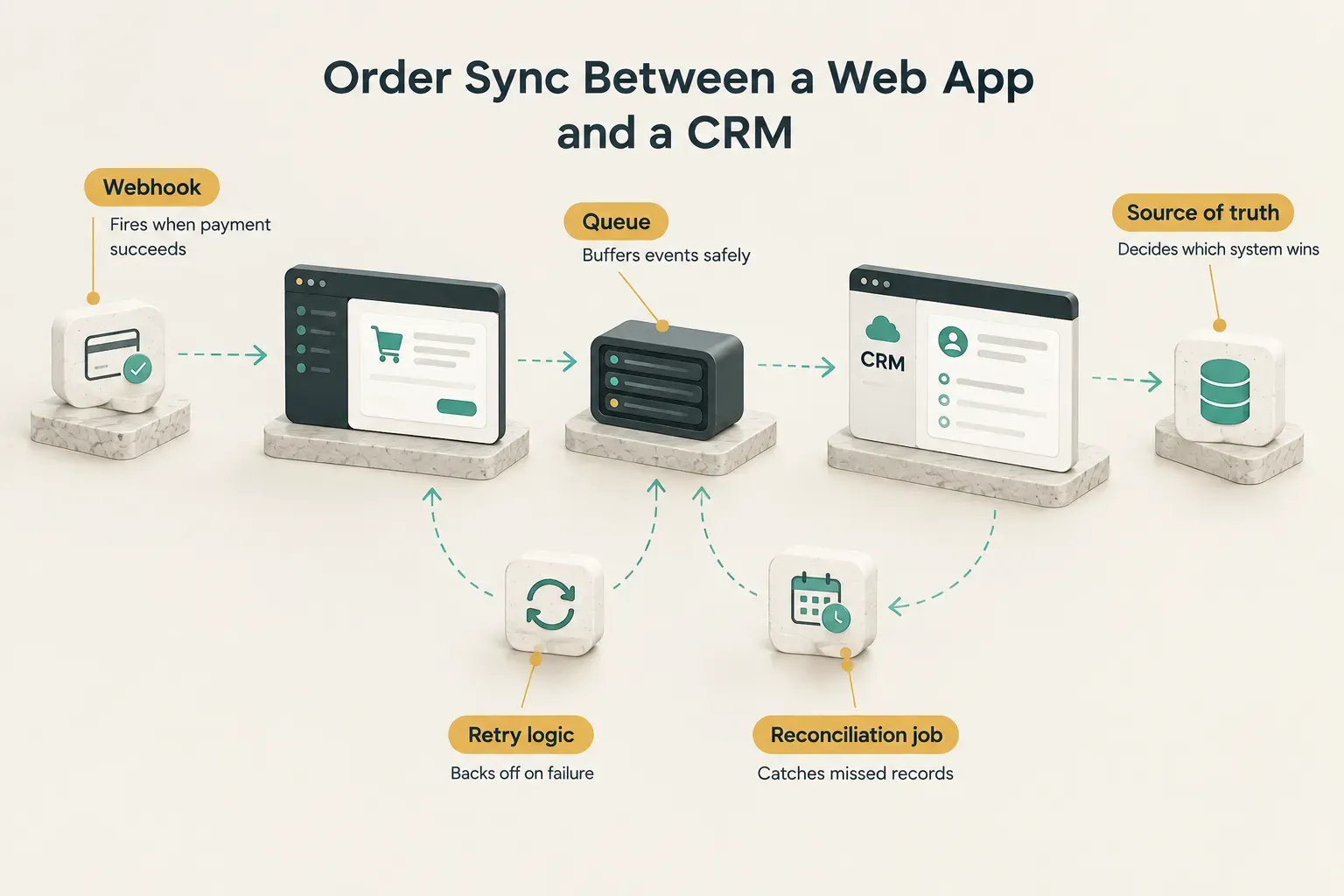
- Complex synchronization: Keeping two systems consistent over time. This involves webhooks that fire on events, retry logic for failed requests, rate limits that throttle how fast you can send data, and reconciliation jobs that catch records that slipped through.
- Data ownership questions: When the same order exists in your web app and your CRM, which one is the source of truth if they disagree? This needs a written answer before development.
- Failure handling: What happens when the payment processor is down for 20 minutes? Good integrations queue events and recover automatically. Bad ones silently lose data.
Consider syncing orders between a web app, a CRM, and a payment processor like Stripe.
A customer pays, Stripe sends a webhook, your app records the order, and the CRM gets updated.
Now imagine the CRM call fails, the webhook arrives twice, or a refund happens in Stripe directly.
Each scenario needs explicit handling.
Where AI Actually Helps
Every 2026 software pitch mentions AI.
Some of those uses earn their place.
Many don’t.
- Classification: Routing support tickets, tagging documents, or flagging risky transactions based on unstructured text is a strong fit for AI models.
- Generation: Drafting proposals, summarizing long records, or writing first-pass product descriptions saves real time when a human reviews the output.
- Assistants: In-app helpers that answer questions about a user’s own data can reduce support load, provided they’re grounded in that data.
- Automation on top of a real workflow: AI works best layered onto a process that already functions, not as a substitute for designing one.
- When deterministic automation wins: If the rule can be written as “if X, then Y,” plain code is more reliable, cheaper to run, and easier to debug. Calculating tax or sending a reminder 24 hours before an appointment doesn’t need a language model.
- Non-negotiables: Validate model outputs before they touch your database or reach customers, and strip or mask sensitive data before it’s sent to any external AI service.
Quality, Security, and What Comes Next
“Secure and scalable” appears on nearly every agency website.
It means almost nothing until someone shows you the checklist behind it.
Here’s what that checklist should contain.
Security, Accessibility, Performance
Security is a set of specific practices, each with an owner. Ask any development partner how they handle every item below:
- Authentication and authorization: Authentication confirms who a user is; authorization controls what they can do. Use proven providers or libraries, support multi-factor login, and enforce role-based access control on the server, not just by hiding buttons.
- Secrets management: API keys and database passwords belong in a secrets vault or environment configuration, never in the code repository.
- Input validation: Every form field and API request gets validated server-side to block injection attacks and malformed data.
- Basic threat modeling: Before building, the team should list what attackers would want, how they might get it, and which defenses address each path.
- Dependency management: Modern apps rely on hundreds of open-source packages. Automated scanning should flag known vulnerabilities and outdated libraries.
- Backups: Automated, tested backups with a documented restore process. An untested backup is a hope, not a plan.
- Incident response plan: A written plan for who gets notified, how breaches are contained, and how users are informed if something goes wrong.
Accessibility belongs in the design phase, not a final audit.
Building to WCAG 2.2 accessibility standards from day one means choosing accessible components, labeling forms properly, supporting full keyboard navigation, and maintaining color contrast.
Retrofitting these later can touch nearly every screen.
Performance for authenticated apps is its own discipline. Track API latency (aim for most responses under 300 milliseconds), database query efficiency through proper indexing, and perceived performance using skeleton screens and optimistic updates. Real-user monitoring shows how the app performs on actual devices, and Core Web Vitals (LCP under 2.5 seconds, INP under 200 milliseconds, CLS under 0.1) give you shared targets.
Vetting a Development Partner
A polished portfolio tells you a team can build something.
It doesn’t tell you what happens when the project hits trouble.
Use this due-diligence checklist instead:
- Source-code ownership: Your contract should state clearly that you own the code and intellectual property upon payment, with no licensing strings attached.
- Deployment access: You should have admin access to the hosting account, repository, domain, and cloud deployment environment. Never let these live solely in the agency’s name.
- Documentation quality: Ask to see sample documentation from a past project. Another developer should be able to pick up the code without a week of guesswork.
- Evidence of testing: Look for automated testing, a CI/CD pipeline that runs tests on every change, and a staging environment for review before release.
- Defined handover process: What exactly do you receive at project end? Credentials, documentation, a walkthrough, and a list of known issues.
- Support terms: Response times for critical bugs, monthly maintenance costs, and what happens if you switch providers.
- Measurable acceptance criteria: Payment milestones tied to written, testable criteria rather than vague “phase complete” sign-offs.
Commercial terms can reduce commitment risk too.
Fixed-scope agreements cap your exposure, and walk-away guarantees let you exit before full payment if early deliverables don’t meet expectations.
CompletApp uses this model, combining fixed scope with a walk-away guarantee so clients can judge real work before committing their entire budget.
Life After Launch
Launch day is the starting line.
The first 90 days after release reveal more about your product than the entire build phase did.
- Analytics instrumentation: Set up product analytics before launch to track activation, feature usage, and drop-off points along the core workflow.
- Monitoring and bug triage: Error tracking and uptime monitoring alert the team before users complain. A triage process sorts bugs by severity so critical issues get fixed in hours, not weeks.
- User feedback loop: In-app feedback, short interviews, and support ticket reviews turn real usage into a prioritized v2 backlog.
- Defined release process: Regular, predictable releases (weekly or biweekly) with staging review reduce the risk of breaking something in production.
- Planning for scale without overengineering: Version one should handle your realistic next 12 months of growth. Building for a million users when you have 200 wastes money and adds complexity.
Total cost of ownership extends well beyond the build invoice.
Budget for hosting, third-party services (email delivery, payments, maps, AI APIs), security updates, and paying down technical debt.
A common planning rule is 15% to 20% of the original build cost per year for maintenance and incremental improvements.
Making the Call
The decision is simpler than most vendors make it sound.
If the workflow is standard and doesn’t set you apart, buy SaaS.
If it’s core to how your business operates or competes, invest in custom web app development services and own the result.
Here’s one thing to do tonight.
Write down, in a single sentence, the core workflow the app must handle end-to-end.
“A customer requests a quote, gets approved pricing, and pays a deposit without emailing us” is the right level of detail.
Then spend 30 minutes testing whether an existing tool already handles that workflow well enough.
If one does, you just saved a significant budget.
If none does, you now have the first line of your requirements document.
And that document matters more than any framework choice. Technology can be swapped, refactored, and upgraded over time.
The biggest risk in custom software isn’t picking the wrong technology. It’s skipping discovery and committing budget before the real requirements are written down.
Get the requirements right first.
Everything else gets easier from there.