Why ‘Web App’ Confuses So Many People
Search “what is a web application” and you’ll find the terms website, web app, SaaS, and PWA swapped around as if they meant the same thing.
They don’t.
Each one describes a different kind of product, built for a different job.
The confusion has real costs.
Founders brief developers for a “website” when they actually need user accounts and payments. Teams pay for a custom app when a simple marketing site would do. And plenty of people simply nod along in meetings, unsure what anyone means.
This guide skips the abstract jargon.
Instead, it explains web apps through the things you already do every day: logging in, searching, saving, and checking out. Once you see what happens behind those actions, the definitions become obvious.
By the end, you’ll be able to tell a web app from a website at a glance. You’ll understand how the pieces fit together, from the button you click to the database that stores your data.
And you’ll know when your business genuinely needs one, and when it doesn’t.
What a Web Application Actually Is
You probably used three or four web applications before lunch today without thinking of them that way.
Your email inbox. Your bank balance. The project board your team updates every morning.
Here’s the plain-language definition.
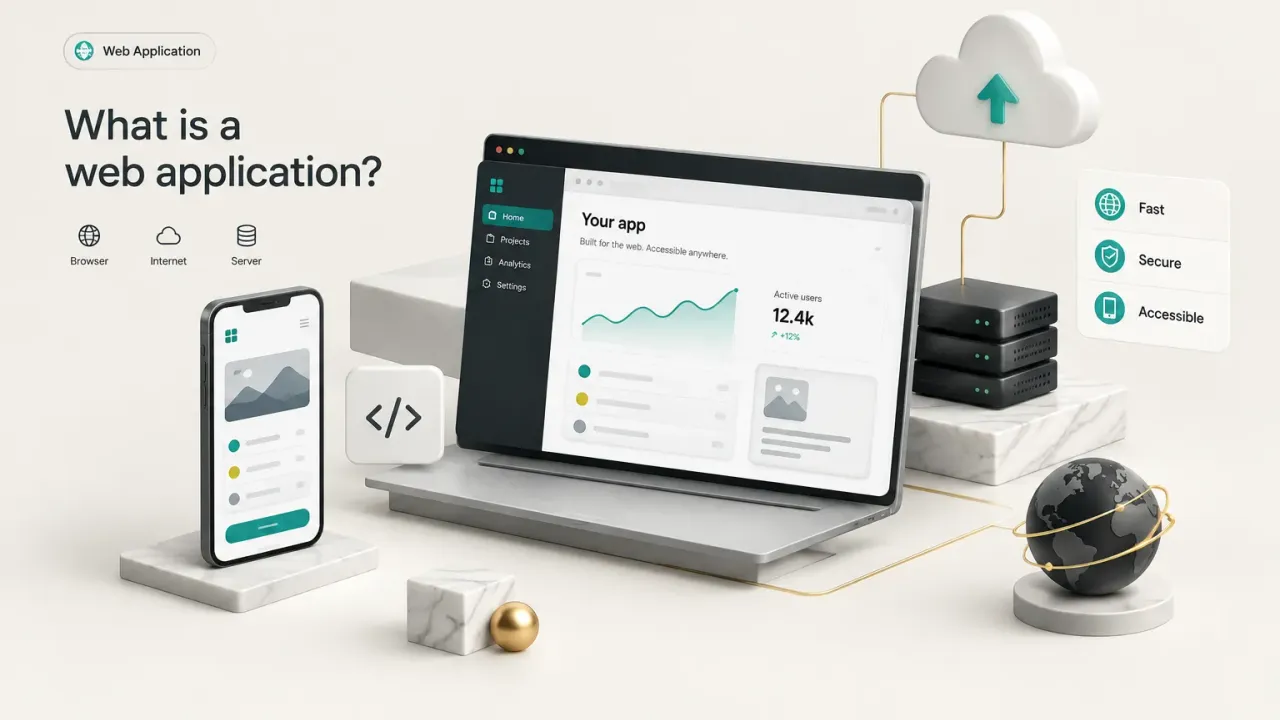
A web application is software that runs in a browser (or an installed shell around a browser) and lets users create, store, and act on their own data, rather than just read content someone else published.
That last part is the key distinction.
A website shows you information. A web app lets you do something with information, and it remembers what you did.
The Four Signs of a Real Web App
Most products that qualify as web applications share four traits. If something has all four, it’s a web app, regardless of what the marketing page calls it.
1. User accounts. The software knows who you are, usually through a login. That identity is the foundation everything else is built on.
2. Personalized data per user. What you see depends on who you are. Your inbox, your files, your order history. Two people visiting the same address see completely different screens.
3. Business logic that processes actions. When you click “send,” “pay,” or “approve,” the system runs rules behind the scenes. It checks balances, validates inputs, routes requests, and triggers follow-up events.
4. Interactivity that changes state. Your actions leave a lasting mark. Move a card on a board, and it stays moved tomorrow. Delete a file, and it’s gone for everyone with access.
A useful shortcut: a website is like a printed brochure, while a web app is like a bank teller. One informs you. The other knows your account and acts on your instructions.
Examples and Why They Qualify
Gmail is the classic example. Your inbox is unique to you, and nobody else logging in sees your messages. When you hit send, backend logic takes over: it formats the message, checks for spam signals, hands it to mail servers, and files a copy in your Sent folder.
All four signs, checked.
Now compare that with a restaurant’s online menu page. Everyone who visits sees the same dishes and prices. There’s no login, nothing to save, and no action that changes anything.
That’s a website. A useful one, but a website.
Things get interesting when the same restaurant adds online ordering with saved addresses and order history. At that point, the ordering system is a web app sitting alongside the informational site.
Web applications span almost every category of software you use:
- Communication: Gmail, Outlook on the web, and Slack in the browser all store personal messages and trigger delivery logic.
- Finance: Online banking portals show your balances, process transfers, and enforce security checks on every transaction.
- Productivity: Trello and Notion let teams create boards, pages, and databases that persist and sync across users.
- Commerce: The Shopify admin lets merchants manage inventory, orders, and payouts from a browser.
- Internal operations: HR approval tools, expense systems, and leave-request portals that employees log into but customers never see.
That last category matters more than people think. Some of the most valuable web apps in any company are the unglamorous internal ones.
Website vs Web App vs SaaS vs PWA
Here’s the counterintuitive part: these five terms aren’t all the same type of label.
Some describe technology. One describes a business model. One describes an upgrade to an existing product.
Mixing those categories is exactly why the terms get muddled.
The table below compares them on the traits that actually matter to users.
| Type | Primary Purpose | User Accounts | Data Personalization | Installable | Offline Capability |
|---|---|---|---|---|---|
| Website | Publish information (brand, services, articles) | No | None; everyone sees the same content | No | None |
| Interactive Website | Inform plus light engagement (contact forms, calculators, filters) | Rarely | Minimal, often session-only | No | None |
| Web App | Let users create, store, and act on their own data | Yes | High; each user has unique data | Not by default | None without a service worker |
| SaaS | Sell web app access on a subscription basis | Yes, often with team and billing roles | High, usually organized by company or workspace | Sometimes, via desktop wrapper or PWA | Depends on implementation |
| PWA | Deliver a web app with app-like installation and resilience | Usually | High | Yes, to home screen or desktop | Limited, for cached screens and queued actions |
Notice the SaaS row.
Software as a service is not a separate technical category. It’s a business model: you pay a recurring fee to use software someone else hosts and maintains.
Under the hood, nearly every SaaS product is a web app running on cloud hosting. Slack, HubSpot, and Notion are all SaaS businesses delivered through web app technology.
So a web app can exist without being SaaS (your company’s internal leave-request tool, for example).
But a modern SaaS product almost always is a web app.
The same logic applies to the words people use at work. When someone says “log into the dashboard” or “check the client portal,” they’re almost always describing a web app or a SaaS platform.
The label changes. The technology doesn’t.
What Makes a PWA Different
A progressive web app sounds like a whole new product type.
It isn’t.
A PWA is simply a web app with three enhancements added on top.
- A service worker: a small script that runs in the background of the browser, caching files and intercepting network requests so certain screens still load on a weak or missing connection.
- A web app manifest: a configuration file that tells the device the app’s name, icon, and colors, which makes it installable to a home screen or desktop like a native app.
- Limited offline support: previously viewed content stays available, and some actions can be queued until the connection returns.
Think of it like adding a trailer hitch to a car. It’s the same car, just able to do a bit more.
Starbucks, Pinterest, and X (formerly Twitter) have all shipped PWA versions of their products to reach users on slower networks.
Browser support has also improved.
Since iOS 16.4, Safari has supported web push notifications for PWAs added to the home screen, closing one of the biggest historical gaps with native apps. Still, as of 2026, PWAs can’t access every device feature a native app can.
How a Web Application Works
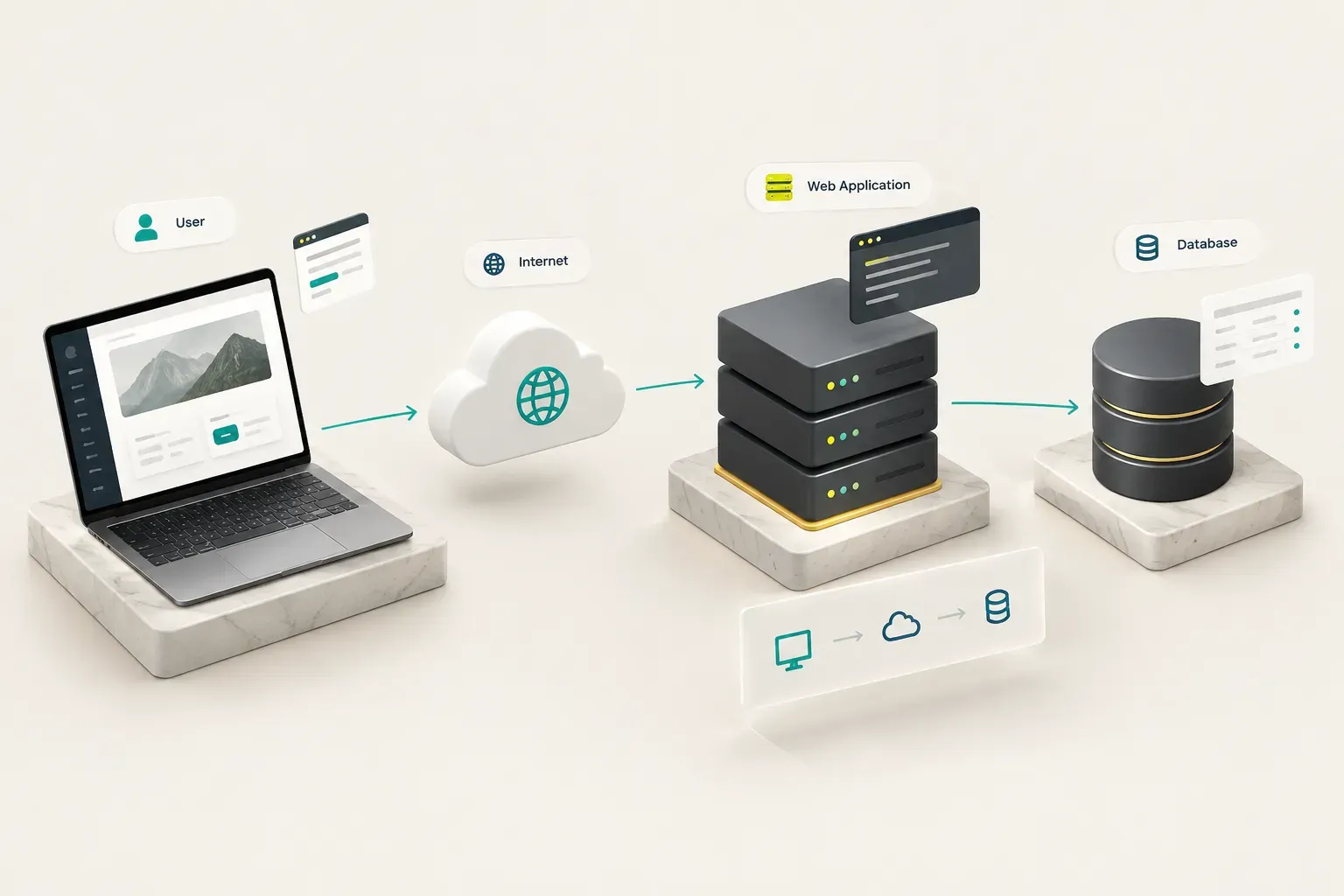
What actually happens in the half-second after you click “Log in”?
A surprising amount.
Following that single click from start to finish is the fastest way to understand client-server architecture, the model behind almost every web app.
The client is your browser. The server is a computer somewhere in a data center running the app’s code.
They talk to each other in a structured back-and-forth called an HTTP request and response.
From Click to Database and Back
Here’s the full journey of a login, step by step.
- You click the button. You’ve typed your email and password into a form and pressed “Log in.”
- The frontend sends a request. JavaScript running in your browser packages your credentials and sends them to the server as an HTTP request over an encrypted HTTPS connection.
- The backend validates the input. Server code checks that the email is properly formatted and the fields aren’t empty or malicious before doing anything else.
- The database is queried. The backend looks up your account and compares a hashed version of your password against the stored hash (real passwords are never stored in plain text).
- The API returns a response. If everything matches, the server sends back a success message and a session token. If not, it returns an error.
- The interface updates. Your browser receives the response and swaps the login form for your dashboard, often without reloading the whole page.
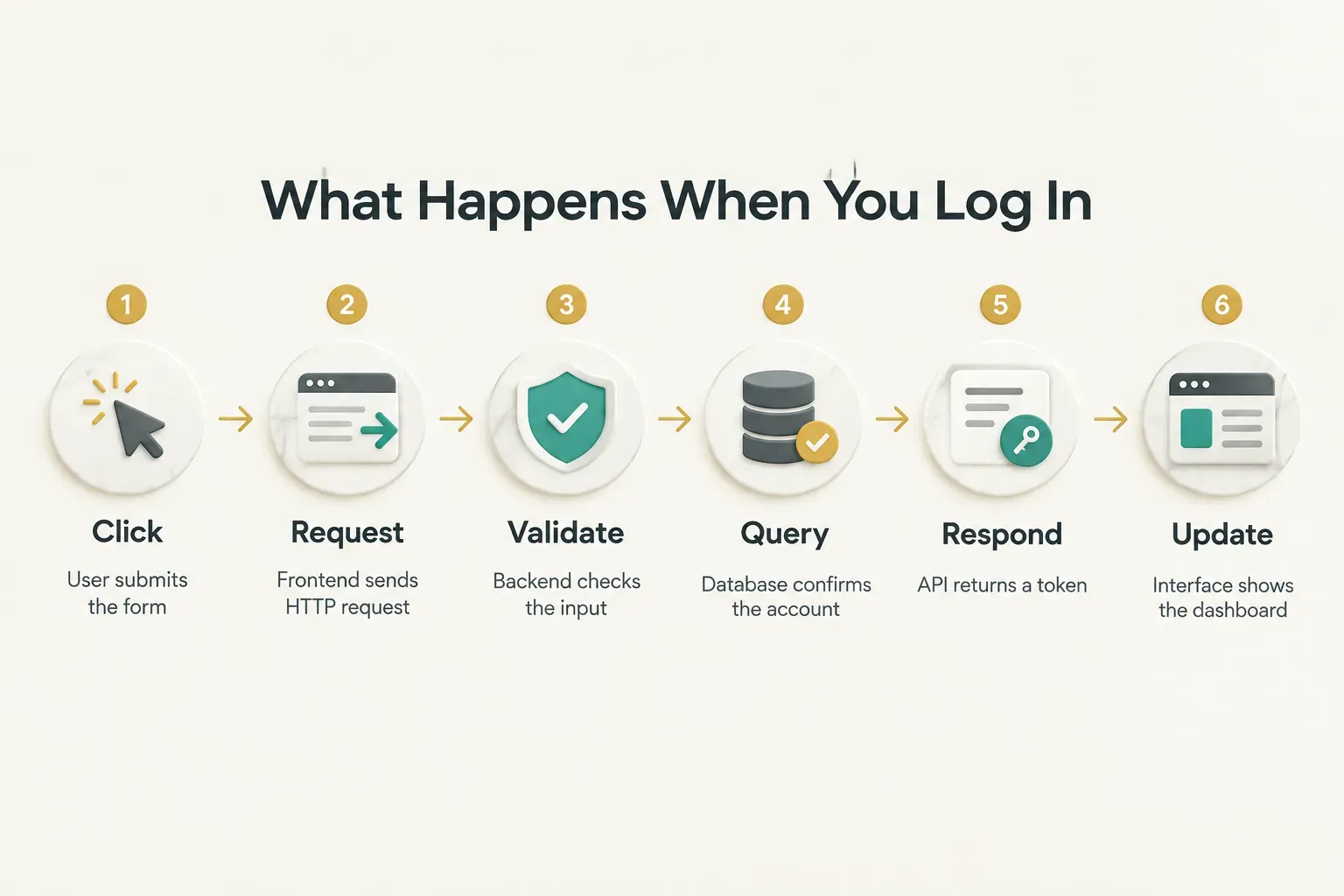
Every action in every web app follows a version of this loop.
Search, save, checkout, upload. Different data, same pattern.
Frontend and Backend, Mapped to Features
The frontend is everything you see and touch: the user interface. The backend is everything you don’t see: the logic, storage, and integrations that make the interface meaningful.
A helpful analogy is a restaurant. The frontend is the dining room and menu. The backend is the kitchen.
Mapped to real features, the split looks like this:
- Forms (frontend) send data that the backend validates and stores in a database.
- Search bars (frontend) trigger backend queries that filter thousands of records in milliseconds.
- Dashboards and charts (frontend) display numbers the backend calculates from raw data.
- Drag-and-drop boards (frontend) send position updates the backend saves so every teammate sees the change.
- Checkout buttons (frontend) kick off backend payment processing, usually through API integration with a provider like Stripe.
- “Notify me” toggles (frontend) register backend triggers that send emails or push notifications later.
- Upload buttons (frontend) pass files to backend storage services that keep them safe and retrievable.
Now, a common myth: web apps always reload the entire page on every click.
That was true in the early 2000s. It’s not true in 2026.
Modern apps use one of three rendering approaches.
Server-side rendering builds each page on the server and sends finished HTML, which loads fast and works well for search engines. A single-page application renders in the browser and updates only the parts of the screen that change, which feels snappy once loaded.
Hybrid rendering, used by frameworks like Next.js, Astro, and Remix, mixes the two: server-rendered first loads, client-side updates afterward.
Whichever approach a team picks, the goals are the same. Good performance optimization, responsive design that adapts to phones and widescreens alike, and solid browser compatibility across Chrome, Safari, Firefox, and Edge.
Authentication vs Authorization
These two words sound almost identical.
They solve completely different problems, and confusing them is one of the most common causes of security holes.
Authentication answers “Who are you?” It’s the process of proving identity, through a password, a magic link, a one-time code, or OAuth sign-in with Google or Microsoft.
Authorization answers “What are you allowed to do?” It happens after authentication.
A verified employee might view their own payslips but not anyone else’s. A manager can approve expenses. An admin can delete accounts.
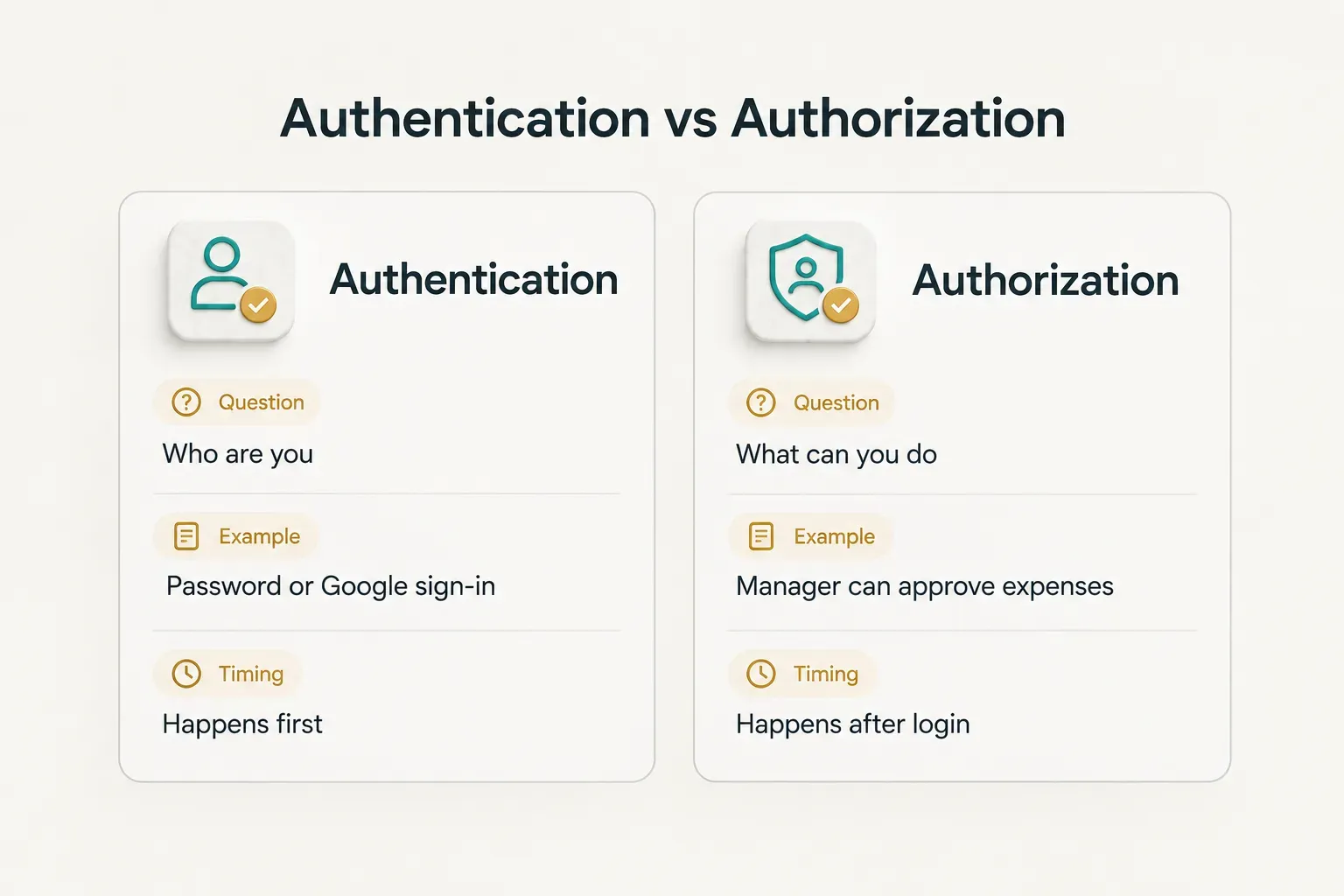
An app with perfect authentication but sloppy authorization is like a hotel that checks your ID at the front desk, then hands you a key that opens every room.
Both layers matter.
Strong web application security adds two more essentials.
Input validation checks every piece of data users submit, blocking attacks like SQL injection and cross-site scripting. Encryption protects data in transit (HTTPS) and at rest (encrypted databases and backups).
Skip any of these, and the rest of your security work is undermined.
Is a Web App Right for Your Business?
Not every business needs a web app.
Plenty of companies spend months building custom software when a well-designed website would have served them better. Others limp along with spreadsheets and email threads long after a simple internal tool would have saved hundreds of hours.
The right answer depends on one question: what do your users need to do?
When a Web App Beats a Website or Mobile App
Use this decision framework as a starting point.
Choose a marketing website when your goal is brand, credibility, and lead generation. Service descriptions, case studies, a blog, a contact form.
If visitors mostly read and then call or email you, a website is enough.
Choose a web app when users need accounts and ongoing interaction. They log in, save information, come back repeatedly, and expect the system to remember them.
Web apps also win when you need reach across every device without maintaining separate iOS and Android codebases.
Choose a mobile app when device features are essential, not just nice to have. Reliable push notifications, deep camera integration, background location, Bluetooth, or genuinely offline-first use (think field technicians in areas without signal).
If those are core to the product, native is worth the extra cost.
A practical rule: start with the web unless a specific device capability forces you onto mobile. You can always wrap or extend a web app later. Going the other direction is much harder.
And here’s where many businesses miss opportunities.
Web apps aren’t just for consumer startups. Some of the highest-return use cases are quietly operational:
- Internal operational dashboards that pull data from sales, inventory, and support into one live view, replacing weekly spreadsheet reports.
- Customer self-service portals where clients download invoices, track orders, or update details without emailing your team.
- Scheduling and booking systems for clinics, salons, consultants, and equipment rentals, cutting the back-and-forth of manual coordination.
- Approval workflows for expenses, purchase orders, content, or leave requests, with clear status tracking and audit trails.
None of these will make headlines.
But a booking portal that saves a front-desk team ten hours a week pays for itself quickly, and it’s exactly the kind of tool web apps do well.
What Belongs in an MVP
A minimum viable product is the smallest version of your web app that lets real users complete the core task. Not a prototype. Not a mockup. A working product, deliberately narrow.
The biggest mistake first-time founders make? Assuming an MVP needs custom infrastructure built from scratch.
It doesn’t.
In 2026, managed backend services handle most of the plumbing that used to take months.
Firebase and Supabase both provide authentication, file storage, and a hosted database out of the box. Stripe handles payments, subscriptions, and invoicing. Modern cloud hosting platforms deploy your frontend in minutes.
Instead of building login systems and payment flows, your team spends its time on the one workflow that makes your product worth using.
A focused MVP usually includes:
- One core workflow, done well (book an appointment, submit an approval, create a project).
- Sign-up and login through a managed auth service.
- Basic roles, if your users differ in what they can do.
- Payments, only if charging is part of validating the idea.
- Simple analytics to see what people actually use.
Everything else waits.
Team workspaces, advanced reporting, integrations with ten other tools… those come after real users tell you they need them.
For a sense of realistic scope and timing, some studios have standardized this approach. CompletApp, for example, builds MVPs in about four weeks using React or Astro on the frontend, Firebase or Supabase for the backend, and Stripe for payments.
Treat that as a reference point: a tightly scoped web app on managed services is a matter of weeks, not quarters.
Launch is the start, not the finish.
Every web app carries ongoing responsibilities:
- Monitoring uptime and errors so you catch problems before users report them.
- Analytics to understand which features drive retention and which go untouched.
- Security updates for frameworks, libraries, and dependencies, which publish patches regularly.
- Backups tested on a schedule, because an untested backup is just a hopeful guess.
- Iteration based on real usage data rather than assumptions made before launch.
Budget for this from day one.
A web app that isn’t maintained slowly becomes a liability.
The Simple Test to Remember
Forget the jargon for a moment.
Here’s the one-line test you can reuse anywhere: if it remembers who you are and does something with your data, it’s a web app, not just a website.
That single question cuts through SaaS, PWA, portal, and dashboard.
The labels describe business models and enhancements. The test describes what the product actually does.
If you’re considering building one, your next step is simple.
Before writing requirements or hiring anyone, map the one core action your users need to perform. Book the slot. Approve the request. Track the order.
Build around that first, and let everything else earn its place.
In 2026, the line between web apps, PWAs, and mobile apps keeps blurring as browsers gain new capabilities each year.
So the real decision isn’t about the label. It’s about your user’s workflow, and which tool helps them finish it fastest.