Why Everyone’s Suddenly an App Builder
Ten years ago, a non-technical founder with an app idea had two options: learn to code or raise money to pay someone who could. Neither was fast. Today, a solo founder can drag components onto a canvas on Monday and put a working app in front of customers by Friday.
That shift is real and measurable. Gartner predicted that by 2025, 70% of new applications built by organizations would use low-code or no-code technologies, up from less than 25% in 2020. As of 2026, no code app development platforms are a standard part of how startups test ideas and how operations teams build their own tools, a movement often called citizen development.
But most guides stop at a ranked list of tools.
That’s the wrong starting point.
The better question is this: what does your product actually need to do, and can a visual app builder do it reliably? This guide gives you a requirements-based way to answer that, covering data, integrations, security, app store rules, and ownership, before you spend months building on a platform you might outgrow.
Here’s the core tension.
No-code is excellent for validating an idea and building simple internal tools. But once you have paying users, sensitive data, and a listing in the App Store, the math changes. Ownership, scale, and review requirements start to matter more than build speed.
Understanding where that line sits for your product is the whole game.
What No-Code Platforms Actually Are
Every no-code app still runs on code. You just never see it, and in most cases, you never own it.
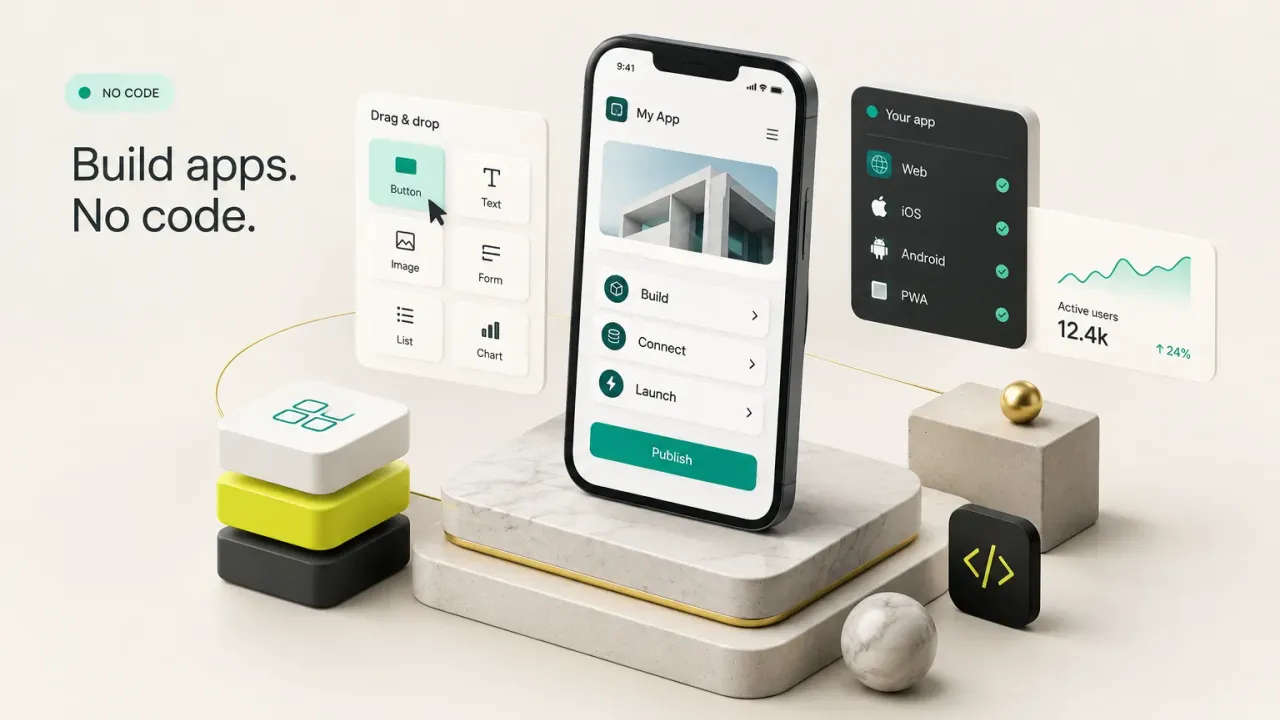
No-code platforms are visual, drag-and-drop development tools that generate an app’s interface, logic, and data layer without hand-written code. The app typically lives on the vendor’s own hosting and backend, which is a big part of why setup feels so effortless.
How No-Code Builders Work
Think of a no-code builder as a very sophisticated set of LEGO bricks. The vendor has already built the bricks (buttons, forms, lists, maps, login screens), and your job is to snap them together and tell them how to behave.
Under the hood, most platforms share four layers.
First, pre-built components form the user interface. Second, visual workflow logic defines behavior through “when this happens, do that” rules, such as “when a user taps Submit, create a record and send an email.”
Third, a visual database stores your data in tables you can edit like a spreadsheet, hosted and managed by the vendor. Fourth, most tools offer limited custom code hooks or plugin marketplaces for edge cases the visual system can’t handle.
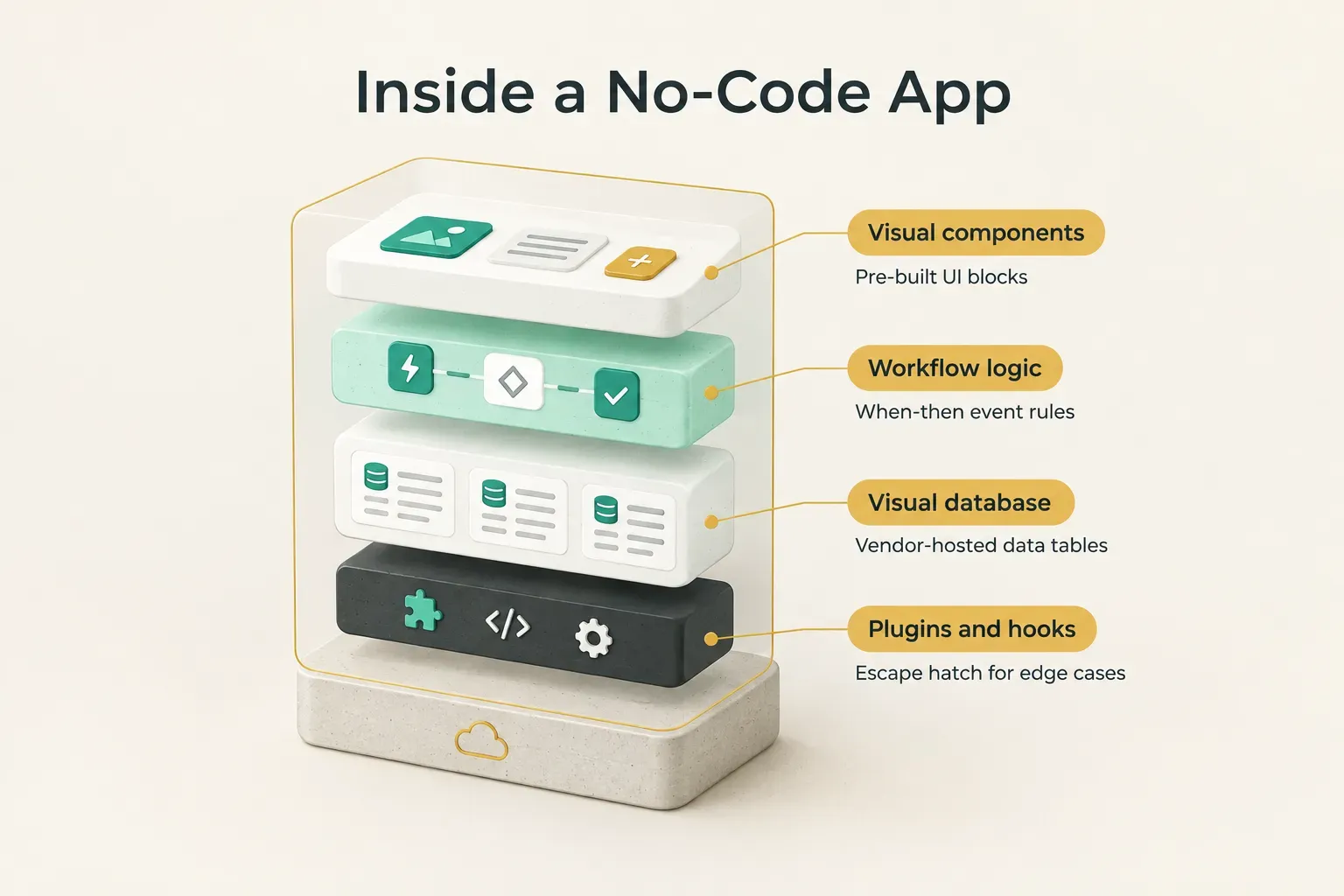
That last layer matters more than it looks.
It’s the escape hatch, and how wide that hatch is determines how far the platform can stretch before you hit a wall.
No-Code vs Low-Code vs AI App Builders
These three terms get used interchangeably.
They shouldn’t be.
True no-code tools (Glide, Softr, Adalo) constrain you to the platform’s visual system. If the feature isn’t in the builder or a plugin, you generally can’t have it.
Low-code development platforms (FlutterFlow, OutSystems, Retool) combine visual tools with the ability to write custom code, extend logic, and in some cases export source code. They trade a steeper learning curve for a much higher ceiling.
AI app builders are a different animal entirely.
Tools like Lovable, Bolt, and Replit generate actual source code from natural-language prompts, a style of work now widely called vibe coding. You describe the app, and the model writes React, TypeScript, or Python files.
That difference has real consequences.
With an AI app builder, you usually get code you can download and own.
But you also inherit that code’s bugs, security gaps, and maintenance burden, often without the skills to review it.
With no-code, the vendor handles maintenance, but you can’t take the app with you.
Neither approach is automatically better.
They solve different problems, and the right one depends on what you’re building and how long it needs to last.
What You Can Realistically Build
“Can I build my app with no-code?” is usually the wrong question. A better one: which kind of app am I building right now?
Prototype, Internal Tool, MVP, or Production App?
Four distinct goals get lumped together, and they have very different requirements.
A clickable prototype exists to collect feedback. It can be fragile, use fake data, and break occasionally.
Nobody cares, because its only job is to answer “do people want this?”
An internal business tool serves a known group of users, often your own team. It needs decent stability and basic permissions, but the audience is small and forgiving.
A public MVP puts real strangers in front of your product. Now data modeling matters, onboarding matters, and a bug costs you a user you may never get back.
A production app handles payments, multiple user roles, sensitive data, and long-term maintenance.
It needs to be stable, secure, and auditable for years, not weeks.
No-code handles the first two tiers reliably.
It can stretch into the third with care.
The fourth is where most founders start feeling friction, because the requirements for authentication, role-based access, and performance outgrow what visual tools were designed for.
The use cases that consistently work well on no-code include internal dashboards, booking and scheduling tools, lead-generation apps, membership directories, client portals, and simple two-sided marketplaces with modest transaction volume. Notice the pattern: structured data, predictable workflows, and limited custom logic.
Web App, PWA, or Native Experience?
Not every “mobile app” is actually a mobile app. There are three types, and users can feel the difference within seconds.
A native mobile app is compiled for iOS or Android (or built with a cross-platform development framework like Flutter or React Native). It has full access to the camera, GPS, push notifications, biometrics, and background processes, and it feels fast because it runs directly on the device.
A progressive web app (PWA) is a website that can be installed to the home screen, work partly offline, and send some notifications. It’s a solid middle ground, though iOS still limits PWA capabilities compared to Android.
A wrapped website is a web app placed inside a native shell called a WebView. Many no-code platforms publish to app stores this way.
It looks like an app, but scrolling, transitions, and offline behavior often feel like a browser in disguise.
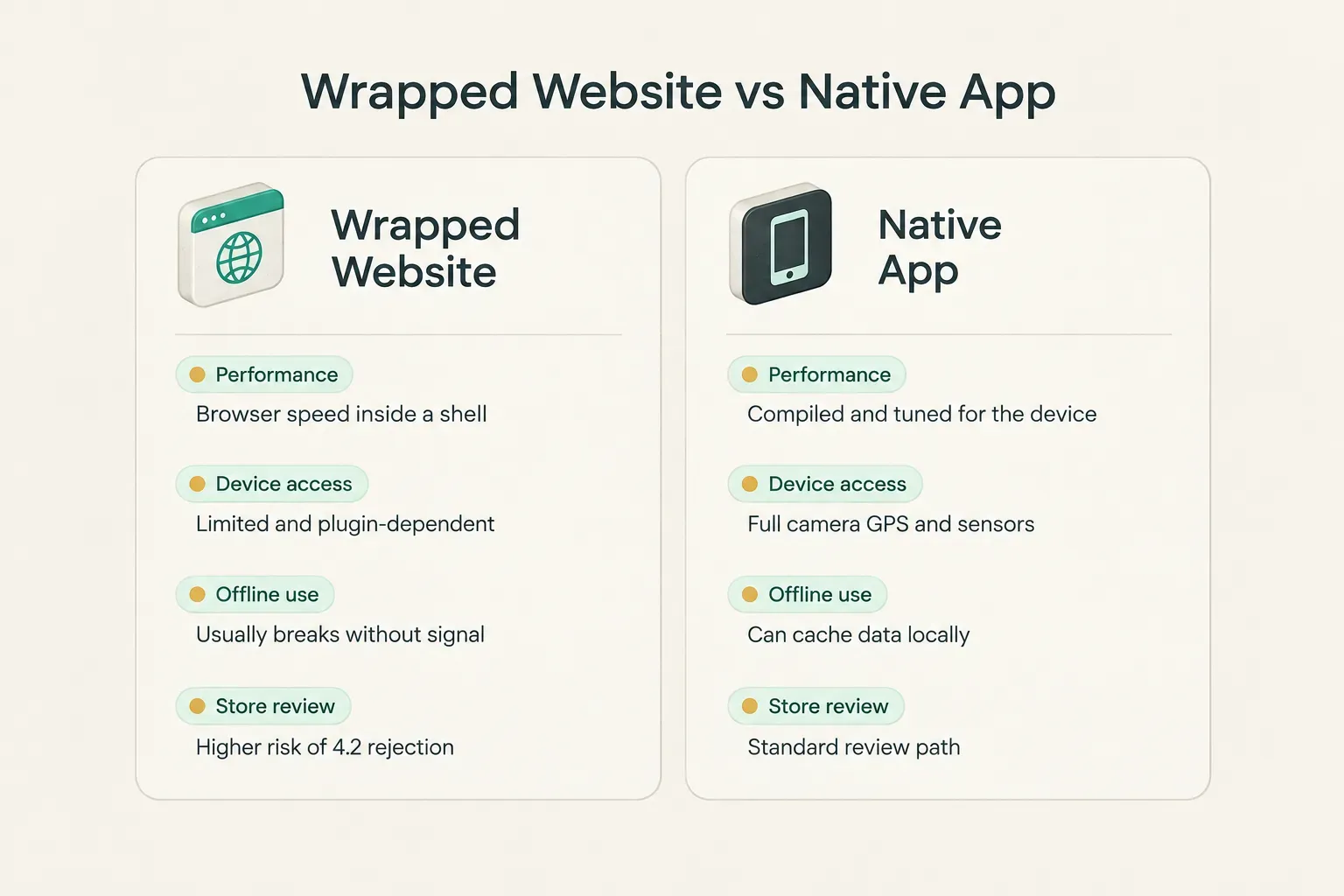
App Store reviewers can tell the difference too.
That brings us to where things get harder.
Where No-Code Starts to Strain
The first 80% of a no-code build feels magical. The last 20%… is where projects stall, budgets balloon, and founders start searching for developers.
The friction rarely comes from one big limitation. It comes from a pile of small ones that compound as the product grows.
Data, Integrations, and Business Logic
Native integrations cover a surprising amount of ground. Most platforms connect cleanly to Stripe, Google Sheets, Airtable, HubSpot, Slack, and Zapier, and many support generic REST API integrations for anything else.
The blockers show up in specific places. Complex business logic (pricing that depends on five variables, multi-step approval chains, scheduled recalculations) becomes a tangle of visual workflows that’s hard to read and harder to debug.
Offline mode is another common wall. Most no-code apps assume a constant connection, so a field technician in a basement or a traveler on a plane gets a spinner instead of their data.
Background processing and device APIs round out the list. If your app needs to track location in the background, process large files, read Bluetooth devices, or run long jobs on a server, you’ll often hit the edge of what the platform’s workflow automation can do.
Security and Compliance
Security on a no-code platform is a shared responsibility.
The vendor secures the infrastructure.
You secure everything you configure on top of it.
That includes authentication and authorization: who can log in, and what each person can see and change once they do. Proper role-based access control means an ordinary user can’t view an admin’s data just by guessing a URL or tweaking a request, and misconfigured privacy rules are among the most common flaws in no-code apps.
API keys deserve special attention. Pasting a secret key into a client-side workflow can expose it to anyone who opens the browser’s developer tools, so keys should only live in server-side actions or secure environment settings.
Then there’s personal data.
If you store health information, payment details, or data on EU residents, you need to know where the data is hosted, how backups work, whether you can produce audit trails, and whether the vendor will sign a data processing agreement.
Some platforms handle this well.
Others leave you guessing.
App Store and Google Play Requirements
“It can be published to the App Store” is a common marketing claim.
Getting approved is a different matter.
Apple’s Guideline 4.2 (Minimum Functionality) states that an app should offer features and content that “elevate it beyond a repackaged website.” Wrapped WebView apps with thin functionality are frequent rejection targets.
Guideline 4.2.6 goes further, explicitly rejecting apps built from commercialized templates or app generation services unless submitted directly by the content provider.
Beyond functionality, reviewers expect stable performance with no crashes, accurate privacy nutrition labels, clear justifications for every permission you request, and an in-app account deletion option for any app that supports account creation. Since 2024, Apple has also required privacy manifests for many common third-party SDKs.
Google Play has its own hurdles. Developers must complete a Data safety form, target a recent Android API level, and, for personal developer accounts created after November 2023, run a closed test with at least 12 testers for 14 consecutive days before going public.
And then there’s scale.
Platforms impose limits on database size, concurrent connections, and server-side logic. Airtable, a common no-code backend, caps bases at 50,000 records on its Team plan. Bubble’s 2023 shift to usage-based “workload units” meant some apps saw their hosting costs jump sharply as traffic grew.
Those limits rarely matter at 100 users. At 100,000, they define your product.
Choosing Your Approach
The most expensive mistake in no-code isn’t picking the wrong platform.
It’s picking any platform before you know what you need.
Ownership and Lock-In Risks
Ask four questions before you build anything. Can I export the source code? Can I export my data in a usable format? Who controls the hosting? And who owns the intellectual property of what I build?
For most true no-code tools, the honest answers are: no source code, partial data export (usually CSV), vendor-controlled hosting, and a terms-of-service clause you should read twice.
That’s vendor lock-in, and it’s the defining trade-off of the category.
Lock-in isn’t theoretical.
Google shut down App Maker in January 2021. Amazon discontinued Honeycode in February 2024. In both cases, users had to rebuild their apps elsewhere, often from scratch, because there was nothing portable to migrate.
A platform doesn’t need to shut down to hurt you. A price increase, a pricing model change, or a new terms clause can force a migration just as effectively.
Low-code tools with code export (FlutterFlow, for example) reduce this risk, though exported code often needs cleanup before a developer can maintain it comfortably.
A Requirements-Based Framework
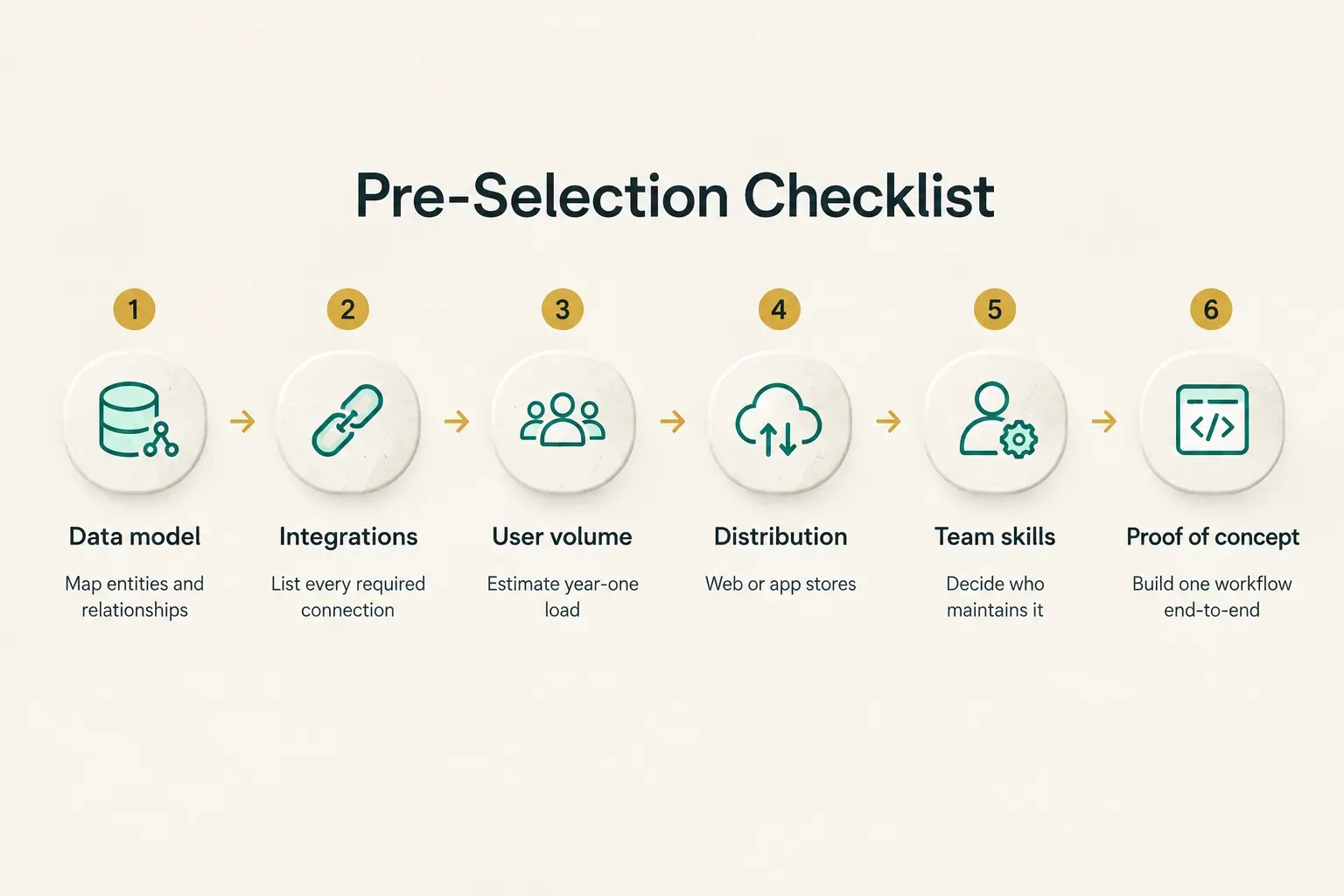
Before comparing tools, write down five things. This takes an afternoon and can save you months.
Start with your data model: the core entities (users, bookings, products, messages) and how they relate.
Next, list every required integration, from payments to email to your CRM.
Then estimate expected user volume for the first year, including peak concurrent users.
Fourth, decide your distribution channel. Web only? PWA? The App Store and Google Play? This single choice eliminates a large share of platforms on its own.
Finally, be honest about your team’s technical skill and who will maintain the app in 12 months.
Then run a proof of concept. Pick one core workflow, such as “a customer signs up, books a slot, pays, and receives a confirmation,” and build it end-to-end on your shortlisted platform.
Not a mockup.
A working flow with real data, real permissions, and a real payment in test mode.
If that workflow takes three days and feels clean, the platform is probably a fit.
If it takes three weeks of plugin hunting and workarounds, you’ve learned something valuable for the price of a few days.
When No-Code Isn’t Enough
Here’s the path many founders miss.
You don’t have to choose between no-code forever and custom code from day one.
The hybrid path works like this: validate the idea with no-code, learn which features users actually use, then rebuild or extend with a professional codebase once real users, payments, and app store presence start to matter. The no-code version becomes a living specification, which is far more useful than a requirements document nobody reads.
This is where specialist studios fit in. CompletApp, for example, takes a validated no-code workflow and rebuilds it as a native app in Flutter, with a real backend (Firebase or Supabase), proper payments (Stripe or RevenueCat for subscriptions), and full source code ownership for the founder. Because the product decisions are already proven, that rebuild typically takes weeks rather than the months a from-scratch build would require.
The signals that it’s time? Users complaining about speed. App Store rejections. Workarounds stacked on workarounds. Or simply a fundraising conversation where an investor asks, “Do you own your code?”
Deciding Where to Start
After all the nuance, the decision rule is surprisingly simple.
If your goal is testing an idea or building an internal tool, start with no-code. You’ll learn faster, spend less, and find out whether the idea deserves more investment.
That’s exactly what these platforms do best.
If your product needs real users, payments, or app store credibility from launch, plan for a professional rebuild from day one. Use no-code to prove the workflow, but budget and schedule for the version you’ll actually own.
Either way, treat no-code as a stage, not a permanent architecture. Read the export and ownership terms before you invest months of work.
Five minutes with a terms-of-service page beats five months rebuilding an app you thought was yours.
Ready for a low-pressure next step? Grab the five-point framework above, write down your data model and distribution channel, and build one core workflow end-to-end on a single platform this week. You’ll know far more after that small test than after reading a dozen “top 10 tools” lists.
And whatever you learn, it will make your next decision a confident one.