Why This Decision Is Harder Than It Looks
Search for the best mobile app development tool and you’ll get a ranked list that puts Xcode, Flutter, Bubble, and Firebase side by side.
That list is broken from the start.
Those four products don’t compete with each other. In a serious project, you might use all of them at once.
The phrase “mobile app development tool” covers at least six distinct categories: integrated development environments (IDEs), cross-platform frameworks, no-code and low-code builders, backend services, testing tools, and AI-assisted platforms. Each one does a different job.
Comparing them in a single ranking is like comparing a hammer, a blueprint, and a concrete supplier to decide which one “builds the house best.”
The most common mistake shows up in nearly every roundup. An IDE like Xcode gets compared against a framework like Flutter as if you have to pick one.
But they sit at different layers of the same stack.
Flutter writes the code, and Xcode compiles, signs, and ships the iOS version of it.
The right question isn’t “which tool is best?” It’s “which job am I hiring this tool to do, and what kind of project am I building?”
This guide takes that approach.
Instead of naming a single winner, it maps each tool category to the job it performs and the project scenarios where it fits. You’ll see where the categories overlap, where they hand off to each other, and where they quietly fall short.
It’s written for two readers.
If you’re a non-technical founder choosing a direction, you’ll come away knowing what to ask for. If you’re a developer validating a stack in 2026, you’ll get a clean framework for defending your choices.
The Toolbox, Sorted by Job
Every working mobile app is assembled from several tools stacked on top of each other. Once you see the layers, most of the confusing “X vs Y” debates disappear, because you realize X and Y were never on the same layer.
Here are the five categories that matter most, sorted by what they actually do.
- IDEs (Android Studio, Xcode): This is where native code is written, compiled, signed, and packaged for the app stores. Android Studio is the official environment for Kotlin and Java on Android, while Xcode handles Swift and Objective-C on Apple platforms. Even if you build with a framework, you still need these IDEs (or their command-line toolchains) to produce installable builds, manage the mobile SDK versions, and submit to the stores.
- Cross-platform frameworks (Flutter, React Native): These let one codebase generate apps for both iOS and Android. Flutter uses Dart and draws its own interface, while React Native uses JavaScript or TypeScript and maps to native components. Both share business logic and usually UI, which cuts duplicate work significantly but never eliminates platform-specific tasks entirely. Kotlin Multiplatform and .NET MAUI sit in this category too, with different trade-offs.
- No-code and low-code builders (FlutterFlow, Bubble, Adalo): A no-code app builder lets you assemble screens, data, and logic visually. These shine for internal tools, clickable prototypes, and early validation where speed matters more than polish. FlutterFlow is a special case: as a low-code app builder, it exports real Flutter code, which gives you an exit path when you outgrow it.
- Backend and supporting services (Firebase, Supabase, Stripe, RevenueCat): This is backend-as-a-service territory. Firebase and Supabase handle authentication, databases, file storage, and serverless functions. Stripe and RevenueCat handle payments and in-app subscriptions, so your team isn’t rebuilding billing infrastructure from scratch.
- AI-assisted development platforms: These generate code, screens, or entire app scaffolds from prompts. They’re genuinely fast for first drafts and boilerplate. But they don’t replace architecture decisions, security review, or knowledge of Apple and Google’s store guidelines, and they rarely produce code that survives a senior engineer’s review unchanged.
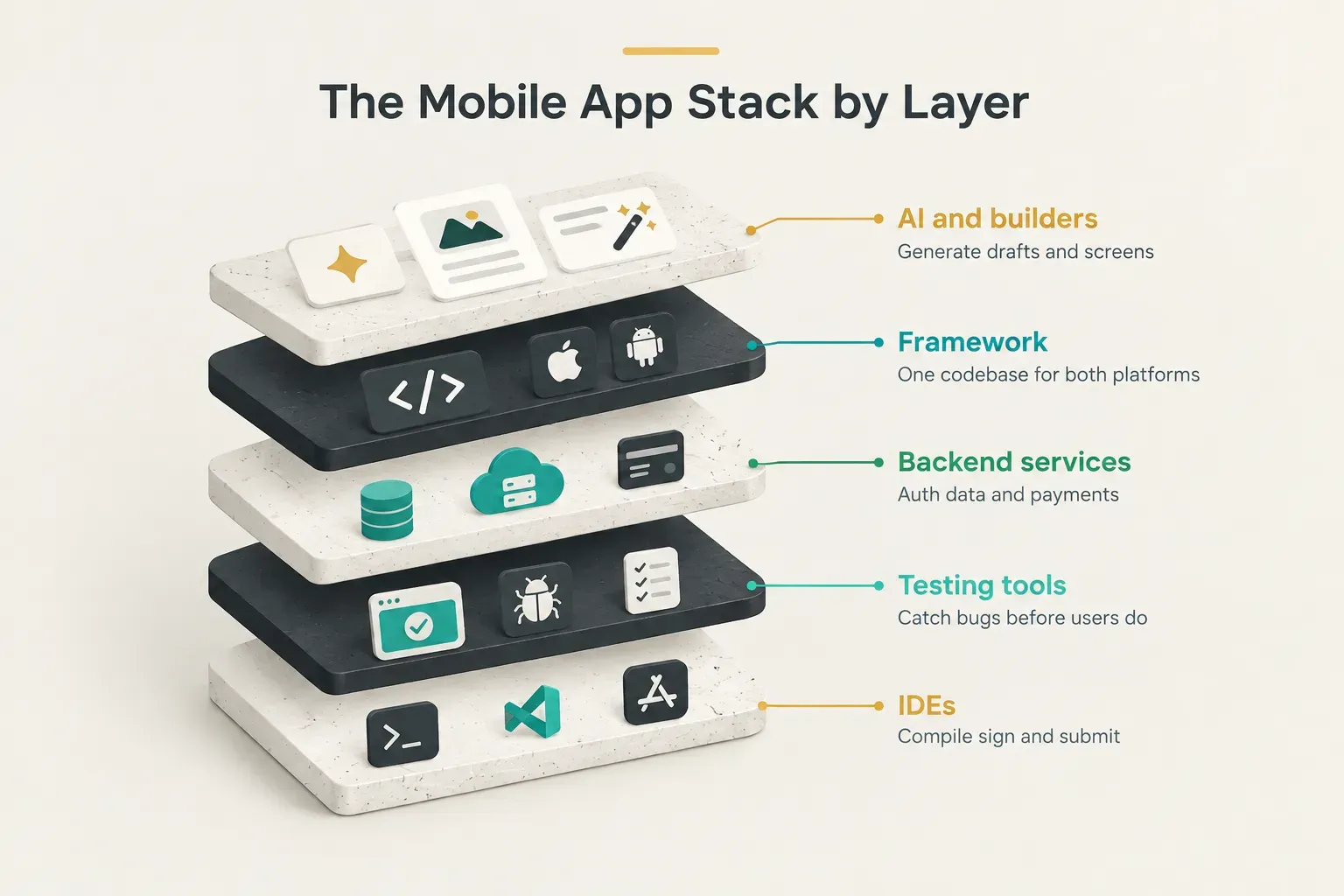
Notice the dependency chain.
A no-code builder or AI platform often outputs framework code. That framework code still compiles through native IDEs.
And all of it talks to backend services.
Picking a tool means picking a layer, then making sure the layers below it are covered.
Match the Tool to the Project
A prototype and an enterprise app can both be called “a mobile app,” but they have almost nothing in common technically. The fastest way to choose a mobile app development tool is to start with the project type, then work backward to the tools.
The table below maps six common project types to realistic tool choices, typical timelines, and the main risk to watch for.
| Project type | Realistic tool choices | Typical timeline | Main watch-out |
|---|---|---|---|
| Quick prototype | FlutterFlow, Adalo, Bubble, AI app generators, Figma clickable prototypes | 1 to 3 weeks | Built to be thrown away; don’t mistake a demo for a product |
| Investor-ready MVP | Flutter or React Native, plus Firebase or Supabase, plus RevenueCat if monetized | 8 to 14 weeks | Scope creep; investors want a working core loop, not every feature |
| Consumer product at scale | Flutter or React Native with native modules, CI/CD pipeline, crash reporting, analytics | 3 to 6 months for v1 | Performance on low-end devices and app-store review requirements |
| Internal business app | Low-code builders (FlutterFlow, Microsoft Power Apps, Glide) or Flutter for complex logic | 2 to 8 weeks | Integration with existing systems like SSO, ERP, or CRM |
| Hardware-intensive app (AR, Bluetooth, biometrics) | Native Swift and Kotlin, or Flutter/React Native with custom native modules | 4 to 9 months | Framework plugins may lag behind new OS hardware APIs |
| Enterprise application | Native, Flutter, Kotlin Multiplatform, or .NET MAUI for Microsoft-centric teams | 6 to 12+ months | Security audits, compliance, device management, and long-term maintenance |
Timelines are typical ranges for a small, focused team. Your scope, integrations, and approval cycles will shift them.
Why hardware-heavy apps break the cross-platform promise. Augmented reality, Bluetooth Low Energy, NFC, and biometric authentication all depend on deep native API access.
Cross-platform frameworks reach these through plugins, and plugins are only as current as their maintainers.
When Apple ships a new ARKit capability, Swift developers can use it immediately, while framework users often wait or write the bridge themselves.
That’s why many hardware-intensive apps end up as hybrids of a different kind: shared Flutter or React Native code for most screens, with custom native modules for the sensor-heavy parts.
It works well.
It just requires someone who can write Swift and Kotlin when needed.
When a low-code builder is enough. An internal app for 40 warehouse staff, distributed through a company device program, doesn’t need to win App Store design awards.
It needs to load inventory data and work offline.
A low-code builder can handle that comfortably, often for good.
A consumer product aiming for hundreds of thousands of users is different.
Performance, custom animations, monetization, and store compliance push past what most builders can deliver without friction.
That ceiling arrives sooner than founders expect.
Tools can graduate. The same project often moves through categories as it matures.
A founder might validate demand with a FlutterFlow prototype in three weeks, then rebuild in hand-written Flutter for the MVP, then add native modules once the product needs Bluetooth pairing.
Choosing a tool for this stage doesn’t lock you in forever, provided you plan the handoff.
Native Code, Cross-Platform, or Hybrid?
“Cross-platform” is one of the most overloaded words in mobile development.
Two teams can both claim to be cross-platform while sharing 30% and 95% of their code respectively.
Knowing which version you’re getting changes everything about cost, performance, and maintenance.
What ‘One Codebase’ Really Means
There are four distinct technical approaches hiding under the cross-platform label. Each shares a different amount of work across iOS and Android.
Shared business logic means the data handling, networking, and rules live in one codebase, while each platform keeps its own native UI.
Kotlin Multiplatform is the leading example.
You get native look and feel, but you still build two interfaces.
Shared UI means both the logic and the screens come from one codebase. Flutter and React Native work this way, as does .NET MAUI.
This is where most of the time savings come from.
A hybrid mobile app renders web content (HTML, CSS, JavaScript) inside a native shell, using tools like Ionic with Capacitor. It’s fast to build if you already have web developers, but complex animations and heavy lists can feel less fluid.
Finally, fully native apps are written separately in Swift and Kotlin, with zero code sharing and maximum control.
Here’s what the marketing pages leave out.
Even a shared-UI framework needs native modules for the camera, GPS, push notifications, and biometrics. You still configure iOS and Android permissions separately, handle platform-specific UI conventions (like back navigation on Android), and test each platform on its own.
“One codebase” realistically means one codebase plus a thin layer of platform work.
Flutter vs React Native vs Native IDEs
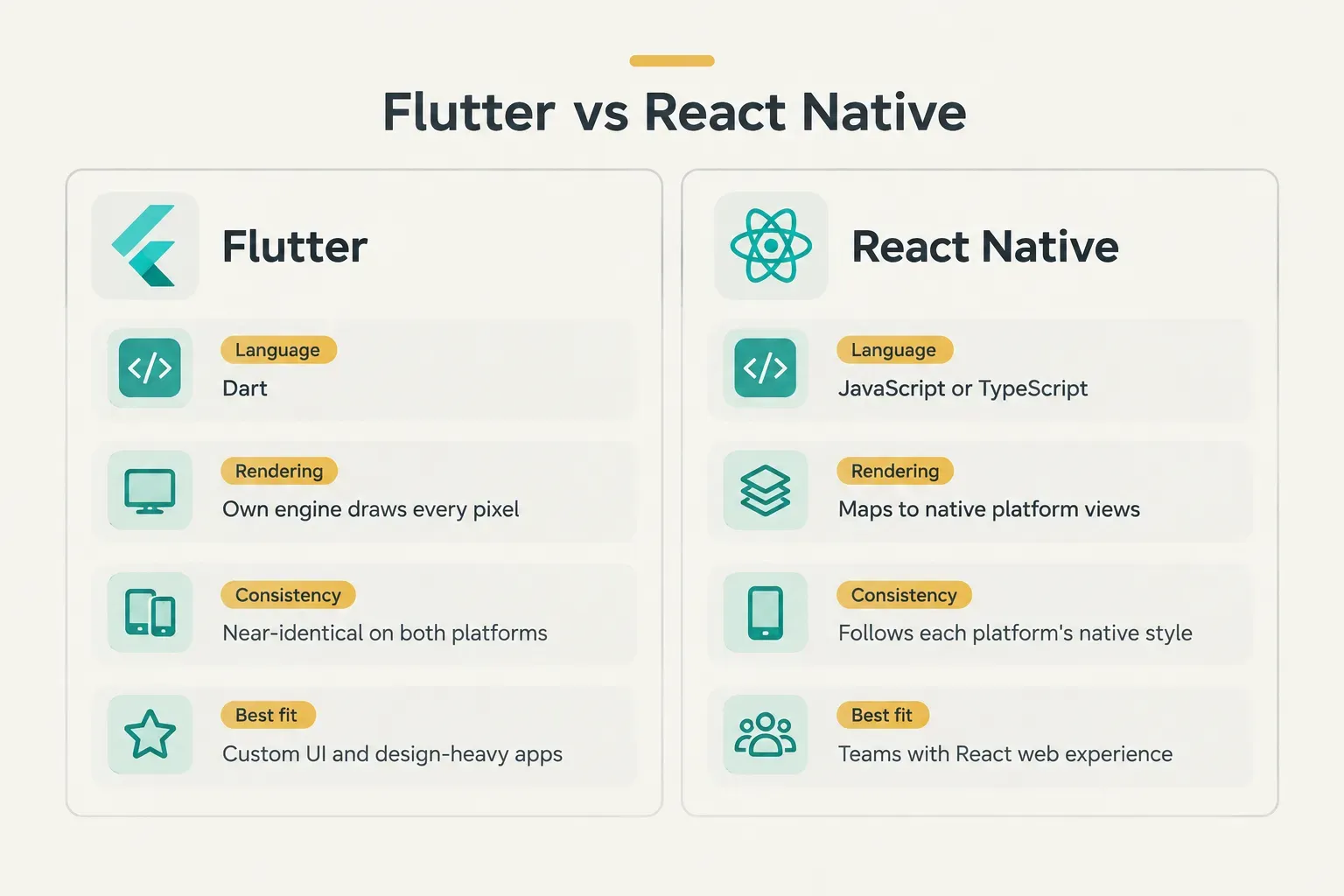
Flutter and React Native take opposite approaches to UI rendering.
Flutter draws every pixel itself using its own rendering engine (Impeller is now the default on both iOS and Android). React Native maps your components to the platform’s real native views, and its New Architecture, enabled by default since late 2024, removed much of the old bridge overhead.
The practical difference is consistency.
Because Flutter controls its own canvas, an app looks and behaves almost identically on a budget Android phone and a new iPhone.
React Native apps inherit native components, which means they feel more “at home” on each platform but can show subtle differences between them.
Performance-wise, both are fast enough for the vast majority of business and consumer apps in 2026.
Team background often matters more than benchmarks.
A company with five React web developers will usually move faster in React Native; a team starting fresh often finds Flutter’s tooling more predictable.
Some studios standardize on one framework for exactly that predictability. CompletApp, for example, builds its client apps on Flutter specifically so it can ship one build to both the App Store and Google Play at native quality, rather than maintaining two parallel codebases.
And where do Android Studio and Xcode fit?
Underneath all of it.
They’re not alternatives to Flutter or React Native. They’re the native toolchains those frameworks rely on to compile and debug.
Why You Still Need a Mac for iOS
Building, code-signing, and submitting an iOS app requires Xcode, and Xcode only runs on macOS.
That’s true whether your code was written in Swift, Flutter, React Native, or generated by an AI tool.
There’s no Windows or Linux workaround for the final build.
You do have options for where that Mac lives. Cloud build services like Codemagic, Bitrise, and Expo’s EAS Build run Xcode on remote macOS machines inside a CI/CD pipeline.
But somewhere in the chain, a Mac running Xcode signs your app with an Apple Developer certificate before it reaches TestFlight or the App Store.
What Happens After You Pick a Tool
Choosing the framework takes a week.
Getting the app tested, monitored, and approved can take longer than building it.
This is the part of the decision most tool comparisons skip entirely, and it’s where most first-time projects stumble.
Testing Before You Launch
Emulator and simulator testing is a starting point, not a finish line.
Simulators don’t reproduce real thermal throttling, low memory, weak cellular signals, or the quirks of specific Android manufacturers.
A serious testing plan covers much more.
Real-device testing should include at least one older, low-end Android phone and an older iPhone, since that’s where performance problems surface first.
Device farms like Firebase Test Lab and BrowserStack extend coverage across dozens of models without buying them all.
Accessibility checks (screen readers, dynamic text sizes, color contrast) belong on the list too, because both stores and many markets increasingly expect them.
Network-condition testing matters if your app syncs data.
Throttle the connection, kill it mid-request, and see what happens.
Apps built on an offline-first architecture handle this gracefully; most others don’t, until a user on a train leaves a one-star review.
Then come the tools that run continuously.
Crash reporting through Firebase Crashlytics or Sentry tells you exactly which line failed on which device.
Beta distribution through TestFlight and Firebase App Distribution gets builds into testers’ hands before launch.
Automated UI testing with Appium, Detox (for React Native), or Flutter’s integration_test package catches regressions before they ship.
The Supporting Toolchain
A production app depends on a surrounding toolchain that rarely appears in “best tool” lists.
Skip any piece and you’ll feel it within the first few releases.
Source control comes first: Git, hosted on GitHub, GitLab, or Bitbucket. Then a CI/CD pipeline through Codemagic, Bitrise, or GitHub Actions automatically builds, tests, and signs every change, which turns app-store deployment from a stressful manual ritual into a repeatable process.
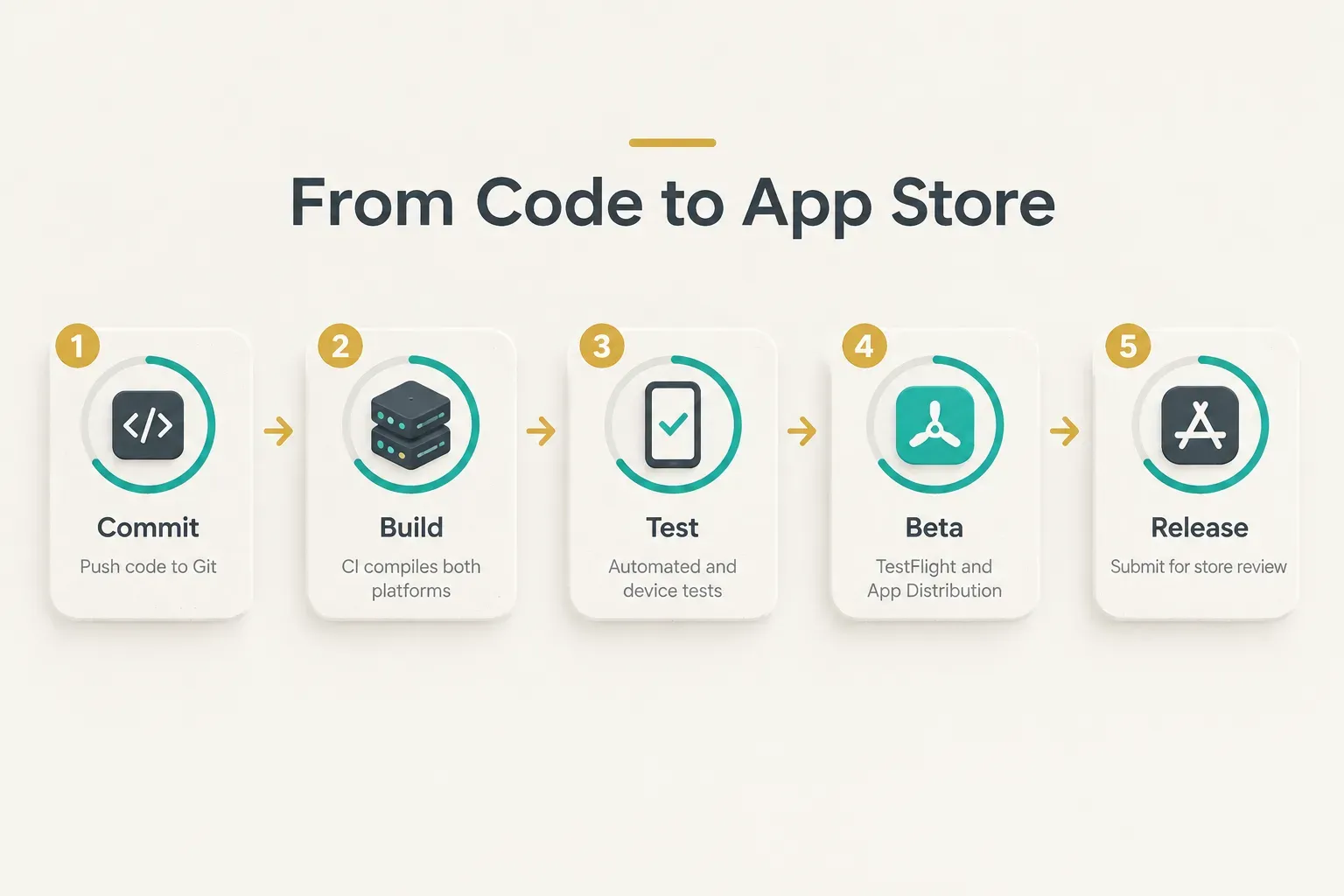
Around that sit the integrations: backend services, mobile app analytics (Firebase Analytics, Mixpanel, Amplitude), payments, push notification services like Firebase Cloud Messaging and Apple Push Notification service, error monitoring, and release management for staged rollouts.
Each is individually simple.
Wiring them together correctly, securely, and across two platforms is not.
When AI Tools and DIY Builds Hit a Wall
The failure pattern is remarkably consistent.
An AI tool or solo developer produces a working demo in days. It looks great in a screen recording.
Then it meets reality.
The breaking points tend to be the same four.
Code review reveals hard-coded API keys, no error handling, and logic nobody can maintain. A security review finds unprotected database rules.
Apple rejects the build for guideline violations around privacy disclosures, login requirements, or payments.
Or real users arrive, and the app that worked for one tester slows to a crawl for 5,000.
A demo proves an idea can work. A product proves it keeps working when strangers use it on devices you’ve never seen.
This is the point where assembling tools yourself stops being cheaper.
If you’re a founder without an in-house team, a development partner that owns the whole workflow can be faster than learning each layer the hard way.
CompletApp is one concrete example: the studio handles design, Flutter development, backend, QA, and launch in a single accountable workflow, with fixed scope and a walk-away guarantee after the first milestone.
That structure means one team is responsible when something breaks, rather than five tools and nobody.
Choosing With Confidence
The decision rule is simpler than the tool lists make it seem.
Pick the tool category first, based on your project type and timeline. Then pick the specific tool within that category.
A three-week prototype points to a no-code builder; a store-ready consumer MVP points to a cross-platform framework plus a backend service; a Bluetooth-heavy product points to native modules.
If you need an MVP or consumer app shipped to both stores and you don’t have a development team, assembling and debugging the full stack alone is the slowest path. A scoped conversation with a studio like CompletApp (they offer a free 30-minute call) will tell you faster what your project actually needs, what it costs, and how long it takes.
One last shift in perspective.
The mobile app development tool is never the hard part.
Flutter, Xcode, and Firebase are all excellent and well documented.
What separates a demo from a real product is ownership after launch… testing on real devices, maintaining code through every OS update, and making sound platform judgments when Apple or Google changes the rules.
Choose your tools well.
Then make sure someone owns everything that comes after.