Why This Decision Shapes Your Business
Most software projects that fail don’t fail because of bad code. They fail weeks before anyone writes a line of it, when nobody pins down what the product actually needs to do.
A web app development service is more than programming. It combines product strategy, UI/UX design, frontend development, backend development, quality assurance, deployment, and ongoing application maintenance into one delivery process.
Code is only one part of it.
If you hire for code alone, you get code alone, and you’ll still need someone to manage everything around it.
The biggest risk is vague requirements.
PMI research has found that poor requirements management is a primary cause in nearly half of projects that miss their goals. Undefined scope invites constant change requests, and every change costs money and calendar time.
This guide covers what you should receive from a provider, how a project moves from discovery to launch, the security and ownership standards to insist on, and how to evaluate a build partner. It’s written for three kinds of readers:
founders without a technical co-founder, operations leaders replacing spreadsheets and aging internal tools, and business owners scaling a product that already has users.
If you’re about to sign a contract worth five or six figures, read this first.
What a Web App Service Delivers
What should actually land in your hands when the project ends?
Many founders can’t answer that before signing, and that gap is where disputes start.
A professional provider should hand over concrete, inspectable artifacts at every stage, and you should know who is responsible for each one.
Core Deliverables and Roles
The table below lists the deliverables a complete custom web application engagement should produce.
Use it as a checklist when comparing proposals.
If a quote doesn’t mention an item, ask about it directly.
| Deliverable | Typical Owner | What You Should Receive |
|---|---|---|
| Discovery documentation | Product manager or business analyst | User roles, user stories, feature list, priorities, and a written scope document |
| UX/UI design files | Product designer | Wireframes, clickable prototype, and a design system for a responsive user interface (usually in Figma) |
| Frontend code | Frontend engineer | The browser-side application in a Git repository, with build instructions |
| Backend code | Backend engineer | Server logic, business rules, user authentication, and role-based access control |
| Database schema | Backend engineer or architect | Documented database design with entities, relationships, and migration scripts |
| API integrations | Backend engineer | Working REST API integration with payments, email, CRM, or other third-party services |
| QA test plans | QA engineer | Test cases, automated testing suites, and a bug log with resolution status |
| Deployment | DevOps engineer | Live app on cloud hosting, with continuous integration and deployment pipelines |
| Documentation and training | Project lead | Technical docs, admin guides, and a recorded walkthrough for your team |
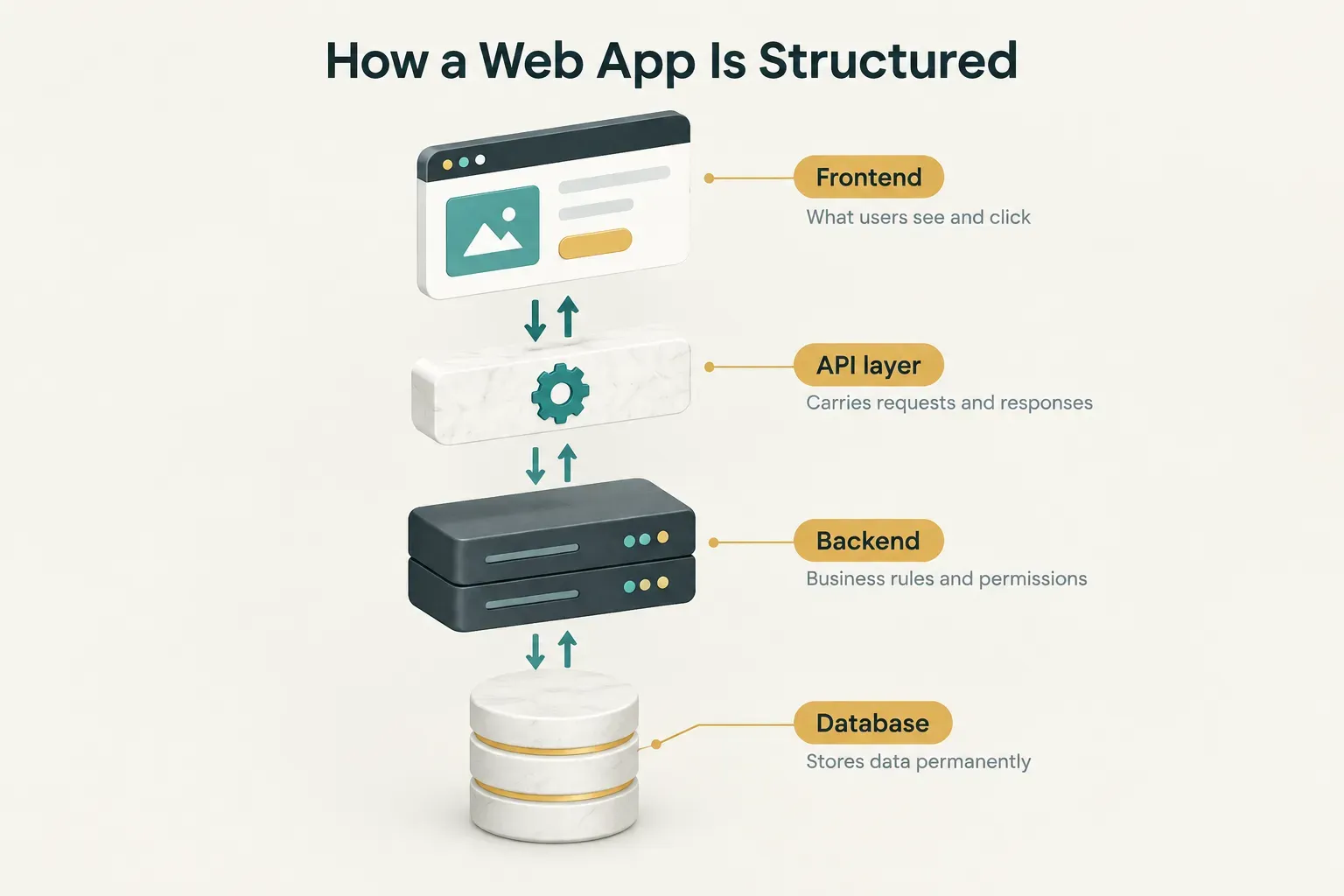
Behind those deliverables sits a standard client-server architecture. The browser handles what users see, an API carries requests, the backend applies business logic, and the database stores everything permanently.
Website, SPA, PWA, SaaS, or App?
Here’s the simplest test.
A website mostly shows information, while a web app lets users do things: log in, save data, and complete workflows that persist between visits.
If your product has user accounts, stored records, and interactive processes, you’re building a web app, and the budget should reflect that.
Within web apps, the architecture choice affects speed, cost, and what’s possible later. Here’s how the main options compare.
| Type | Rendering | Offline Capability | Typical Use Case | Examples |
|---|---|---|---|---|
| Marketing website | Static or CMS-generated pages | None | Brand presence, content, lead capture | Company homepage, blog |
| Server-rendered app | HTML built on the server per request | None | Portals, content-heavy apps, SEO-sensitive tools | Banking portals, GitHub pages |
| Single-page application (SPA) | Rendered in the browser via JavaScript | Limited, with caching | Dashboards, editors, internal tools | Gmail, Trello |
| Progressive web app (PWA) | Browser-rendered with service workers | Strong, works offline once cached | Field work, mobile-first audiences, installable tools | Starbucks ordering PWA, X Lite |
| Software as a service (SaaS) platform | Usually SPA or hybrid with multi-tenant backend | Varies | Subscription products serving many organizations | Notion, HubSpot, Shopify admin |
| Native mobile app | Device-native UI (iOS or Android) | Strong | Camera, GPS, push-heavy, app-store distribution | Uber, Instagram |
Your business need should drive the web application architecture, not the developer’s favorite framework. These are the most common pairings.
| Business Need | Recommended Architecture | Why It Fits |
|---|---|---|
| Dashboards and internal tools | SPA plus API | Fast interactions after first load, and SEO doesn’t matter behind a login |
| Marketplaces | Multi-sided data model with separate buyer and seller roles | Listings, transactions, reviews, and payouts must link across two user types |
| Booking systems | Real-time scheduling backend with conflict checks | Prevents double bookings and syncs availability instantly |
| Customer portals | Auth-heavy server rendering | Strong session control, fast first load, and secure document access |
From Requirements to Launch
A good build process feels almost boring.
Decisions get made early, surprises stay small, and the launch date doesn’t move.
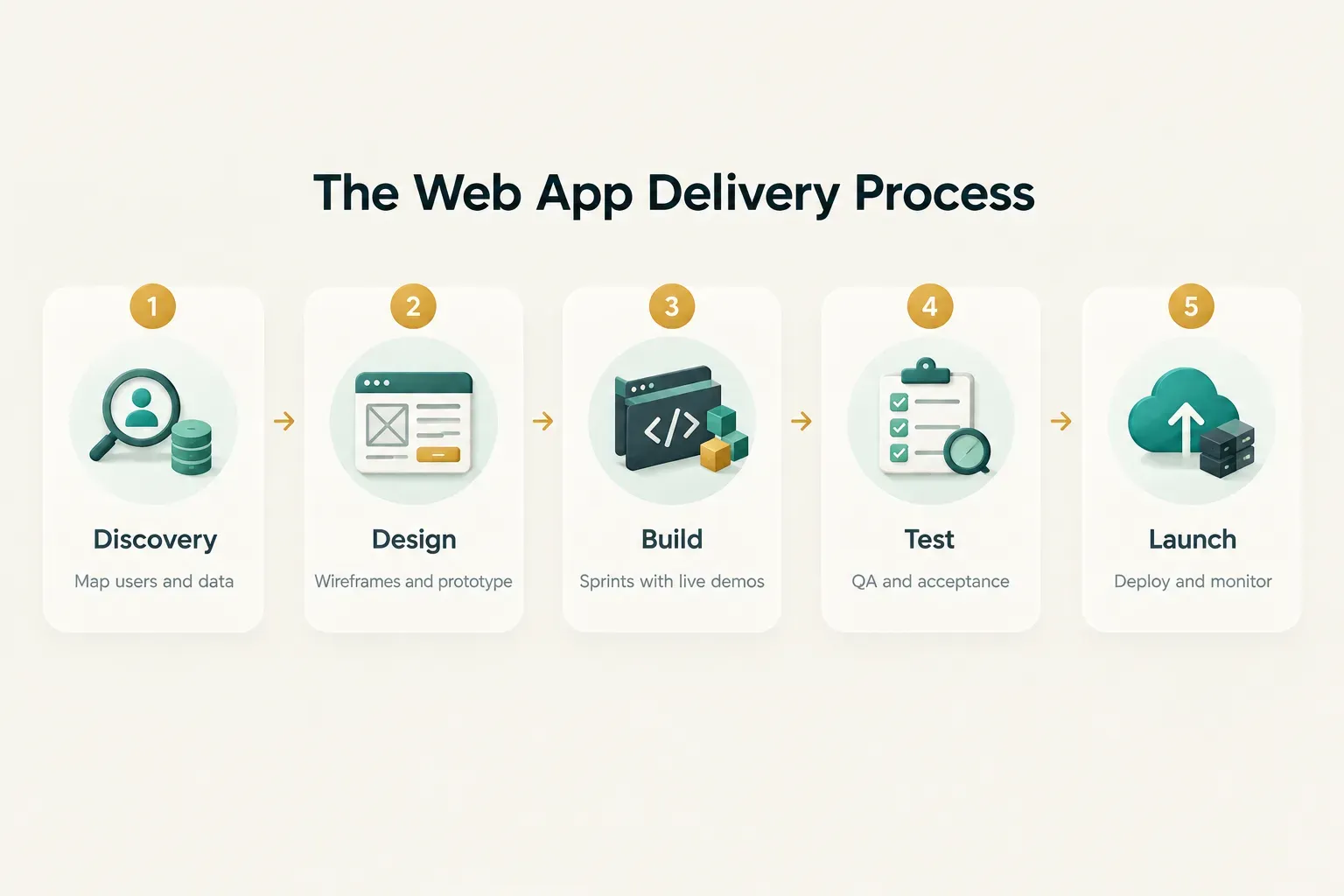
That calm comes from front-loading the hard questions, so every phase below builds on a decision made in the phase before it.
The Requirements Checklist
Before any sales call, work through these six items.
You don’t need technical language.
Plain sentences are fine.
- Define user roles and permissions. List every type of user (admin, manager, customer, vendor) and what each can see, create, edit, or delete. This becomes your role-based access control model.
- Write out the core workflows. Describe step by step what each user does, such as “customer books a slot, pays a deposit, receives confirmation.” Workflows reveal features that feature lists miss.
- Name your data entities and relationships. Identify the “things” your app stores (orders, invoices, projects, users) and how they connect. One customer has many orders, and one order has many line items.
- List third-party integrations. Note every external system involved: Stripe, QuickBooks, Salesforce, Google Calendar, Twilio. Each integration adds time, so surprises here hurt.
- Capture edge cases. What happens when a payment fails, a user cancels mid-flow, or two people edit the same record? Edge cases often account for a third of real build effort.
- Set measurable success metrics. Define what “working” means in numbers: 200 active users in 90 days, order processing cut from 15 minutes to 3, or support tickets reduced by 40%.
MVP First or Full Build?
Building every feature upfront feels safe.
It isn’t.
A minimum viable product focuses on your core value loop, the single sequence of actions that delivers value and brings users back.
- Identify the core value loop. For a booking app, that’s “find a slot, book it, show up.” Everything else is secondary at launch.
- Cut features that don’t serve the loop. Advanced reporting, referral programs, and custom themes can wait. Each cut feature removes design, build, and testing time.
- Defer complexity, don’t ignore it. Ask your provider to design a scalable architecture that supports deferred features later without a rewrite.
- Launch and measure real usage. An MVP that ships in 10 to 14 weeks produces real data, which beats a 9-month build based on assumptions.
The payoff is threefold: a shorter timeline, a smaller budget, and less technical debt, because you aren’t maintaining features nobody uses.
Engagement Models and Timelines
How you pay determines who carries the risk.
Compare the three common models carefully.
- Fixed-price. You agree on a defined scope and a single price. The provider carries delivery and cost risk, which works well when requirements are clear.
- Milestone-based. Payments release as specific deliverables are accepted, such as approved designs or a working beta. Risk is shared, and you keep control through acceptance criteria.
- Time-and-materials. You pay for hours worked. You carry the cost risk, though you gain flexibility for evolving or research-heavy projects.
Want a short timeline?
These prerequisites matter more than team size:
- A focused MVP. Fewer features means fewer things to design, build, and test.
- Fast stakeholder decisions. A 48-hour feedback turnaround keeps sprints moving, while a week of silence per review can double a schedule.
- Available content and data. Copy, product images, and migration data should be ready before the build needs them.
- Defined integrations. API credentials and documentation for third-party tools should be in hand during discovery.
- Limited custom complexity. Standard patterns for login, payments, and notifications ship faster than bespoke inventions.
Security, Performance, and Accessibility
These three areas share a pattern.
They’re cheap to build in from day one and painfully expensive to retrofit after launch.
Treat each as a written acceptance criterion in your contract, not a promise in a sales deck.
Security Built Into Every Stage
Modern teams practice DevSecOps, meaning security checks run throughout development instead of in a single audit before launch. Your provider should cover each of these:
- Authentication versus authorization. Authentication confirms who a user is (login, multi-factor codes), while authorization controls what they’re allowed to do. Mixing these up is behind many data-exposure incidents.
- Encrypted data in transit. Every connection should use HTTPS with TLS 1.2 or higher, and sensitive fields like passwords must be hashed, never stored in plain text.
- Input validation. All user input gets checked on the server, which blocks SQL injection and cross-site scripting attacks listed in the OWASP Top 10.
- Dependency and patch management. Modern apps rely on hundreds of open-source packages, so automated scanners should flag vulnerable versions weekly.
- Logging. Security-relevant events, such as failed logins and permission changes, should be recorded and retained for investigation.
- Automated backups. Daily backups with tested restores protect you from data loss, and “tested” is the key word.
- Vulnerability testing. Automated scans during development, plus a penetration test before launch for apps handling payments or personal data.
Performance Targets That Matter
“Fast” isn’t a requirement.
Numbers are.
Google’s Core Web Vitals give you an objective baseline, measured at the 75th percentile of real visits.
- Largest Contentful Paint (LCP). The main content should load within 2.5 seconds.
- Interaction to Next Paint (INP). The app should respond to clicks and taps within 200 milliseconds. INP replaced First Input Delay as a Core Web Vital in March 2024.
- Cumulative Layout Shift (CLS). Visual stability should score 0.1 or lower, so buttons don’t jump around while users try to tap them.
- API response time. A reasonable target is under 300 milliseconds for 95% of requests on standard endpoints.
- Uptime. A 99.9% uptime target allows roughly 43 minutes of downtime per month, which suits most business apps.
- Error rate. Server errors should stay below 1% of requests, with alerts triggering automatically above that threshold.
- Lab testing versus real-user monitoring. Lighthouse tests performance in a controlled lab environment, while real-user monitoring captures what actual visitors experience on their devices and networks. You need both, because lab scores often look better than reality.
Accessibility as a Requirement
About one in six people worldwide lives with a significant disability, according to the World Health Organization. Web accessibility also carries legal weight in the US, UK, and EU, where the European Accessibility Act took effect in June 2025.
- WCAG 2.2 AA baseline. Specify WCAG 2.2 Level AA conformance in your contract, as it’s the current standard most regulations reference.
- Keyboard navigation. Every feature must work without a mouse, including menus, modals, and form submissions.
- Screen-reader support. Proper labels, headings, and ARIA attributes let assistive technology describe the interface accurately.
- Color contrast. Normal text needs a contrast ratio of at least 4.5:1, and large text at least 3:1.
- Visible focus states. Users should always see which element is selected, which WCAG 2.2 strengthened with new focus-appearance criteria.
- Cross-browser, cross-device, and connection testing. QA should cover Chrome, Safari, Firefox, and Edge, real phones and tablets, and throttled 3G-speed connections. These checks belong in the test plan, not in a post-launch surprise from your first customer.
Ownership, Support, and the Right Partner
Here’s a scenario that plays out more often than it should.
A founder pays $80,000 for an app, the relationship sours, and they discover the agency controls the server, the domain, and the code repository… and wants another fee to hand them over.
What You Own After Launch
Ownership should be defined in the contract before work starts, not negotiated after launch.
At minimum, you should hold the source code and full repository access, ideally in a GitHub or GitLab organization that you created and control.
The provider gets invited as a collaborator, not the other way around.
The same principle applies to every account the app depends on.
Your domain, cloud hosting accounts (AWS, Google Cloud, Vercel, or similar), analytics properties, and deployment credentials should all be registered under your business email.
Third-party services like Stripe or Firebase must sit in your name too, since payment accounts are especially painful to migrate later.
Finally, documentation is part of ownership.
Without setup guides, architecture notes, and environment instructions, a new developer may need weeks just to understand what was built.
Owning code you can’t operate isn’t real ownership.
Keeping the App Running
Launch is the start of the app’s life, not the end of the project.
Plan to budget roughly 15% to 20% of the initial build cost per year for application maintenance, a figure that holds across most industry estimates.
Ongoing operations cover several layers.
Monitoring tools watch uptime and errors around the clock, automated backups run on schedule, and an incident response plan defines who gets alerted and how fast they respond when something breaks.
Dependency and operating system updates should happen monthly, because unpatched libraries are a leading entry point for attackers.
The most valuable post-launch work is strategic.
Review analytics every month to see which features people actually use, where they drop off, and what they ignore.
Then prioritize new features based on that real usage data rather than the loudest opinion in the room.
Finding the Right Build Partner
The right partner depends partly on what kind of build you need. So before comparing agencies, decide which approach fits.
No-Code, Low-Code, or Custom Code
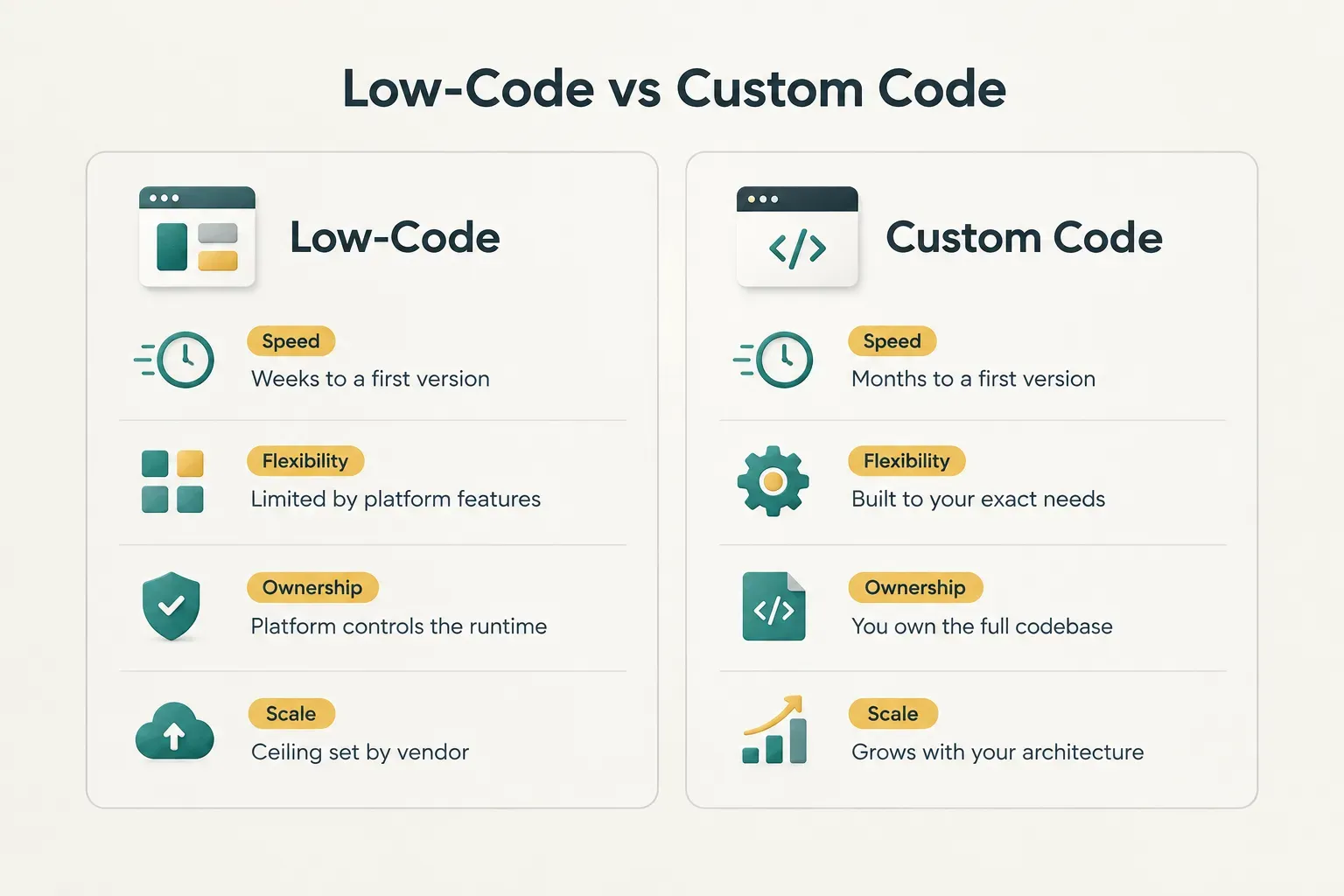
No-code platforms like Bubble or Glide let non-developers build working apps fast. They’re excellent for validating an idea or running a simple internal tool, but flexibility, performance, and integration depth hit a hard ceiling set by the platform.
Low-code tools like Retool or OutSystems sit in the middle.
Developers can add custom logic, which makes them strong for internal dashboards connected to existing databases.
Maintainability is good within the platform, though you’re still tied to its pricing and roadmap.
Custom code offers the highest performance ceiling, the deepest integrations, and full long-term ownership.
It costs more upfront and takes longer to reach a first version.
But for customer-facing products with payments, complex permissions, or ambitions to scale, it’s usually the only option that won’t need a rebuild within two years.
What Separates a Qualified Partner
Portfolio screenshots tell you a team can make things look good.
They tell you nothing about whether the app underneath works.
Evaluate providers on five criteria instead.
Discovery quality comes first.
Strong partners ask hard questions about your users, data, and edge cases before quoting, while weak ones quote from a one-paragraph brief.
Next, judge technical communication: can they explain an architecture decision in plain language, and will they show working software every sprint?
Then ask for documented testing practices, including sample test plans and their approach to automated testing.
Request an example of their handoff documentation.
And confirm accountability guarantees in writing, covering bug-fix warranty periods, response times, and what happens if a milestone slips.
One more factor matters if your roadmap extends beyond the browser.
Many web platforms eventually need a mobile companion app or AI features, and coordinating separate vendors for each creates gaps in accountability.
CompletApp is one example of a studio that handles web apps, mobile apps, backend systems, and AI features under a single fixed-scope engagement, with 100% code ownership transferring to the client on full payment.
That structure keeps one team responsible for how every piece fits together.
Start With a Clear Conversation
The right path depends on what you’re building.
A simple internal tool for a dozen users may be well served by low-code.
A customer-facing product with accounts and payments warrants custom development, and a product that needs web, mobile, and AI working together warrants one accountable partner.
Whatever you choose, prepare first.
Fill out the requirements checklist from the process section (user roles, workflows, data entities, integrations, edge cases, and success metrics) before any sales call.
That single page makes discovery faster and every quote more accurate.
Then book a free 30-minute discovery call.
A good one ends with a written scope, a timeline, and a fixed price within days.
Not a verbal estimate.