Why Flutter hiring often goes wrong
The demo looked perfect.
Smooth animations, clean screens, a login flow that worked on the first try.
Three months after launch, the app crashes on older Android devices, fails App Store review over a missing privacy manifest, and buckles the moment real users hit the backend.
This is the most common way Flutter hiring fails.
The Flutter framework makes it fast to build something impressive, and that speed hides a gap.
A prototype and a production app are different animals.
Most hiring processes test the wrong things.
Fluency in the Dart programming language, a confident “I know Flutter,” or a portfolio of polished screenshots are weak signals.
Anyone can follow a tutorial.
Far fewer people have shipped an app, handled a rejection from Apple, fixed a crash that only appears on Samsung devices, and kept the codebase healthy through 20 releases.
The best predictor of a Flutter developer who ships is evidence that they have already shipped, maintained, and fixed real apps under real constraints.
This guide gives you a five-part evaluation framework you can use whether you hire a freelancer, a studio, or a full-time engineer:
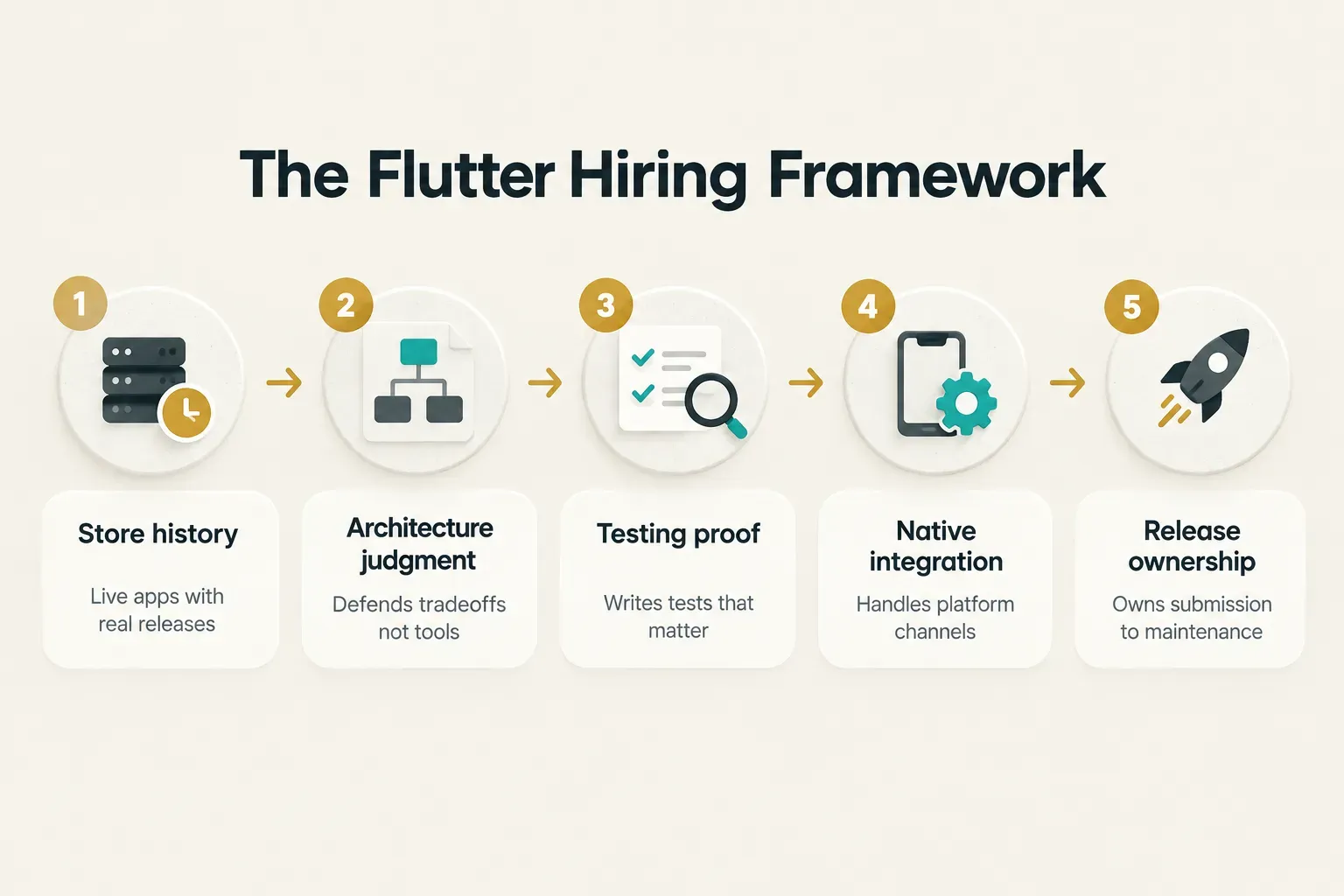
One more reframe before we start.
When you hire a Flutter developer, you are not filling a coding seat. You are choosing who will shape your product from product discovery through launch and into maintenance, where most of the real cost lives.
Skills to expect at each level
Titles are cheap.
A “senior Flutter developer” on one marketplace might be a mid-level engineer by any serious standard, so calibrate against what each level should actually deliver.
The table below sets realistic expectations for cross-platform mobile development roles. Use it to match the hire to the job, not to inflate requirements.
| Level | Core technical skills | State management and architecture | Testing and release | What to verify |
|---|---|---|---|---|
| Junior (0 to 2 years) | Comfortable with widget composition, layouts, navigation basics, null safety, and simple REST calls using async and await | setState and Provider for small screens; follows an existing architecture rather than designing one | Little to no production release experience expected; may write basic unit tests with guidance | Clean, readable code in a small project; ability to explain why a widget rebuilds |
| Mid-level (2 to 5 years) | Owns a full feature end-to-end, including REST API integration, error handling, offline states, and form validation; some GraphQL integration experience is common | Picks Riverpod or BLoC appropriately for moderate complexity; separates UI from business logic | Writes unit and widget tests for their own features; has contributed to at least one store release | A shipped feature they can trace from ticket to production, plus the tests that cover it |
| Senior / lead (5+ years, 3+ in Flutter) | Handles platform channels and native iOS and Android integration for payments, push, biometrics, and background work | Makes and documents architecture decisions; manages technical debt and dependency management deliberately | Owns continuous integration and delivery, signing, store submissions, and rejection fixes; sets testing strategy | Multiple live apps with version history; a written or verbal architecture decision they will defend; mentorship examples |
| Agency-assigned team | Varies by individual; the agency’s brand says nothing about who writes your code | Should present a named lead who owns architecture for your project specifically | Should show a CI/CD pipeline and release process they run, not one they plan to set up | Named contributors with traceable commits and apps, not an account manager fronting rotating freelancers |
Notice where the real jumps happen.
Juniors build screens.
Mid-level developers build features.
Seniors own decisions and releases, which is exactly where most failed projects break down.
The agency row deserves extra scrutiny.
Ask for the names of the people who will commit code to your repository, then verify their individual work with the same rigor you would apply to a solo hire.
If the agency can’t or won’t name them, treat that as your answer.
How to verify real production experience
Here is the uncomfortable truth: most candidates can talk about Flutter far better than they can ship it.
Verification means moving from claims to artifacts, and from vocabulary to judgment.
Store history and release signals
Start with the simplest, highest-signal request. Ask for live links on both the App Store and Google Play, then check the version history yourself.
Look at three things.
Release cadence tells you whether the app is alive (a healthy production app typically ships updates every two to six weeks). Changelog substance tells you whether updates are real work or cosmetic version bumps.
And review responses show whether anyone is handling crash complaints.
Then ask about ownership directly.
Who submitted the builds? Who handled the last App Store rejection, and what was the reason?
A developer who has fought through Guideline 4.3 or a privacy manifest rejection will tell you the story in specific, slightly annoyed detail.
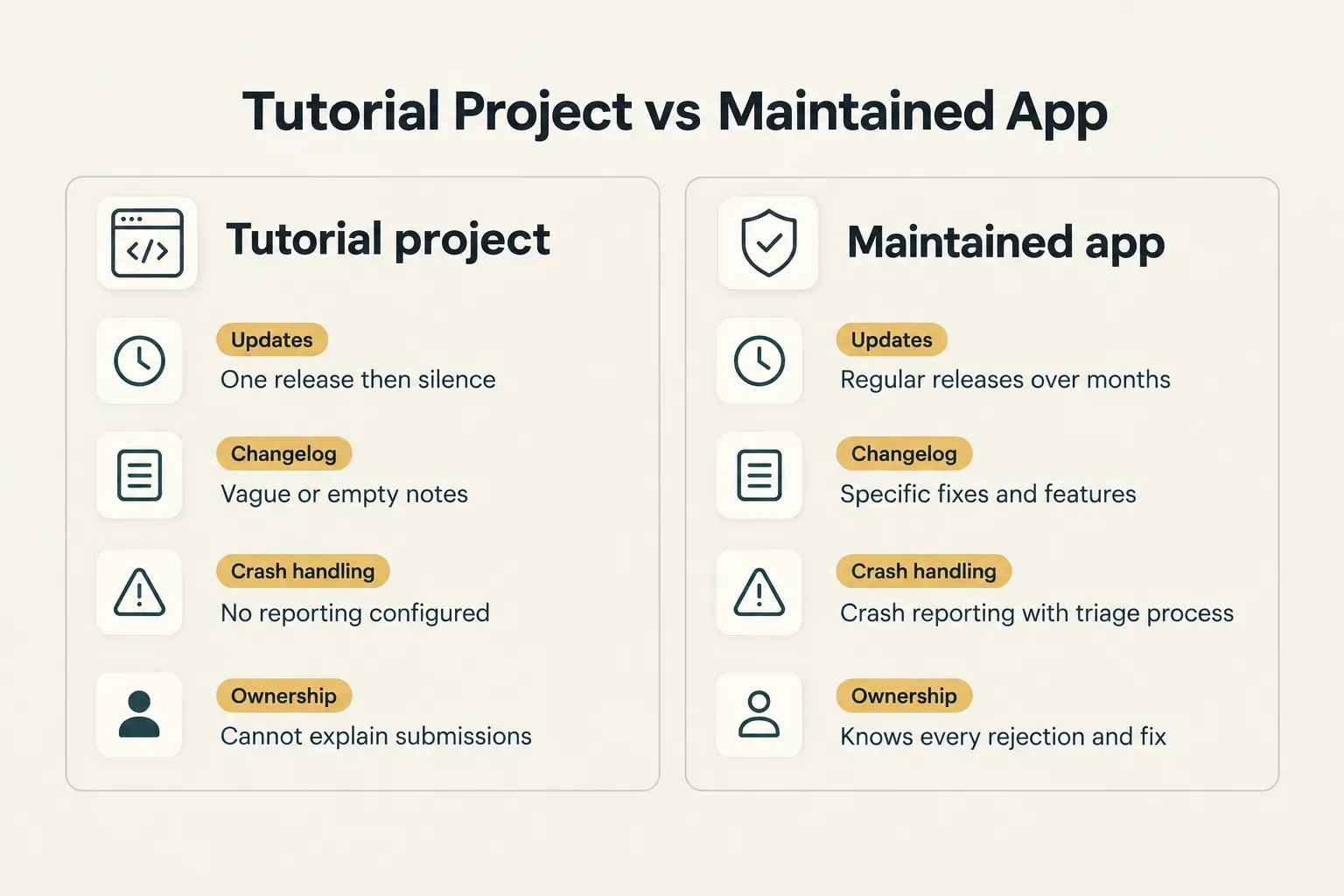
That distinction matters.
A one-off project proves someone can build.
A maintained app proves they can keep building after users, edge cases, and OS updates arrive.
Ask what crash reporting tool they used (Firebase Crashlytics and Sentry are common) and what their crash-free session rate looked like.
Architecture, state management, and native integration
Don’t ask which state management tools a candidate “knows.” Everyone knows Riverpod and BLoC by name.
Ask them to choose.
Give a scenario.
“You’re building a checkout flow with cart state, promo codes, payment, and order confirmation. Then a social feed with infinite scroll and real-time likes. Which state management approach fits each, and why?” Strong candidates talk about testability, predictable state transitions for checkout, granular rebuilds for the feed, and team familiarity.
Weak ones recite package features.
Next, probe the native edges of Flutter app architecture.
This is where cross-platform promises meet reality.
Ask which of these they have personally implemented:
- Payments: Apple Pay, Google Pay, Stripe, or in-app purchases, including receipt validation and restore flows.
- Push notifications: APNs and FCM configuration, permission prompts, and handling taps from a terminated app state.
- Deep links: Universal Links and App Links, including the server-side association files that often break silently.
- Biometrics, camera, and Bluetooth: permission handling, device fragmentation, and fallback paths when hardware is missing.
- Background tasks: the very different rules iOS and Android impose on work that runs when the app isn’t visible.
A senior developer will have written at least one custom platform channel in Swift or Kotlin. If they have only ever used plugins, ask what they would do when a plugin is abandoned.
Silence here is informative.
Testing, performance, and security evidence
“Do you write tests?” always gets a yes.
Better question: which kinds, and why those?
Separate the layers.
Unit testing covers business logic.
Widget testing verifies UI behavior in isolation.
Integration testing runs full flows on a device or emulator. Then there’s regression testing, real-device testing across OS versions, and performance testing.
A credible senior explains where they invest effort (often heavy unit coverage on logic, targeted widget tests, a few critical integration flows) and why they skip the rest.
For performance, ask them to narrate a Flutter DevTools session.
How do they find unnecessary rebuilds? How do they spot jank in the frame chart on a real mid-range Android phone, not a simulator? How do they track a memory leak from an undisposed controller?
Experienced developers will also mention the Impeller rendering engine, now the default on iOS and Android, and how it changed shader compilation stutter.
Security literacy is the next filter.
Ask about secure storage for tokens (Keychain and Keystore, not shared preferences), refresh token handling, certificate pinning, and how they vet third-party SDKs before adding them.
Bonus points for referencing OWASP mobile application security guidance such as the MASVS standard, or describing even basic threat modeling.
Finally, accessibility.
Ask how they add semantics labels, check color contrast, and run accessibility testing with VoiceOver and TalkBack.
With the European Accessibility Act enforceable since June 2025, this is a compliance risk, not a nice-to-have.
Building a hiring process that filters
A good process does one job: it makes weak candidates self-select out early and lets strong ones show what they can do.
Most processes do the opposite, rewarding confident talkers and exhausting busy professionals with free homework.
Freelancer, agency, or in-house
Each route solves a different problem. Pick based on scope and ownership, not just hourly rate.
A freelancer suits narrow, well-defined work: adding a feature, fixing performance issues, upgrading to a new Flutter version. The risk is that nobody owns the product decisions around that work.
An in-house hire suits long-term ownership of a core product.
But hiring well is slow, often six to ten weeks for a strong senior, and one bad hire can cost months.
A product studio suits full ownership from discovery to launch. CompletApp is a practical example of this model: one accountable operator handles design, build, and launch under fixed scope and a fixed price, and you get 100% code ownership on completion.
The appeal is simple.
One party is responsible for the outcome, not a chain of handoffs between designers, developers, and release engineers.
The question isn’t “who is cheapest per hour?” It’s “who is accountable when something breaks between design and the App Store?”
Interview questions that test judgment
Good interview questions have no single right answer. They reveal how someone reasons under tradeoffs.
- “Why Riverpod over BLoC here?” A strong answer surfaces testability, boilerplate cost, team size, and how state scales as features grow. Follow up: “What would make you switch?”
- “A bug only appears on iOS 17 when the app resumes from background. Walk me through debugging it.” Look for a structured approach: reproduce on device, check lifecycle events, inspect platform channel logs, isolate native versus Dart. Follow up: “What if you can’t reproduce it?”
- “Review this pull request from a teammate.” Hand them 50 to 100 lines with a subtle rebuild issue and a missing dispose call. Strong reviewers catch the bugs and give feedback a colleague could act on. Good code review is a senior skill.
- “Tell me about a release that went wrong.” Anyone who claims none either hasn’t shipped much or isn’t being honest.
- “How would you upgrade a two-year-old app to the latest Flutter version?” This tests dependency management, migration planning, and risk awareness all at once.
Listen for specifics.
Names of devices, OS versions, error messages, actual numbers.
Vague answers usually mean borrowed experience.
A paid evaluation, not free work
The take-home test is where many processes lose the best candidates. Strong developers rarely have time to build a free full app for a stranger.
Keep the task short: 4 to 8 paid hours.
Make it representative of real work, such as adding a feature to a small existing codebase, fixing a seeded bug, or writing tests for an untested module.
Pay a fair rate, and state in writing that you won’t use the output in production.
That protects you legally and signals respect.
Then there’s AI-generated code. As of 2026, a portfolio repository can be produced in an afternoon with a coding assistant, and it often looks clean.
So test ownership, not output.
Two checks work well.
First, ask the candidate to explain a piece of their own code and then modify it live (for example, add pagination or change the error handling).
Second, look at the git history. Real projects show incremental commits, messy fixes, and refactors over weeks.
A single commit dumping 8,000 lines is… worth a conversation.
Using AI tools isn’t the problem.
Not understanding the code they produced is.
Protecting your code, keys, and IP
Plenty of founders discover too late that their app technically belongs to someone else. The code sits in a contractor’s GitHub, the Play Store listing lives under a personal developer account, and the signing key is on a laptop in another country.
Contract essentials and ownership
Your contract should leave no ambiguity about who owns what. At minimum, include these four elements:
- An explicit IP assignment clause transferring all rights in code, designs, and assets created for the project.
- Ownership transfer on payment, with a clear trigger, so there’s no dispute about when rights move.
- An NDA covering your product plans, user data, and business logic.
- A defined post-handoff support window, such as 30 to 90 days, covering bug fixes and store issues after launch.
Fixed-scope agreements add another layer of protection. When scope and price are set upfront, disputes about ownership and billable hours are far less likely to surface at handoff.
Accounts, keys, and access control
Rule one: your company owns every account.
That includes the Apple Developer account, the Google Play Console, domains, Firebase projects, and package registries.
Contractors get access as team members, never as account holders.
Rule two: signing keys are company assets.
Use Google Play App Signing so Google holds the upload-independent app signing key, and store iOS certificates and the Android upload keystore in a company-controlled secrets manager.
Losing an Android signing key used to mean you couldn’t update your app.
Ever.
Rule three: source code lives in a company GitHub or GitLab organization.
Turn on branch protections for main, require pull request reviews, and keep API keys and secrets out of the repository entirely.
Your CI pipeline should pull secrets from a vault, not a hardcoded file.
The first 30 days
The first month tells you more than any interview. Set clear expectations before day one so both sides know what success looks like.
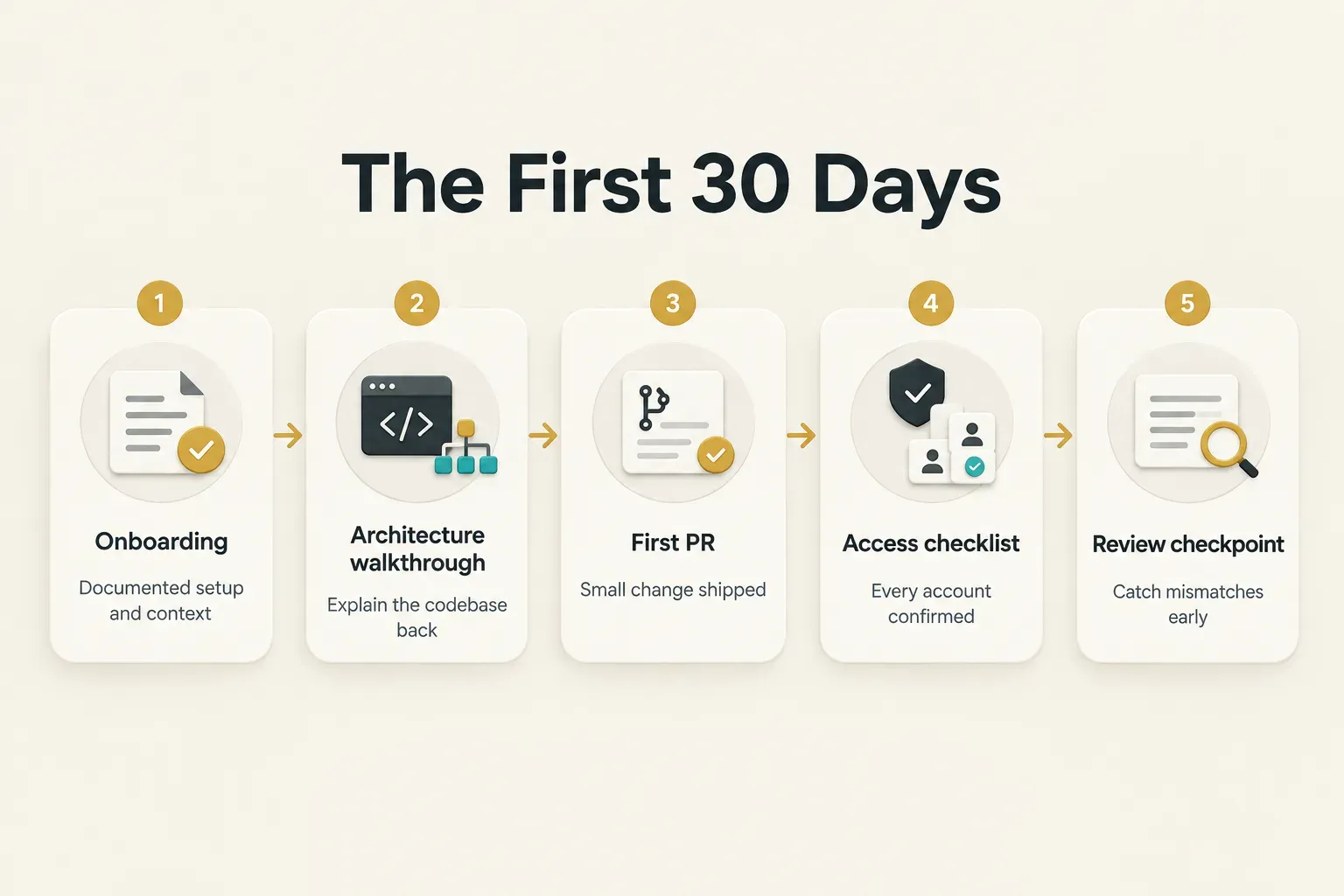
Aim for a small shipped pull request in week one or two. It doesn’t need to be impressive; it needs to go through your full review and release pipeline.
That surfaces tooling gaps fast.
Run the architecture walkthrough in reverse.
Have the new developer explain the codebase back to you, along with the three things they would change first.
Their answer reveals both understanding and judgment.
Then schedule a formal review checkpoint around day 30.
Are they communicating blockers early? Is their code passing review without heavy rework?
Catching a skill or working-style mismatch now costs a few weeks. Catching it at month six costs a rewrite.
The real hiring test
Your situation should drive the choice.
Not the cheapest quote, and not the most charming interview.
If you’re launching a new MVP under time pressure, favor a lifecycle partner who owns design, build, and launch over piecing together freelancers.
If you’re maintaining a complex existing app, prioritize architecture and testing evidence over interview polish.
And if budget is tight in the short term, a freelancer with a paid 4 to 8 hour evaluation can work well for clearly scoped tasks.
One action outweighs everything else in this guide.
Before you make any offer, ask for three things: a live shipped app, its store release history, and one architecture decision they would defend under questioning.
A developer who can show all three has shipped before. Everyone else is still demoing.