Introduction
Kotlin Multiplatform and Flutter get compared as if they were two flavors of the same thing.
They aren’t.
Kotlin Multiplatform (KMP) shares business logic across platforms and lets each app keep its own native UI. Flutter shares both the logic and the interface through one framework and one rendering engine.
That single difference shapes everything downstream. It decides how many codebases you maintain, who you can hire, and how fast your first version reaches the App Store and Google Play.
So here is the verdict upfront.
Flutter is the pragmatic default for most new commercial iOS and Android products in 2026. Kotlin Multiplatform wins when you already have a native Android codebase, or when native UI control is a hard product requirement.
Most comparisons frame this as a developer preference debate. Dart vs Kotlin. Widgets vs Compose.
Those details matter to engineers, but they rarely decide whether a product succeeds.
For a founder or business owner, the Kotlin Multiplatform vs Flutter decision is a business risk question.
Launch speed decides how soon you learn whether anyone actually wants the product. Hiring availability decides whether you can staff the build at all, especially if you are sourcing an external partner rather than employing engineers.
And maintenance cost decides what the app costs you in year two and year three. That bill arrives long after the launch invoice is paid, and it is shaped heavily by how many codebases, design systems, and toolchains you signed up for on day one.
This guide compares both frameworks on architecture, performance, ecosystem, hiring, and long-term maintenance, with a clear winner named in each category.
Neither framework wins everything.
That is exactly why the decision matrix near the end matters more than any single benchmark you will find online.
Quick Comparison Table
Here is how the two frameworks compare as of 2026.
Both are free and open source, so the license costs nothing. The real mobile app development cost sits in implementation, QA, app store deployment, and ongoing maintenance.
| Category | Flutter | Kotlin Multiplatform | Winner |
|---|---|---|---|
| Architecture | Shared logic and shared UI in one Dart codebase | Shared Kotlin logic; UI native per platform or shared via Compose Multiplatform | Depends on goal |
| UI model | Own widget system rendered by the Impeller engine | SwiftUI/UIKit and Jetpack Compose, or optional Compose Multiplatform | KMP (native fidelity) |
| Language | Dart | Kotlin (plus Swift for native iOS UI) | Tie |
| Platform maturity | Stable on iOS, Android, web, Windows, macOS, Linux | Stable for mobile; Compose Multiplatform web still maturing | Flutter |
| Ecosystem size | Large pub.dev package ecosystem | Growing; draws on Kotlin and Android libraries | Flutter |
| Hiring pool | Broad freelance, agency, and studio supply | Concentrated in existing Android/Kotlin teams | Flutter |
| Incremental adoption | Usually a full app; add-to-app is possible | Module by module inside an existing native app | KMP |
| License cost | Free (BSD) | Free (Apache 2.0) | Tie |
| Best-fit use case | New MVPs, branded consumer apps, subscriptions, marketplaces | Existing native apps, Kotlin-first teams, strict native UI requirements | Depends on starting point |
Look at the Winner column.
It changes from row to row, and no framework sweeps the board. Flutter takes ecosystem, hiring, and multi-platform maturity, while Kotlin Multiplatform takes native UI fidelity and incremental adoption.
Kotlin Multiplatform vs Flutter: What They Actually Are
Before comparing performance or hiring, get the categories right. These two tools are not architectural equivalents, and most bad framework decisions start with treating them as if they were.
Kotlin Multiplatform and Compose Multiplatform, Explained
Kotlin Multiplatform is a code-sharing technology first. It lets a team write shared business logic once in Kotlin (networking, data models, validation, caching, and domain rules) and reuse it across Android, iOS, desktop, web, and server targets.
The UI is where KMP differs from everything else.
In a classic setup, the Android app keeps its Android Jetpack Compose interface and the iOS app keeps its SwiftUI or UIKit interface. Both apps call into the same shared Kotlin module underneath.
When shared code needs something platform-specific, such as secure storage or a Bluetooth API, developers use expect/actual declarations. The shared code declares what it expects, and each platform supplies the actual implementation.
Clean, explicit, and native.
On iOS, the shared module compiles to a native framework through Kotlin/Native. Swift interoperability works, but for most teams it still runs through an Objective-C bridge, with direct Swift export still maturing.
That adds friction for iOS engineers who expect idiomatic Swift APIs.
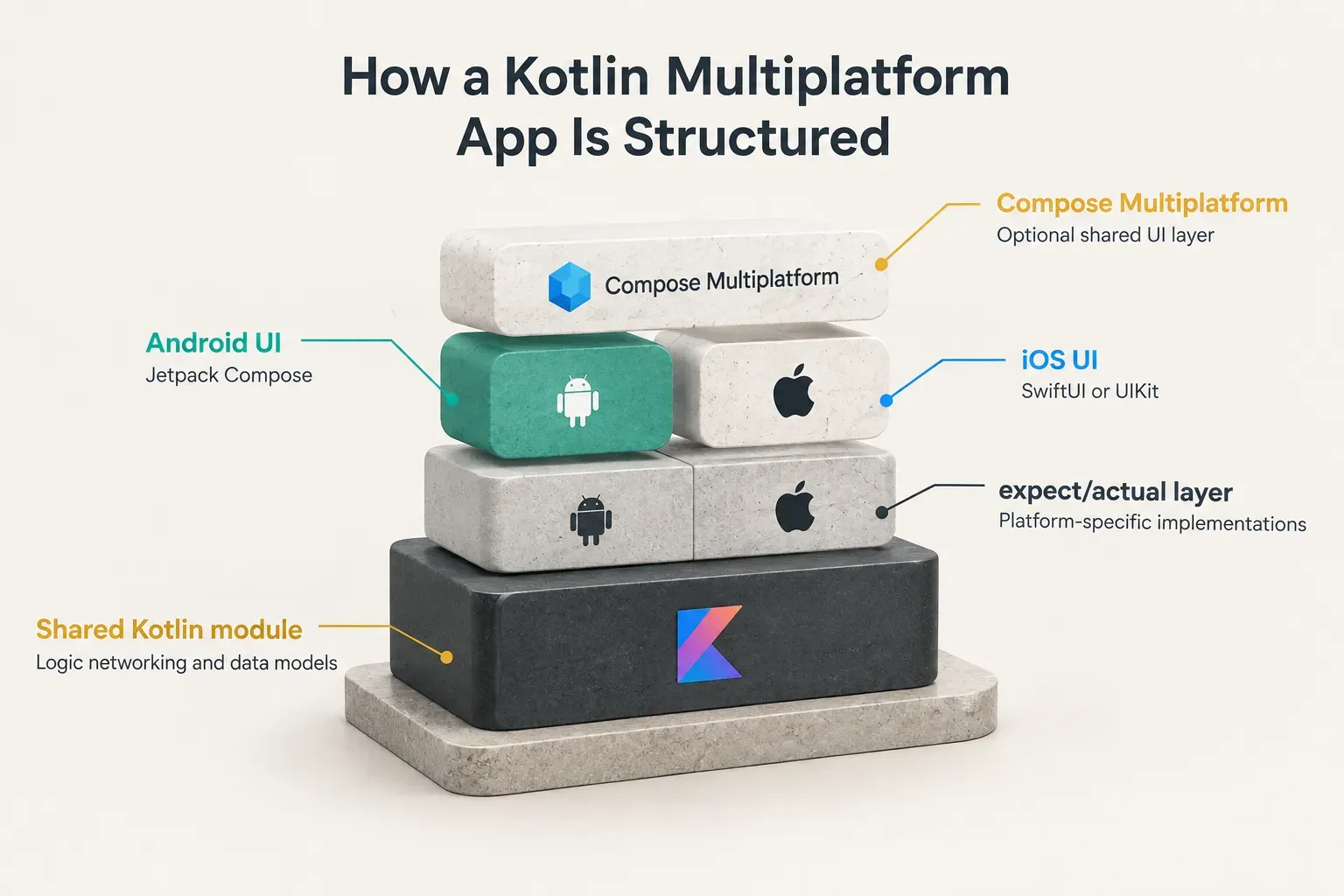
Then there is Compose Multiplatform, JetBrains’ optional shared-UI layer built on top of KMP. It extends the Jetpack Compose model to iOS, desktop, and web, so a team can share UI code as well as logic.
Here is the detail most comparisons never mention.
Compose Multiplatform is production-ready on Android and iOS (iOS support reached stable in 2025), but web support is still at an earlier maturity level.
If a browser version of your product matters, that gap is real.
Flutter: A Complete Cross-Platform UI Framework
Flutter is a complete framework for cross-platform app development. One Dart codebase contains the business logic and the entire interface, and it ships to iOS, Android, web, Windows, macOS, Linux, and embedded devices.
The key architectural choice: Flutter does not map its UI to native platform components. It draws every pixel itself through the Flutter Impeller rendering engine, a GPU-backed renderer that is now the default on iOS and Android.
That is why a Flutter app looks and animates identically on both stores.
Flutter still reaches native code when it needs to.
Platform channels let Dart talk to Swift, Kotlin, or Java for anything the package ecosystem doesn’t cover. And hot reload lets developers see UI changes in about a second, which compounds into serious MVP development speed over a multi-week build.
So which one wins this category?
Neither.
It’s a tie, because they answer different questions.
The real choice is not “KMP or Flutter.” It is whether you want shared UI (Flutter or Compose Multiplatform) or native UI with shared logic (classic KMP). Answer that first, and the framework decision mostly makes itself.
Performance, Native UX, and Platform Access
Performance claims are meaningless without context.
Any credible statement has to specify the workload (list scrolling, animation, heavy computation), the device, and the build mode. Flutter debug builds run on a JIT compiler and feel slower by design; only profile and release builds reflect real-world behavior.
With that caveat in place, here is how the two compare across the dimensions founders actually care about.
| Dimension | Flutter | Kotlin Multiplatform (native UI) | Winner |
|---|---|---|---|
| Rendering approach | Own engine (Impeller) draws every pixel | Platform’s native UI toolkit renders the interface | Depends on goal |
| Native UI fidelity | Close imitation via Material and Cupertino widgets | Genuinely native controls, gestures, and accessibility | KMP |
| Cross-platform visual consistency | One widget tree renders identically on both OSes | Two UIs that must be kept visually aligned by hand | Flutter |
| Animation control | Pixel-level control; precompiled shaders reduce jank | Native animation APIs, written separately per platform | Flutter |
| Business logic performance | Dart compiled ahead-of-time to native code | Kotlin compiled natively on iOS, runs on ART on Android | Tie |
| Native API access | Platform channels to Swift and Kotlin | expect/actual declarations with direct platform calls | Tie |
| App binary baseline | Bundles its engine, so a larger minimum size | No extra rendering engine with native UI | KMP |
Flutter’s Impeller engine benchmarks close to native for animation-heavy UI, and it removed the shader-compilation stutter that plagued older Flutter versions. For most app performance benchmarks that matter to users (scrolling feeds, transitions, onboarding flows), a well-built Flutter app is indistinguishable from native.
KMP with native UI is native performance by definition. There is no shared rendering layer to measure, because the interface simply is SwiftUI or Jetpack Compose.
Winner for native UI fidelity: Kotlin Multiplatform. Platform-specific behaviors like iOS scroll physics, system text selection, and accessibility services come for free because the controls are the real thing.
Winner for consistent visual behavior and animation control: Flutter. One widget tree renders the same way on both platforms without per-OS tuning, which is exactly what branded consumer apps and design-led products want.
What about hardware-heavy features like Bluetooth, NFC, camera pipelines, or health sensors?
Neither framework is blocked. Flutter uses platform channels, KMP uses expect/actual, and both let developers write native Swift or Kotlin when no package exists.
Ecosystem, Hiring, and Delivery Risk
This is the section most engineering-led comparisons underweight.
For a founder, the question isn’t only “can this framework do the job?” It is “can I find people to do the job, and how many things can go wrong along the way?”
| Factor | Flutter | Kotlin Multiplatform | Winner |
|---|---|---|---|
| Package ecosystem | Large pub.dev library covering payments, auth, maps, analytics | Growing multiplatform library set plus Kotlin and Android libraries | Flutter |
| Agency and studio supply | Wide pool of freelancers, agencies, and product studios | Smaller external vendor pool | Flutter |
| Typical in-house profile | Cross-platform generalists | Android/Kotlin engineers plus iOS engineers | Depends on team |
| UI codebases for iOS and Android | One | Often two (unless using Compose Multiplatform) | Flutter |
| Design systems to maintain | One | Often two, kept in sync manually | Flutter |
| QA surface | One UI to test, run on both OSes | Two UIs to test, each on its own OS | Flutter |
| Fit for non-technical founders | High: easier to staff and scope externally | Moderate: best with in-house engineering leadership | Flutter |
Flutter’s developer ecosystem is simply larger and easier to staff from outside. Mature packages exist for Stripe, RevenueCat, Firebase, Supabase, maps, and analytics, so common product features rarely need custom native work.
Winner for hiring availability and agency supply: Flutter. For non-technical founders, that is not a minor detail.
You need delivery certainty, not just framework capability, and a deep vendor pool means more options, more competitive quotes, and less risk if a partner disappears.
Kotlin Multiplatform hiring skews toward existing Android and Kotlin teams. That makes KMP a strong fit for companies that already employ Android engineers.
But for a founder sourcing an external build partner from scratch, the shortlist gets thin quickly.
Then there’s delivery risk on a first product.
Flutter reduces the number of moving parts: one UI codebase, one design system, one QA pass. A typical KMP setup with native UI still requires two interface codebases, which means two sets of screens to build, review, and debug.
Every extra moving part is a place where timelines slip.
For a first release, fewer parts usually wins.
Long-Term Maintenance and Migration Paths
Launch is the cheap part.
Cross-platform app maintenance is where frameworks quietly win or lose, because every architectural choice either compounds technical debt or contains it.
Winner for teams with an existing native Android or iOS app: Kotlin Multiplatform. KMP can be adopted incrementally, one module at a time.
A team can move its networking layer into shared Kotlin this quarter, its data models next quarter, and never touch the existing UI.
That incremental path is KMP’s strongest argument.
A full rewrite into Flutter throws away working, tested screens, and rewrites carry real risk of regressions and lost months. Flutter does offer add-to-app, but it is not as natural a fit for gradual migration as KMP.
Winner for greenfield products: Flutter. If you are starting fresh, Flutter gives you one team, one release cadence, and one dependency-upgrade path for the life of the product.
When a new OS version ships, one codebase needs attention, not two UI layers plus a shared module.
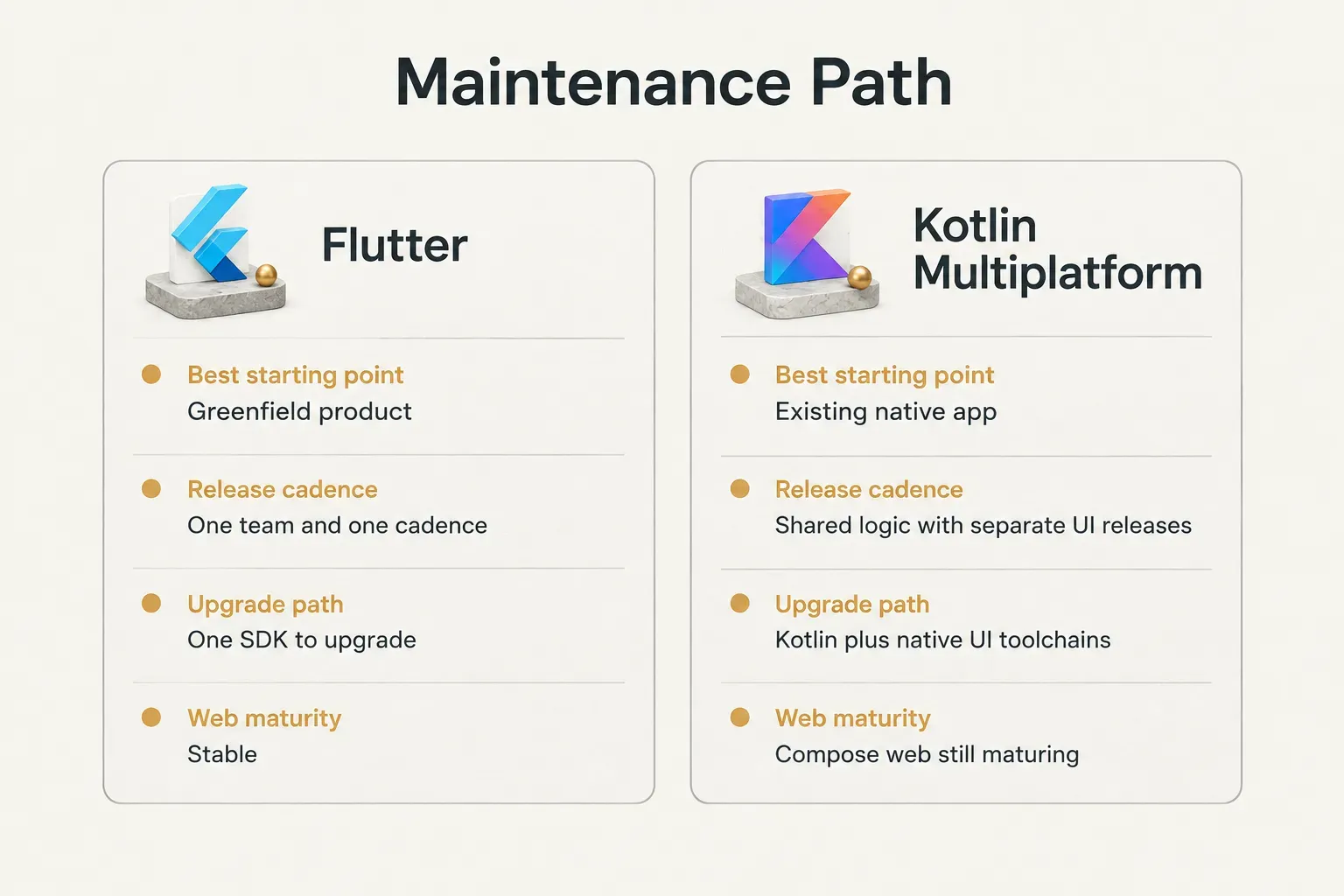
A 2026 maturity note, since this changes fast. Kotlin Multiplatform for mobile is production-ready, and Compose Multiplatform is stable on Android and iOS.
But Compose Multiplatform for web still lags Flutter web, and Flutter’s overall stability across five platform targets remains ahead.
If your roadmap includes a web version or a desktop client later, that gap matters for long-term planning. If you are mobile-only, it matters much less.
Now the part framework debates skip. Real maintenance cost includes OS updates, app store review policy changes, dependency upgrades, payment SDK changes, and QA across two operating systems.
Those costs exist regardless of framework.
Apple and Google don’t care what you built with.
So factor in implementation-partner cost, not just framework cost. A free framework maintained by an expensive, slow, or disappearing team costs more than a free framework maintained by one accountable partner who already knows the codebase.
The license is $0 either way… the people are not.
Which One Should You Choose
The short answer: choose Flutter for most new commercial apps, and choose Kotlin Multiplatform when you are extending an existing native codebase or native UI is non-negotiable. Here is the decision matrix, scenario by scenario.
- Choose Flutter if you are a founder building a new MVP, marketplace, subscription, or media app. You need one team to ship fast with predictable, native-quality UX on both stores. Flutter’s single UI codebase and mature payments and subscriptions packages (Stripe, RevenueCat) cut weeks off a first release.
- Choose Kotlin Multiplatform if you already have a native Android app. You can share logic with a new or existing iOS app without rewriting the Android UI. This is KMP at its best: incremental, low-risk, and respectful of code you already paid for.
- Choose Kotlin Multiplatform if native UI control is a hard product requirement. Apps that must feel indistinguishable from Apple’s and Google’s own apps, or that depend heavily on platform accessibility behaviors, benefit from genuinely native interfaces.
- Choose Flutter if you need to hire an external studio or agency. Vendor and talent availability is significantly wider, which means better options, more competitive pricing, and less dependency on a single hard-to-replace contractor.
- Choose Kotlin Multiplatform if your team is Kotlin-first. In-house Android and iOS engineers who can own expect/actual native integrations will be productive immediately. Moving that team to Dart adds cost without a clear payoff.
- For internal tools and hardware-heavy apps, weigh native API access against delivery speed. Both frameworks support native calls. But Flutter usually ships the wrapper faster, because one team writes one platform channel and one UI around it.
- Choosing Flutter for AI app development? Good fit. AI features like assistants, generation, and classification mostly live in backend logic and API calls, so the shared-UI model lets you iterate on the product experience once instead of twice.
If neither fits, the main Flutter alternatives and Kotlin Multiplatform alternatives each have a clear niche:
- React Native: best for teams already fluent in React and TypeScript who want native platform components and a large JavaScript hiring pool.
- .NET MAUI: best for Microsoft-centric organizations with C# skills that need mobile plus Windows desktop from one codebase.
- Ionic Capacitor: best for web-first teams converting an existing web app into a mobile app, accepting a WebView-based UI over maximum native fidelity.
Now the practical question.
What if Flutter is clearly the right call, but you don’t want to manage a framework decision, a hiring process, and three separate agency departments internally?
That is the exact gap CompletApp fills.
The Budapest-based product studio builds on Flutter, with Firebase or Supabase for the backend, Stripe and RevenueCat for payments, and OpenAI or Claude where AI does real work in the product. One senior operator designs, builds, launches, and supports the app, so nothing gets lost between design, development, and QA.
Most MVPs go from concept to a functional, high-fidelity product in about four weeks. Every project runs on a fixed scope and fixed price agreed in writing, with weekly clickable previews, a walk-away option after the first milestone, and 100% code ownership on full payment.
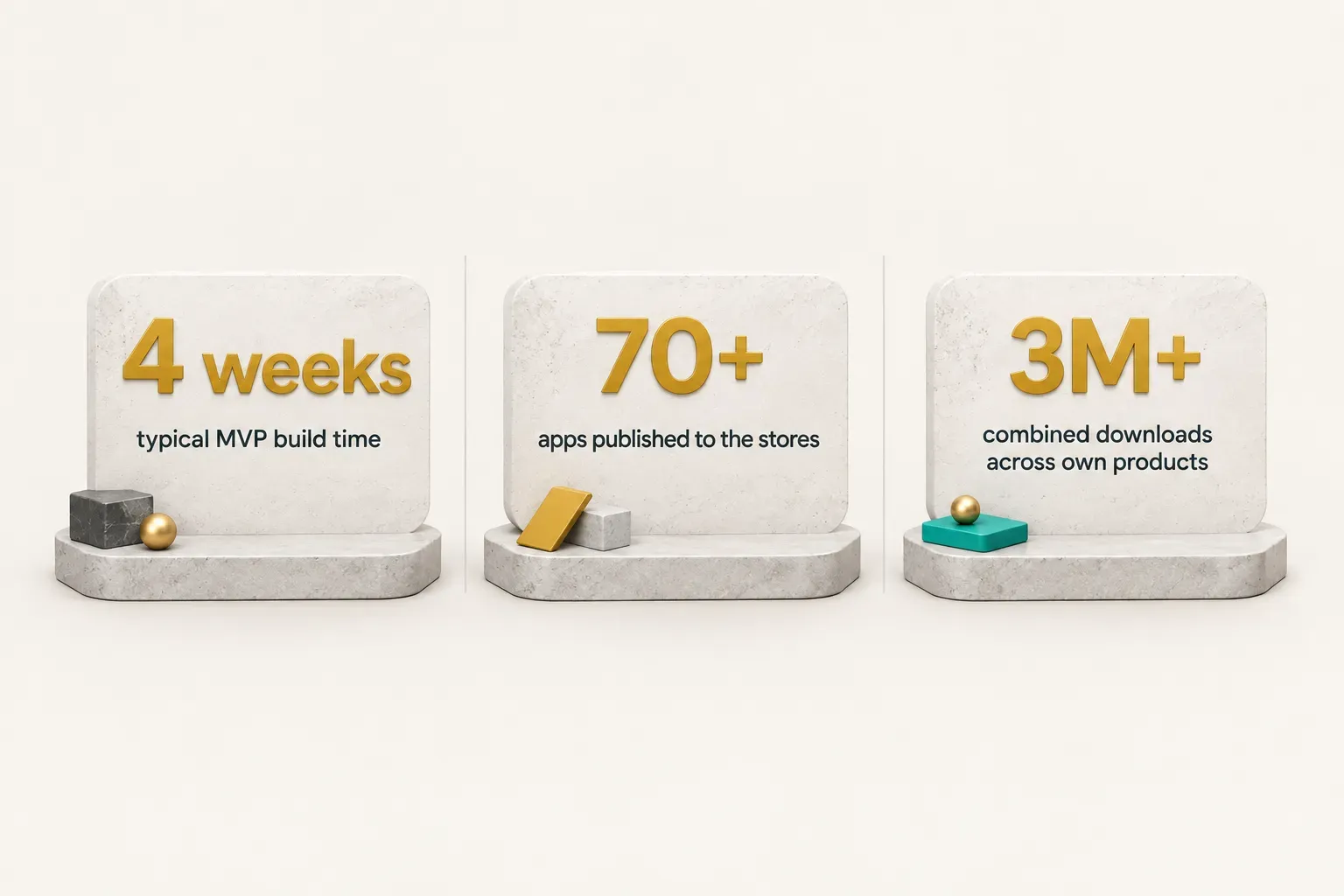
The track record is concrete.
GoalJournal shipped to both stores in 3 weeks and was later acquired on Flippa, and Copywise went from MVP to a $200K first round. Pricing typically lands at a third to a half of a Western European agency for the same seniority.
Bottom line: if you have a native Android team, KMP is the smarter extension. If you are launching something new and want one accountable team to ship it on both stores, Flutter is the call, and a free 30-minute discovery call with CompletApp is the fastest way to a fixed-price plan.